
|
#1
|
||||
|
||||
|
NOTA:-En Este tema Se organizaran Todos Los Script de Emudesc, los Cuales Se organizaran En Tipo De Script y En Plataforma.
NOTA 2:-Tengo El Permiso de el Super Mod Sexy LeGeNt*Of*ST y de Ero-Mod xD Llulian. ~:Reglas:~
Plantilla a Seguir para Postear Script: -Nombre Del Script: -Version Del Script: -Rpg Maker: -Introducion: -Caracteristicas: -Demo: -ScreenShot: -Script: -Instrucciones: -Compatiblidad: -Creditos: Un Ejemplo (Solo Es un Ejemplo No es un Script de Verdad): [SPOILER]-Nombre Del Script: Batalla 3D -Version Del Script: 1.5 -Rpg Maker: Vx (Si Es Rgss Xp y SI es Rgss2 es Vx) -Introducion: En Este script Se Podra pelear En 3D Con Unos Simples Pasos -Caracteristicas: Con los Botones G y F Se Gira La Camara Tienes Muchas Caracteristicas Editables -Demo: Link (el Link no Funciona) -ScreenShot: [SPOILER]Mostrarlas En Spoiler[/SPOILER] -Script: [SPOILER] Código:
Este Va En CODE Dentro de Un Spoiler -Instrucciones: Pegar Sobre El Main Y Las Demas Estan Dentro del Script -Compatiblidad: Falla Con Todo -Creditos: Zieg[/SPOILER] Indice Rgss [XP] [SPOILER] Script de Batalla Completo Batalla Golden Sun Batalla Lateral Sexy Batalla Lateral Batalla Lateral V2 Sistema de Batalla Tactica Script de Batalla Add-On Zoom En Batalla Barras para Los Enemigos Atacar Sin Arma Script de Menu Completo Star Ocean Menu Menu Animado Menu FFVII Personalizado Script de Menu Add-On Localizacion Script de Movimiento Pixel Based Movement Te Sigen los Heroes Script de Mapa Add-on Dia y Noche Segun Hora del Pc Mini-Mapa Mog Hunter (Nombre del Mapa) Objetos en el Mapa ccoa's weather script(climas) Redondel de vida al estilo Kingdomhearts Decorar Casas al estilo Sims Script de Mensajes UMS Script de Sistema de Juego XMS ABS (XMS Action Battle System) Dificltad Del Juego Advanced Real Time Battle System RTH ABS v2.5 Banco Sistema Resident Evil Script de Mini Juegos Juego de Cartas Cocina Tetris Alquimia Script de Titles y Game Over Game Over Mejorado MOG Animated Title Sofia Script Que Afectan A los Personajes Principales Grafico de Defensa Elemental RPG XP Script Variados Elegir Personaje +IVA En las Tiendas GoldenSun Intro Aprende Habilidades Zoom En Los Charas AntiHack [/SPOILER] Indice Rgss2 [VX] [SPOILER] Script de Batalla Completo Sistema de Batalla Tactica Script de Batalla Add-On Auto-Batalla Fast-Skill Bonus de Batalla Script de Menu Completo Menu Stilo Castelvania Script de Menu Add-On Menu Plus Items Avanzado System Menu Options Script de Movimiento Caminar Diagonal Script de Mapa Add-on HUD System Dia y Noche Sistema de Gold Mini-Map Plug&Play Pop Up Cofres Script de Mensajes No Hay Script de Sistema de Juego Enemigos Mas Fuertes Segun LvL MODE 7 Dificultad al Juego Barra de Carga Estilo de Juego a Lo Diablo2 Sistema de Puntos de Habilidades Advancer Save/Load Script de Mini Juegos Snake Script de Titles y Game Over Mog Animated Title Screen Miria Titulo Final Fantasy Script Que Afectan A los Personajes Principales Jugar Con Otro Personaje Cambio De Party Nivel Maximo Cambio de Job Personajes En Fila Script Variados Puerto Tienda de Habilidades Cellphone Orfereria [/SPOILER] Última edición por Alkimista_Zieg fecha: 17-jun-2009 a las 19:44. Razón: Agregando Script! |
|
#2
|
||||
|
||||
|
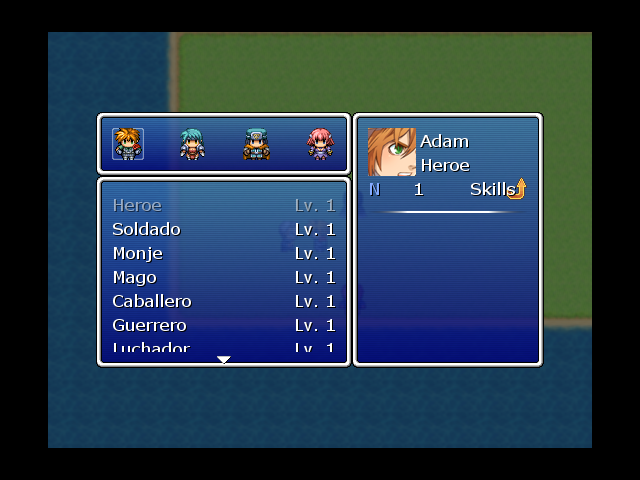
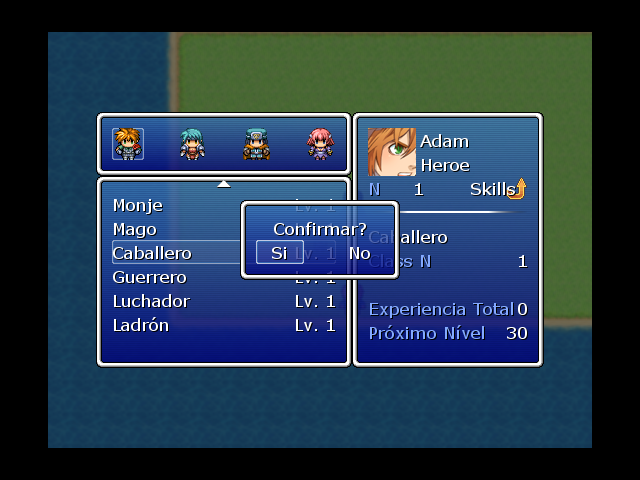
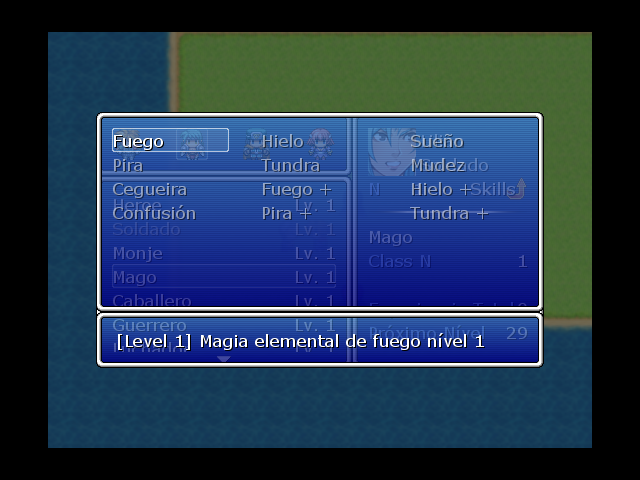
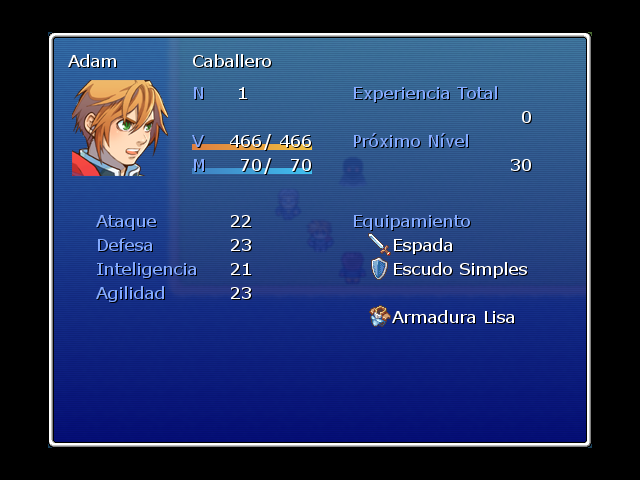
-Nombre Del Script: Cambio de Job
-Version Del Script: ??? -Rpg Maker: Vx (rggs2) -Introducion: Con Este Script podremos seleccionar Los Job´s de los heroes... -Caracteristicas: Las Habilidades Suben De Nivel -Demo: DEMO MEGAUPLOAD Demo RapidShare -ScreenShot: [SPOILER] ![]() ![]() ![]() ![]() [/SPOILER] -Script: [SPOILER] En la Demo [/SPOILER] -Instrucciones: Para llamar el script, se inserta en "llamar script" $scene = Scene_ClassChange.new Y para ver que enemigos dan la cantidad de exp para jobs miren en el script linea 34 a 36 esto: ENEMY_CLASS_EXP = { 1 => 1, 2 => 4 } esto se usa asi: 2 => 4, 2= numero de monstruo en la base de datos 4= numero de exp a los jobs El exp para los jobs sirve para que tengan habilidades por ejemplo: si los guerreros tienen la habilidad cruz sagrada en el lv2 tienen que tener el exp de jobs para subir de nivel hasta que lleguen lvl2. Para ver las habilidades en el cambiador de officios hagan click en shift en el officio seleccionado -Compatiblidad: Hasta Ahora Funciona -Creditos: Autor: NaRuToMaKeR Traductor de utilizacios: hiper_black |
|
#3
|
||||
|
||||
|
nesesito ayuda eh estado buscnaod un script pero no lo consigo el script permite que los enemigos se hagan mas fuertes cuando los personajes suven de nivel para rpg maker vx espero puedna ayudarme
|
|
#4
|
||||
|
||||
|
-Nombre Del Script: Enemigos Mas Fuertes De Acuerdo Al Lvl de Los Heroes
-Version Del Script: 1.1 -Rpg Maker: Vx (rgss2) -Introducion: Con Este Script Los Enemigos Son capaces de Hacerse Mas Fuertes Segun El lvl Aumentando Su Vida Ataque y defensa -Caracteristicas: se puede modificar cuanta vida y todo lo que aumenta! -Demo: No -ScreenShot: No Creo Que Se Pueda Tratare de Poner Una -Script: [SPOILER] Código:
#==============================================================================
# ** Dynamic Difficulty
#------------------------------------------------------------------------------
# By: DrakoShade
# Version 1.1
# Last Updated: 17 March, 2008
#------------------------------------------------------------------------------
# Version History:
# V. 1.1: Updated the note-parsing methodology to work as described by "loam"
# of RMXP.org. This script's use of the Note field will no longer
# interfere with or be confused by other notes. Also, pointless
# methods for the difficulty setting have been removed.
#==============================================================================
=begin
Esta Parte Es la Que Se Modifica Revisen Los Default Por Que Estan modificado a mi Manera
by Zieg xD
=end
module RPG
class Enemy
def get_default_gains
@maxhp_gain = 300 #Default 50
@maxmp_gain = 60 #Default 10
@atk_gain = 7.50 #Default 1.25
@def_gain = 7.50 #Default 1.25
@spi_gain = 15 #Default 2.5
@agi_gain = 15 #Default 2.5
@hit_gain = 5 #Default 0
@eva_gain = 5 #Default 0
@exp_gain = 3 #Default 0
@gold_gain = 15 #Default 0
@variance = 20 #Default 15
@min_level = 1 #Default 1
@max_level = 50 #Default 99
end
end
end
=begin ========================================================================
|| Using the Note Field to your advantage. ||
===============================================================================
The defaults that you set above are fine if you want every single enemy in the
game to follow the same growth pattern. If that's the case, you don't have to
use the Note field at all for this script. If you want your enemies to grow
in different ways from one another, then the Note field is where you make it
happen.
To do anything in the Notes with this script, you will need to include two
special lines in the box:
"=begin dynamic difficulty"
"=end dynamic difficulty"
Don't put quotes around them. Those are simply here so that this explanation
won't mess with the commenting in the script itself.
Anything that falls between those two lines will be evaluated just after the
individual enemy looks up the defaults above. Thus, if you include
@gold_gain = 200
then that specific enemy will be worth an extra 200 gold for every level it
gains, no matter what default you have set. If, instead, you use the line
@gold_gain *= 2
then the enemy is worth twice the gold-per-level of your standard. If the
standard stays at 0, of course, then it's still worth 0 a level, but you
know what I mean.
===============================================================================
|| The Minimum and Maximum Levels ||
===============================================================================
In the defaults, you may have noticed the defaults for @min_level and
@max_level. A creature for which @min_level = 1 and @max_level = 99 will gain
power as long as your party's average level is above 1, and won't stop gaining
power until level 99, which can't normally be exceeded anyway. This works
well if you intend the enemy to scale no matter what level it's encountered at,
but you can do it differently.
An enemy for which @min_level = 10, for example, will be at the power you set
in the database any time it's encountered by a party of level 10 or lower.
When said party hits level 11, that enemy will gain only 1 level, rather than
the 10 that anything else would gain. In this way, you can create enemies that
are never incredibly weak, but still get stronger.
@max_level is similar, but for the other end of the spectrum. An enemy for
which @max_level = 30, for instance, would scale as normal up until the party
reached that level. but if the party were level 40, it would still only grow
as if the party were level 30. Thus, this enemy stops gaining power when the
party's average level hits it's @max_level.
===============================================================================
|| Game Difficulty ||
===============================================================================
At any point, you can set the value of the game's difficulty with a simple
script call. Since it's an attr_accessor, all you have to do is one of these:
$game_system.difficulty = x
$game_system.difficulty += x
$game_system.difficulty -= x
Etcetera, so on, and so forth.
This script uses the difficulty to determine the level of the enemies, mostly
like the party's average level, but with a small difference.
When setting how powerful a monster is, for its maximum HP, attack and defense,
etc. the script will add the difficulty to the party's level. However, when
determining the rewards of experience and gold returns, the script ignores
this value.
Example:
An enemy at level 8 and game difficulty of 2 will be just as hard to beat as
the same enemy at level 10 and game difficulty 0, but will give rewards the
same as if you'd beat it at level 8 and difficulty 0.
===============================================================================
|| General Advice ||
===============================================================================
When designing your enemies, take into account the level at which you want them
to be a real challenge for your party. Their stats should be roughly similar
to those of a party member at their @min_level wearing the equipment you'd
expect your party to have at the target level.
In this way, although the enemy scales down to match a party whose level is
lower than expected, he still fights as if he were equipped to take on the
stronger party. The ability to defeat him will, at this point, hinge more
on your party's equipment than their level.
Of course, the act of balancing is purely up to you. My default numbers are
set so that enemies will scale with a new actor's default gains in the
database. You could retool them to scale with equipment as well, or factor
how well-equipped your enemy is into his stats at minimum level. The choice
is yours.
I hope you enjoy using this script. Happy creating.
===============================================================================
|| That's it. On to the rest of the script. ||
===============================================================================
=end
#==============================================================================
# ** Game_System
#------------------------------------------------------------------------------
# The actual difficulty of the game as a whole is added into this class.
#==============================================================================
class Game_System
attr_accessor :difficulty #New public instance variable.
#----------------------------------------------------------------------------
# * Aliasing the Initialize method.
#----------------------------------------------------------------------------
alias drakoshade_dynamic_difficulty_initialize initialize
def initialize
drakoshade_dynamic_difficulty_initialize
@difficulty = 0
end
end
#==============================================================================
# End modifications to Game_System.
#==============================================================================
#==============================================================================
# ** RPG::Enemies
#------------------------------------------------------------------------------
# Most of the magic happens here. New methods are created which allow the
# enemies to gain levels, based on a combination of both the party's average
# level and the new $game_system.difficulty.
#==============================================================================
module RPG
class Enemy
#--------------------------------------------------------------------------
# * Public Instance Variables
#--------------------------------------------------------------------------
attr_accessor :base_maxhp, :base_maxmp, :base_atk, :base_def, :base_spi
attr_accessor :base_agi, :base_hit, :base_eva, :base_exp, :base_gold
attr_accessor :maxhp_gain, :maxmp_gain, :atk_gain, :def_gain, :spi_gain
attr_accessor :agi_gain, :hit_gain, :eva_gain, :exp_gain, :gold_gain
attr_accessor :min_level, :max_level
#--------------------------------------------------------------------------
# * Set_Bases
#--------------------------------------------------------------------------
def set_bases
@base_maxhp, @base_maxmp = @maxhp, @maxmp
@base_atk, @base_def = @atk, @def
@base_spi, @base_agi = @spi, @agi
@base_hit, @base_eva = @hit, @eva
@base_exp, @base_gold = @exp, @gold
get_default_gains
eval(@note[/(?<==begin dynamic difficulty)(.*?)(?==end dynamic difficulty)/m].to_s)
end
#--------------------------------------------------------------------------
# * Update Level
#--------------------------------------------------------------------------
def update_level
levels = [([$game_party.ave_level, @max_level].min - @min_level), 0].max
diff = $game_system.difficulty
@maxhp = generate_stat(@base_maxhp-1, @maxhp_gain, (levels + diff)) + 1
@maxmp = generate_stat(@base_maxmp-1, @maxmp_gain, (levels + diff)) + 1
@atk = generate_stat(@base_atk-1, @atk_gain, (levels + diff)) + 1
@def = generate_stat(@base_def-1, @def_gain, (levels + diff)) + 1
@spi = generate_stat(@base_spi-1, @spi_gain, (levels + diff)) + 1
@agi = generate_stat(@base_agi-1, @agi_gain, (levels + diff)) + 1
@hit = generate_stat(@base_agi, @agi_gain, (levels + diff))
@eva = generate_stat(@base_eva, @eva_gain, (levels + diff))
@exp = generate_stat(@base_exp, @exp_gain, levels)
@gold = generate_stat(@base_gold, @gold_gain, levels)
end
#--------------------------------------------------------------------------
# * Generate Stat
#--------------------------------------------------------------------------
def generate_stat(base, gain, levels)
result = base + (gain * levels)
result *= (rand(@variance*2)+(100-@variance))
result /= 100
result = [result.to_i, 0].max
return result
end
end
end
#==============================================================================
# ** Game_Party
#------------------------------------------------------------------------------
# I'm adding a method here that will allow this script (or any other) to
# determine the average party level.
#==============================================================================
class Game_Party
def ave_level
level = 0
for i in @actors
actor = $game_actors[i]
level += actor.level
end
level /= @actors.size
return level.round
end
end
#==============================================================================
# ** Scene_Title
#------------------------------------------------------------------------------
# Methods that load the database need to be altered so that the enemies set
# their bases.
#==============================================================================
class Scene_Title
#----------------------------------------------------------------------------
# *Alias the Load Database method.
#----------------------------------------------------------------------------
alias drakoshade_dynamic_difficulty_load_database load_database
def load_database
drakoshade_dynamic_difficulty_load_database
for i in 1...$data_enemies.size
$data_enemies[i].set_bases
end
end
#----------------------------------------------------------------------------
# *Alias the Load Battle Test Database method.
#----------------------------------------------------------------------------
alias drakoshade_dynamic_difficulty_load_bt_database load_bt_database
def load_bt_database
drakoshade_dynamic_difficulty_load_bt_database
for i in 1...$data_enemies.size
$data_enemies[i].set_bases
end
end
end
#==============================================================================
# ** Game_Troop
#------------------------------------------------------------------------------
# The modification here allows for greater versitility than modifying the
# battle scene in this situation. Enemies will load into the troop with
# updated stats.
#==============================================================================
class Game_Troop
#----------------------------------------------------------------------------
# *Alias the Setup method.
#----------------------------------------------------------------------------
alias drakoshade_dynamic_difficulty_setup setup
def setup(troop_id)
for i in 1...$data_enemies.size
$data_enemies[i].update_level
end
drakoshade_dynamic_difficulty_setup(troop_id)
end
end
-Instrucciones: Pegar Sobre El MAIN -Compatiblidad: Niun error Has Ahora -Creditos: DrakoShade Última edición por Alkimista_Zieg fecha: 20-nov-2008 a las 16:32. |
|
#5
|
||||
|
||||
|
gracias con ese script podre por fin poner mi demo mañana
|
|
#6
|
||||
|
||||
|
-Nombre Del Script: Fast skill
-Version Del Script: 1.1 -Rpg Maker: VX -Introducion: una manera elegante y rapida para seleccionar skill -Caracteristicas: por el momento no hay informacion -Demo: http://www.mediafire.com/?zffjshffwjh mirror by (my) aka-kun: http://www.megaupload.com/es/?d=9Z145H6S -ScreenShot: [SPOILER] [/SPOILER]-Script: [SPOILER] Código:
#-------------------------------------------------------------------------------#
# * Moon's Fast skill script.
#-------------------------------------------------------------------------------#
# Yousing this script will help the player to choose his skills faster.
# ============================================================================= #
#-------------------------------------------------------------------------------#
# Modifying part #
#-------------------------------------------------------------------------------#
module Moon
module Window_ActorCommand
Change_Key = Input::X #~ The key used to switch from Fast to
#~ Normal skill command
No_Skills = "No Skills" #~ Text displayed when the actor has no skills
Default_Fast_skill = false #~ The battle starts with Fast
#~ skill turned On if this is true
Help_window = true #~ Will the help window appear?
end
end
#-------------------------------------------------------------------------------#
# Modifying part End #
#-------------------------------------------------------------------------------#
#==============================================================================
# ** Window_ActorCommand
#------------------------------------------------------------------------------
# This window is used to select actor commands, such as "Attack" or "Skill".
#==============================================================================
class Window_ActorCommand < Window_Command
attr_accessor :index
attr_accessor :fastskill
attr_accessor :need_refresh
#--------------------------------------------------------------------------
# * Object Initialization
#--------------------------------------------------------------------------
alias initialize_moon_fast_skill_actor_command initialize
def initialize
initialize_moon_fast_skill_actor_command
if Moon::Window_ActorCommand::Help_window
@help_window = Window_Help.new
@help_window.visible = false
end
@fastskill = Moon::Window_ActorCommand::Default_Fast_skill
@need_refresh = false
end
#--------------------------------------------------------------------------
# * Setup
# actor : actor
#--------------------------------------------------------------------------
alias setup_moon_actor_command setup
def setup(actor)
setup_second_part(actor)
setup_moon_actor_command(actor)
@need_refresh = true
end
#--------------------------------------------------------------------------
# * Setup 2 - new function added in the old one
#--------------------------------------------------------------------------
def setup_second_part(actor)
if ( Moon::Window_ActorCommand::Help_window ) and
( !@help_window.visible and @fastskill )
@help_window.visible = true
update_help
end
@actor = actor
a = @actor.skills.size / 4
a += @actor.skills.size % 4
c=0
@data_skills = {}
for i in 1..(a+1)
for j in 0..3
if !@actor.skills[c].nil?
key = [i,j+1]
@data_skills[key] = @actor.skills[c]
c+=1
end
end
end
@last_data_skill = @actor.skills[c-1]
@SM = @actor.skills.size - 1 # Skill maximum size
@screen_index1 = 1
@screen_index2 = 1
@skill_index_id = @data_skills[[1,1]].id
@command2 = Moon::Window_ActorCommand::No_Skills
end
alias dispose_moon_actor_command_fast dispose
def dispose
@help_window.dispose
dispose_moon_actor_command_fast
end
#--------------------------------------------------------------------------
# * Update - checking if the script needs a refresh
#--------------------------------------------------------------------------
alias update_moon_actorcommand_fast_skill update
def update
if Moon::Window_ActorCommand::Help_window
if @index == 1 and @fastskill
@help_window.visible = self.active
else
@help_window.visible = false
end
end
if @need_refresh
refresh
@need_refresh = false
end
update_moon_actorcommand_fast_skill
end
#--------------------------------------------------------------------------
# * Refresh - New Refresh function
#--------------------------------------------------------------------------
def refresh
if ( Moon::Window_ActorCommand::Help_window ) and
( @fastskill and !@help_window.nil? )
update_help
end
if !@help_window.nil?
if ( Moon::Window_ActorCommand::Help_window ) and
( @help_window.visible and !@fastskill )
@help_window.visible = false
end
end
self.contents.clear
for i in 0...@item_max
if @fastskill and i == 1 and !@data_skills[[1,1]].nil?
draw_fast_skill(i)
else
draw_item(i)
end
end
end
#--------------------------------------------------------------------------
# * Move cursor right
# wrap : Wraparound allowed
#--------------------------------------------------------------------------
def cursor_right(wrap = false)
if @index == 1 and @fastskill
if @data_skills[[@screen_index2,@screen_index1]] != @last_data_skill
@screen_index1 += 1
if @screen_index1 > 4
@screen_index1 = 1
@screen_index2 += 1
end
else
Sound.play_buzzer
end
@need_refresh = true
end
end
#--------------------------------------------------------------------------
# * Move cursor left
# wrap : Wraparound allowed
#--------------------------------------------------------------------------
def cursor_left(wrap = false)
if @index == 1 and @fastskill
if @screen_index1 * @screen_index2 > 1
@screen_index1 -= 1
if @screen_index1 < 1
@screen_index1 = 4
@screen_index2 -= 1
end
else
Sound.play_buzzer
end
@need_refresh = true
end
end
#--------------------------------------------------------------------------
# * Fast skills - gets the skill that is going to be used
#--------------------------------------------------------------------------
def fastskills
skill = @data_skills[[@screen_index2, @screen_index1]]
return skill
end
#--------------------------------------------------------------------------
# * Draw_fast_skill
# index : Index used for the Lines. 0 - Attack, 1 - Skill, 2 - Defense,
# 3 - Item
#--------------------------------------------------------------------------
def draw_fast_skill(s)
rect = item_rect(s)
for i in 1..4
if i * @screen_index2 <= @SM and !@data_skills[[@screen_index2,i]].nil?
skill = @data_skills[[@screen_index2,i]]
enabled = 0
enabled += 1 if @actor.skill_can_use?(skill)
enabled += 2 if @screen_index1 == i
rect.x = 24*(i-1)
self.contents.clear_rect(rect)
draw_icon(skill.icon_index, rect.x, rect.y, enabled)
end
end
end
#--------------------------------------------------------------------------
# * New Draw Item function
#--------------------------------------------------------------------------
def draw_item(index, enabled = true)
rect = item_rect(index)
rect.x += 4
rect.width -= 8
command = @commands[index]
command = @command2 if index == 1 and !@data_skills[[1,1]] and @fastskill
self.contents.clear_rect(rect)
self.contents.font.color = normal_color
self.contents.font.color.alpha = enabled ? 255 : 128
self.contents.draw_text(rect, command)
end
#--------------------------------------------------------------------------
# * Draw icon
# icon_index - index of the icon
# x - x coordinates
# y - y coordinates
# enabled - opacity style. Opacity can be in the range 0-255.
# 0 - 64 (for not enabled, and not selected skills)
# 1 - 128 (for enabled, and not selected skills)
# 2 - 192 (for not enabled, but selected skills)
# 3 - 255 (for enabled, and selected skills)
#--------------------------------------------------------------------------
def draw_icon(icon_index, x, y, enabled = 3)
bitmap = Cache.system("Iconset")
case enabled
when 0
alpha = 64
when 1
alpha = 128
when 2
alpha = 192
when 3
alpha = 255
end
rect = Rect.new(icon_index % 16 * 24, icon_index / 16 * 24, 24, 24)
self.contents.blt(x, y, bitmap, rect, alpha)
end
#--------------------------------------------------------------------------
# * Update Help Text
#--------------------------------------------------------------------------
def update_help
skill = @data_skills[[@screen_index2,@screen_index1]]
if @index == 1 and !skill.nil?
desc = skill.description
mp_c = skill.mp_cost
@help_window.set_text(skill == nil ? "" : "#{skill.name}:#{mp_c}MP - #{desc}" )
else
@help_window.visible = false
end
end
end
#==============================================================================
# ** Scene_Battle
#------------------------------------------------------------------------------
# This class performs battle screen processing.
#==============================================================================
class Scene_Battle < Scene_Base
alias update_moon_window_actorcommand_fast_skill update
def update
update_moon_window_actorcommand_fast_skill
if ( Input.trigger?(Moon::Window_ActorCommand::Change_Key) ) and
( @skill_window.nil? and !@party_command_window.active )
if @actor_command_window.fastskill
@actor_command_window.fastskill = false
@actor_command_window.need_refresh = true
else
@actor_command_window.index = 1
@actor_command_window.fastskill = true
@actor_command_window.need_refresh = true
end
end
end
#--------------------------------------------------------------------------
# * Update Acotr Command Selection
#--------------------------------------------------------------------------
alias update_actor_command_selection_moon_actor_command_fast_skill update_actor_command_selection
def update_actor_command_selection
if Input.trigger?(Input::B)
if @target_enemy_window != nil
Sound.play_cancel
end_target_enemy_selection
return
elsif @target_actor_window != nil
Sound.play_cancel
end_target_actor_selection
else
Sound.play_cancel
prior_actor
end
else
update_actor_command_selection_moon_actor_command_fast_skill
end
end
#--------------------------------------------------------------------------
# * Start Skill Selection
#--------------------------------------------------------------------------
alias start_skill_selection_moon_actorcommand_fast_skill start_skill_selection
def start_skill_selection
if @actor_command_window.fastskill
@skill = @actor_command_window.fastskills
@active_battler.last_skill_id = @skill.id if !@skill.nil?
if @active_battler.skill_can_use?(@skill)
Sound.play_decision
determine_skill
else
Sound.play_buzzer
end
return
end
start_skill_selection_moon_actorcommand_fast_skill
end
#--------------------------------------------------------------------------
# * Confirm Skill
#--------------------------------------------------------------------------
alias determine_skill_moon_actorcommand_fast_skill determine_skill
def determine_skill
if @actor_command_window.fastskill
@active_battler.action.set_skill(@skill.id)
if @skill.need_selection?
if @skill.for_opponent?
start_target_enemy_selection
else
start_target_actor_selection
end
else
next_actor
end
return
end
determine_skill_moon_actorcommand_fast_skill
end
#--------------------------------------------------------------------------
# * Next actor: refreshing the fast skill.
#--------------------------------------------------------------------------
alias next_actor_moon_actor_command_fast_skill next_actor
def next_actor
@actor_command_window.need_refresh = true
next_actor_moon_actor_command_fast_skill
end
end
-Instrucciones: Pegar sobre Main -Compatiblidad: errores comunes: problema: [SPOILER] ![]() Line 53 Código:
alias setup_moon_actor_command setup solucion: [SPOILER] [/SPOILER]problema: [SPOILER] [/SPOILER]solucion: [SPOILER]poner Default_Fast_skill = true[/SPOILER] -Creditos: Moon "recomiendo que se bajen la demo para evitar el surgimiento de los errores ya mencionados..." sayonara Última edición por Yagami Setsuna fecha: 20-nov-2008 a las 21:36. |
|
#7
|
||||
|
||||
|
aki va mi aporte
Barra pa lo enemigos Version del script:?????? Rpg:XP Descripcion: no es necesaria [SPOILER]#------------------------------------------------------------------------------ # Script Barra de vida para los enemigos #================================================= ============================= class Window_Help < Window_Base def set_enemy(actor) self.contents.clear draw_actor_name(actor, 4, 0) draw_actor_state(actor, 140, 0) carol3_draw_hp_bar(actor, 284, 0) carol3_draw_sp_bar(actor, 460, 0) @text = nil self.visible = true end def carol3_draw_hp_bar(actor, x, y, width = 128) self.contents.font.color = system_color self.contents.fill_rect(x-1, y+17, width+2,6, Color.new(0, 0, 0, 255)) w = width * actor.hp / actor.maxhp self.contents.fill_rect(x, y+18, w,1, Color.new(12, 90, 96, 200)) self.contents.fill_rect(x, y+19, w,1, Color.new(255, 0, 0, 255)) self.contents.fill_rect(x, y+20, w,1, Color.new(128, 0, 0, 255)) self.contents.fill_rect(x, y+21, w,1, Color.new(0, 0, 0, 255)) self.contents.font.color = normal_color end def carol3_draw_sp_bar(actor, x, y, width = 128) self.contents.font.color = system_color self.contents.fill_rect(x-1, y+17, width+2,6, Color.new(0, 0, 0, 255)) w = width * actor.sp / actor.maxsp self.contents.fill_rect(x, y+18, w,1, Color.new(128, 20, 255, 255)) self.contents.fill_rect(x, y+19, w,1, Color.new(0, 255, 120, 255)) self.contents.fill_rect(x, y+20, w,1, Color.new(0, 192, 192, 255)) self.contents.fill_rect(x, y+21, w,1, Color.new(0, 128, 128, 255)) self.contents.font.color = normal_color end end [/SPOILER] |
|
#8
|
||||
|
||||
|
Hay va otro
Nombre del script: Continue game version:???? Rpg:XP Descripcion:cuando mueres te sale un menu con las opciones de continuar el juego, cargar otro juego o salir al menu ppal [SPOILER]#================================================= ============================= # ** TDS Continue [Scene_Gameover] # Version: 1.0 #------------------------------------------------------------------------------ # Allows for a player to continue at the last save point when he dies. #================================================= ============================= # Variable para los comandos en español ESPAÑOL = true #================================================= ============================= # ** TDS Game_Temp #------------------------------------------------------------------------------ # This class handles temporary data that is not included with save data. # Refer to "$game_temp" for the instance of this class. #================================================= ============================= class Game_Temp attr_accessor laying_filename alias tds_continue_gameover_game_temp_initialize initialize #-------------------------------------------------------------------------- # * Object Initialization #-------------------------------------------------------------------------- def initialize @playing_filename = 0 tds_continue_gameover_game_temp_initialize end end #================================================= ============================= # ** Scene_File #------------------------------------------------------------------------------ # This is a superclass for the save screen and load screen. #================================================= ============================= class Scene_File alias tds_continue_gameover_scene_file_update update def update # If C button was pressed if Input.trigger?(Input::C) # Call method: on_decision (defined by the subclasses) on_decision(make_filename(@file_index)) $game_temp.last_file_index = @file_index $game_temp.playing_filename = @file_index + 1 return end tds_continue_gameover_scene_file_update end end #================================================= ============================= # ** TDS Window_Command #------------------------------------------------------------------------------ # This window deals with general command choices. # Gives more options for the command window. #================================================= ============================= class TDS_Window_Command < Window_Selectable #-------------------------------------------------------------------------- # * Object Initialization # width : window width # commands : command text string array # #-------------------------------------------------------------------------- def initialize(width, commands, column_max = 1, style = 0, inf_scroll = 1) # Compute window height from command quantity super(0, 0, width, (commands.size * 1.0 / column_max).ceil * 32 + 32) @inf_scroll = inf_scroll @item_max = commands.size @commands = commands @column_max = column_max @style = style self.contents = Bitmap.new(width - 32, (@item_max * 1.0 / @column_max).ceil * 32) refresh self.index = 0 end #-------------------------------------------------------------------------- # * Refresh #-------------------------------------------------------------------------- def refresh self.contents.clear for i in 0...@item_max draw_item(i, normal_color) end end #-------------------------------------------------------------------------- # * Draw Item # index : item number # color : text color #-------------------------------------------------------------------------- def draw_item(index, color) self.contents.font.color = color rect = Rect.new(index%@column_max * (self.width / @column_max) + 4, 32 * (index/@column_max), self.width / @column_max - 40, 32) self.contents.fill_rect(rect, Color.new(0, 0, 0, 0)) self.contents.draw_text(rect, @commands[index], @style) end #-------------------------------------------------------------------------- # * Disable Item # index : item number #-------------------------------------------------------------------------- def disable_item(index) draw_item(index, disabled_color) end def update_help @help_window.set_actor($game_party.actors[$scene.actor_index]) end end #================================================= ============================= # ** Scene_Gameover #------------------------------------------------------------------------------ # This class performs game over screen processing. #================================================= ============================= class Scene_Gameover #-------------------------------------------------------------------------- # * Main Processing #-------------------------------------------------------------------------- def main # Make game over graphic @sprite = Sprite.new @sprite.bitmap = RPG::Cache.gameover($data_system.gameover_name) # Creates command window if ESPAÑOL == true @command_window = TDS_Window_Command.new(192, ['Continuar', 'Pantalla de título','Cargar Fila','Salir'],1,1) else @command_window = TDS_Window_Command.new(192, ['Continue', 'Title Screen', 'Load file','Quit'],1,1) end @command_window.back_opacity = 0 @command_window.opacity = 0 @command_window.contents_opacity = 0 @command_window.x = 320 - @command_window.width / 2 @command_window.y = 40 @command_window.visible = false @command_window.active = false # Stop BGM and BGS $game_system.bgm_play(nil) $game_system.bgs_play(nil) # Play game over ME $game_system.me_play($data_system.gameover_me) # Execute transition Graphics.transition(120) @intro_updating = true @continue_enabled = false # Main loop loop do # Update game screen Graphics.update # Update input information Input.update # Frame update update # Abort loop if screen is changed if $scene != self break end end # Prepare for transition Graphics.freeze # Dispose of game over graphic @sprite.bitmap.dispose @sprite.dispose @command_window.dispose # Prepare for transition Graphics.freeze # If battle test if $BTEST $scene = nil end end #-------------------------------------------------------------------------- # * Updates the first fading effect #-------------------------------------------------------------------------- def update_enter @command_window.opacity += 10 @command_window.back_opacity += 10 if @command_window.back_opacity < 160 @command_window.contents_opacity += 10 if @command_window.contents_opacity < 255 @command_window.visible = true if @command_window.opacity >= 255 @command_window.active = true @intro_updating = false return end end #-------------------------------------------------------------------------- # * Frame Update #-------------------------------------------------------------------------- def update update_enter if @intro_updating == true # Update command window @command_window.update # Gets the value of playing file to apply it later when the game is reloaded @game_value = $game_temp.playing_filename # Gets the filename # of the last playing variable @filename = "Save#{$game_temp.playing_filename}.rxdata" # If file last playing file exist let's you continue otherwise it cancels the # continue command unless FileTest.exist?(@filename) # Disables first item in the command window @command_window.disable_item(0) # Allows to continue if file exist @can_continue = false else @can_continue = true end # checks to see if save files 1 to 5 exist for i in 0..5 if FileTest.exist?("Save#{i+1}.rxdata") # Allows for continue command to be used @continue_enabled = true end end # if continue disable if @continue_enabled == false # Disables load game command @command_window.disable_item(2) end if @command_window.active == true && Input.trigger?(Input::C) # Branch by command window cursor position case @command_window.index when 0 # Continue if @can_continue == true $game_system.se_play($data_system.decision_se) # loads filename if filename from continue exist # stops ME audio Audio.me_stop # Load File load = Scene_Load.new load.on_decision(@filename) # Make player face down $game_player.turn_down #Gives back the value of the game you were playing $game_temp.playing_filename = @game_value else $game_system.se_play($data_system.buzzer_se) end when 1 # To title Graphics.transition(40) $game_system.se_play($data_system.decision_se) $scene = Scene_Title.new when 2 # Load File if @continue_enabled == true $game_system.se_play($data_system.decision_se) $scene = Scene_Load.new else $game_system.se_play($data_system.buzzer_se) end when 3 # Shutdown $game_system.se_play($data_system.decision_se) $scene = nil end end end end[/SPOILER] |
|
#9
|
||||
|
||||
|
Y otro mazz
nombre bjetos en el mapaVersion:????? RPG:XP Descripcion:Los onjetos ke contienes los puedes usar en el mapa si estar metiendote en el menu Instrucciones egar encima del main y lestocomo se usa: el boton a, gira los objetos a un lado y el boton d los gira hacia el otro y el boton s los usa ke idiota no puze l script jeje [SPOILER]################################################## ########################## ################# Objetos en mapa ######################### ################################################## ########################## ################# Creado por ######################### ################# Rudy_Guillan ######################### ################# 15-6-2007 ######################### ################################################## ########################## $obj_index = 0 class Scene_Map alias guil_main main def main @objects_window = Window_Objects.new guil_main @objects_window.dispose end alias guil_update update def update @objects_window.update @data = [] for i in 1...$data_items.size if $game_party.item_number(i) > 0 @data.push($data_items[i]) end end if Input.trigger?(Input::L) if @data.size != 0 if $obj_index == 0 $obj_index = @data.size - 1 $game_system.se_play($data_system.equip_se) else $obj_index -= 1 $game_system.se_play($data_system.equip_se) end end end if Input.trigger?(Input::X) if @data.size != 0 if $obj_index == @data.size - 1 $game_system.se_play($data_system.equip_se) $obj_index = 0 else $game_system.se_play($data_system.equip_se) $obj_index += 1 end end end if Input.trigger?(Input::Y) @item = @data[$obj_index] $game_party.actors[0].item_effect(@item) $game_temp.common_event_id = @item.common_event_id $game_system.se_play(@item.menu_se) if @item.consumable $game_party.lose_item(@item.id, 1) end end guil_update end end class Window_Objects < Window_Base def initialize super(-16, -16, 147, 147) self.contents = Bitmap.new(width - 32, height - 32) self.opacity = 0 self.contents.font.size = 15 refresh end def refresh self.contents.clear @data = [] @number = [] for i in 1...$data_items.size if $game_party.item_number(i) > 0 @data.push($data_items[i]) @number.push($game_party.item_number(i)) end end if @data.size != 0 if $obj_index >= @data.size $obj_index = @data.size - 1 end @icon1 = Sprite.new if $obj_index - 2 >= 0 @icon1.bitmap = RPG::Cache.icon(@data[$obj_index - 2].icon_name) else if $obj_index == 0 @icon1.bitmap = RPG::Cache.icon(@data[@data.size - 2].icon_name) else @icon1.bitmap = RPG::Cache.icon(@data[@data.size - 1].icon_name) end end @icon1.zoom_x = 0.5 @icon1.zoom_y = 0.5 @icon1.x = 90 @icon1.y = 0 @icon2 = Sprite.new if $obj_index - 1 >= 0 @icon2.bitmap = RPG::Cache.icon(@data[$obj_index - 1].icon_name) else if $obj_index == 1 @icon2.bitmap = RPG::Cache.icon(@data[0].icon_name) else @icon2.bitmap = RPG::Cache.icon(@data[@data.size - 1].icon_name) end end @icon2.x = 70 @icon2.y = 25 @icon3 = Sprite.new @icon3.bitmap = RPG::Cache.icon(@data[$obj_index].icon_name) @icon3.zoom_x = 1.5 @icon3.zoom_y = 1.5 @icon3.x = 50 @icon3.y = 50 if @data[$obj_index].consumable self.contents.draw_text(88, 65, 25, 32, "x" + "#{@number[$obj_index]}") end @icon4 = Sprite.new if $obj_index + 1 < @data.size @icon4.bitmap = RPG::Cache.icon(@data[$obj_index + 1].icon_name) else @icon4.bitmap = RPG::Cache.icon(@data[0].icon_name) end @icon4.x = 25 @icon4.y = 70 @icon5 = Sprite.new if $obj_index + 2 < @data.size @icon5.bitmap = RPG::Cache.icon(@data[$obj_index + 2].icon_name) else if $obj_index + 1 < @data.size @icon5.bitmap = RPG::Cache.icon(@data[0].icon_name) else if @data[1] @icon5.bitmap = RPG::Cache.icon(@data[1].icon_name) else @icon5.bitmap = RPG::Cache.icon(@data[0].icon_name) end end end @icon5.zoom_x = 0.5 @icon5.zoom_y = 0.5 @icon5.x = 0 @icon5.y = 90 end end def update if @icon1 != nil @icon1.dispose @icon1.bitmap.dispose end if @icon2 != nil @icon2.dispose @icon2.bitmap.dispose end if @icon3 != nil @icon3.dispose @icon3.bitmap.dispose end if @icon4 != nil @icon4.dispose @icon4.bitmap.dispose end if @icon5 != nil @icon5.dispose @icon5.bitmap.dispose end refresh end end[/SPOILER] Última edición por diego_max5 fecha: 22-nov-2008 a las 05:27. |
|
#10
|
||||
|
||||
|
diego_max5 gracias por el aporte pero no los agregare hasta que completes bn la plnatilla por que asi como estan no em dana ganas de ponerlos ademas puede q los MOD te multen por tanto seguido.. pudes poner 2 seguidos pero tienes q esperar almenois 1 dia o mas .. eso espero los arregles
~ZIEG~ |
![]() |
|
|
Temas Similares para: ~Base De Datos de Script de EMD~
|
||||
| Tema | Autor | Foro | Respuestas | Último mensaje |
| Aplicación Base de datos de .ISOS | Áldaron | Playstation | 15 | 21-jul-2008 19:05 |
| Mi firma a base de paint | Miguel_ | Exposición de diseños | 3 | 11-jul-2008 00:10 |
| Data Base Error(pag Emd) | Espartan94 | Ayuda | 11 | 03-jun-2008 21:57 |
| Gestion de Base de Datos con *FileMaker* | sawyer3000 | Descargas directas | 0 | 02-nov-2007 13:26 |