


Bien, cómo dice el titulo, he pensado que es mejor que coja todos los Recursos/Aportes del Subforo de RPG Maker XP y los junte, para que a los news que vengan, no se les haga tan complicado buscar...
Los recursos se actualizarán siempre que aparezca un aporte nuevo en qualquier tema, Jay y yo nos encargaremos de eso, y si alguien más quiere colaborar, que lo diga.
Recursos [Charas, Battlers...]
Recursos de Kingdom Hearts
Charas:Descarga
Armas:Descarga
Battle:Descarga
Facesets:Descarga
Monsters:Descarga
Chipsets:Descarga
Title:Descarga
Game Over:Descarga
Recursos de todo Tipo:
[Pincha para descargar] Recursos RPG Maker XP
Recursos de Pokemon (Aportado por xXdarkmotXx)
http://rapidshare.com/files/43688190...sos_X.zip.html
Paquete de Charas de Ragnarok (Aportado por xXDarkMotXx)
http://www.savefile.com/files/1051350
Charas Final Fantasy (Aportado por xXDarkMotXx)


Aquí para descargar Chocobos (aportado por xavi_metralla)
Mirrors:
megaupload
rapidshare
sendspace
4share


Scripts de Batallas
Scripts Para las Batallas
Spoiler
Con este Script tu batalla cambiara hasì:

Debès poner esta imagen en PICTURES de tu juego

DESCARGAR
---------------------------------------------------------------------------------------------------------------------------------------------------------------------------------
Este Script cambia tu comando de batalla que se verà algo hasì:

Debès pegar esto en PICTURES de tu juego:


DESCARGAR
-------------------------------------------------------------------------------------------------------------------------------------------------------------------------------
Este SCRIPT lo que hase es que no se vea el recuadro donde se encuentran los jugadores:
DESCARGAR----------------------------------------------------------------------------------------------------------------------------------------------------------------------
Estos son por el Momentos los mejores Scripts COMUNES...Aportado por: SavioWED
Scripts de Menu:
Menu ITIGO:

DESCARGAR
-----------------------------------------------------------------------------------------------------------------------------------------------------------------------------------------
Menu Status

DESCARGAR----------------------------------------------------------------------------------------------------------------------------------------------------------------------------
Menu SKILL

DESCARGAR--------------------------------------------------------------------------------------------------------------------------------------------------------------------------
Menu Guardar:

DESCARGAR-------------------------------------------------------------------------------------------------------------------------------------------------------------------------
Menu de Equipamento

DESCARGAR-----------------------------------------------------------------------------------------------------------------------------------------------------------------------------
Menu ITEM

DESCARGAR------------------------------------------------------------------------------------------------------------------------------------------------------------------------
Menu COMPRAR

DESCARGAR------------------------------------------------------------------------------------------------------------------------------------------------------------------------
Menu END

DESCARGAR---------------------------------------------------------------------------------------------------------------------------------------------------------------------
Menu de Elecciòn de Nombre

DESCARGAR--------------------------------------------------------------------------------------------------------------------------------------------------------------------------
Para el MAPA

DESCARGAR-----------------------------------------------------------------------------------------------------------------------------------------------------------
Iconos de VIDA para el mapa


DESCARGAR Aportado por: SavioWED
Inventario en el Mapa (Aportado por Alkimista_Zieg)
Este script muestra los objetos que tienes en el inventario, y te permite utilizarlos en el mapa. Es útil para ARPGs.
Instrucciones:
Pegar encima de Main.
Controles:
Q, A: Desplazarse por la lista de objetos.
S: Utilizar objeto. Tendrá efecto sólo sobre el Personaje 1.
Script:
Código:
############################################################################
################# Objetos en mapa #########################
############################################################################
################# Creado por #########################
################# Rudy_Guillan #########################
################# 15-6-2007 #########################
############################################################################
$obj_index = 0
class Scene_Map
alias guil_main main
def main
@objects_window = Window_Objects.new
guil_main
@objects_window.dispose
end
alias guil_update update
def update
@objects_window.update
@data = []
for i in 1...$data_items.size
if $game_party.item_number(i) > 0
@data.push($data_items)
end
end
if Input.trigger?(Input::L)
if @data.size != 0
if $obj_index == 0
$obj_index = @data.size - 1
$game_system.se_play($data_system.equip_se)
else
$obj_index -= 1
$game_system.se_play($data_system.equip_se)
end
end
end
if Input.trigger?(Input::X)
if @data.size != 0
if $obj_index == @data.size - 1
$game_system.se_play($data_system.equip_se)
$obj_index = 0
else
$game_system.se_play($data_system.equip_se)
$obj_index += 1
end
end
end
if Input.trigger?(Input::Y)
@item = @data[$obj_index]
$game_party.actors[0].item_effect(@item)
$game_temp.common_event_id = @item.common_event_id
$game_system.se_play(@item.menu_se)
if @item.consumable
$game_party.lose_item(@item.id, 1)
end
end
guil_update
end
end
class Window_Objects < Window_Base
def initialize
super(-16, -16, 147, 147)
self.contents = Bitmap.new(width - 32, height - 32)
self.opacity = 0
self.contents.font.size = 15
refresh
end
def refresh
self.contents.clear
@data = []
@number = []
for i in 1...$data_items.size
if $game_party.item_number(i) > 0
@data.push($data_items)
@number.push($game_party.item_number(i))
end
end
if @data.size != 0
if $obj_index >= @data.size
$obj_index = @data.size - 1
end
@icon1 = Sprite.new
if $obj_index - 2 >= 0
@icon1.bitmap = RPG::Cache.icon(@data[$obj_index - 2].icon_name)
else
if $obj_index == 0
@icon1.bitmap = RPG::Cache.icon(@data[@data.size - 2].icon_name)
else
@icon1.bitmap = RPG::Cache.icon(@data[@data.size - 1].icon_name)
end
end
@icon1.zoom_x = 0.5
@icon1.zoom_y = 0.5
@icon1.x = 90
@icon1.y = 0
@icon2 = Sprite.new
if $obj_index - 1 >= 0
@icon2.bitmap = RPG::Cache.icon(@data[$obj_index - 1].icon_name)
else
if $obj_index == 1
@icon2.bitmap = RPG::Cache.icon(@data[0].icon_name)
else
@icon2.bitmap = RPG::Cache.icon(@data[@data.size - 1].icon_name)
end
end
@icon2.x = 70
@icon2.y = 25
@icon3 = Sprite.new
@icon3.bitmap = RPG::Cache.icon(@data[$obj_index].icon_name)
@icon3.zoom_x = 1.5
@icon3.zoom_y = 1.5
@icon3.x = 50
@icon3.y = 50
if @data[$obj_index].consumable
self.contents.draw_text(88, 65, 25, 32, "x" + "#{@number[$obj_index]}")
end
@icon4 = Sprite.new
if $obj_index + 1 < @data.size
@icon4.bitmap = RPG::Cache.icon(@data[$obj_index + 1].icon_name)
else
@icon4.bitmap = RPG::Cache.icon(@data[0].icon_name)
end
@icon4.x = 25
@icon4.y = 70
@icon5 = Sprite.new
if $obj_index + 2 < @data.size
@icon5.bitmap = RPG::Cache.icon(@data[$obj_index + 2].icon_name)
else
if $obj_index + 1 < @data.size
@icon5.bitmap = RPG::Cache.icon(@data[0].icon_name)
else
if @data[1]
@icon5.bitmap = RPG::Cache.icon(@data[1].icon_name)
else
@icon5.bitmap = RPG::Cache.icon(@data[0].icon_name)
end
end
end
@icon5.zoom_x = 0.5
@icon5.zoom_y = 0.5
@icon5.x = 0
@icon5.y = 90
end
end
def update
if @icon1 != nil
@icon1.dispose
@icon1.bitmap.dispose
end
if @icon2 != nil
@icon2.dispose
@icon2.bitmap.dispose
end
if @icon3 != nil
@icon3.dispose
@icon3.bitmap.dispose
end
if @icon4 != nil
@icon4.dispose
@icon4.bitmap.dispose
end
if @icon5 != nil
@icon5.dispose
@icon5.bitmap.dispose
end
refresh
end
end
Incompatibilidades:
Ninguna conocida.
Créditos:
Rudy Guillan.
Gradient Bars (Aportado por Alkimista_Zieg) (Explicación dentro del Spoiler]
Introduccion
Debido a mi reciente obsesion de encontrar un buen script para barras, que no cause tanto lag o que al menos sean bonitas... Se me ocurrio intentar usar un metodo ya existente para crear unas barras propias. Este es el resultado.
Caracteristicas
* Facil de incorporar a tu proyecto, solo copiar y pegar
* Pocas lineas de codigo y menos lag con respecto a otros scripts
* Altamente personalizable, no tendras que preocuparte de encontrar otro juego con las mismas barras
* Mas de 6 estilos diferentes
Script
Código:
#=============================================================
===============#
# ** Plug & Play Gradient Bars ( Silent's Edition )
# - Barras de HP, SP y EXP dibujadas a Pixel
#----------------------------------------------------------------------------#
# * - Version - 1.0b
# * - Fecha - 10 de Octubre, 2007
#----------------------------------------------------------------------------#
# * Introduccion - Buscando y buscando...(?) encontre unos metodos faciles de
# usar para hacer un degradado con barras O____O, pero solo estaba el metodo
# y un ejemplo, no podia solo pegarse en el editor y usarlos, requeria algo
# de trabajo para poder sacar algo decente de ahí...
# Entonces un dia de aburrimiento me puse a boludear con los metodos e hice
# estas barritas que quedaron bastante bonitas a mi parecer xD
#
# * Instrucciones - Pegar sobre Main, configurar el modulo como mas te guste
# y nada mas , procura no editar debajo del modulo a menos que sepas lo
# que estas haciendo.
#
# * Creditos - No es necesario que me den creditos ya que los metodos
# ( lineas 40 - 68 ) de degradados usados no son mios... aunque tampoco
# se quien es el autor verdadero o_o.
#
#
#============================================================================#
# Modulo Personalizable
#----------------------------------------------------------------------------#
# Estilo de Colores en las barras
ESTILO = 1 # 0 : Standard, 1 : Lightness, 2 : Darkness
# Cantidad de Colores para Degradado
GRADIENTES = 2 # 0 : Solo un Color, 1 : Dos Colores, 2 : Tres Colores
#----------------------------------------------------------------------------#
# Fin del Modulo Personalizable
#============================================================================#
# ** Adicion de metodos a la clase Bitmap
# - Metodos encontrados en www.creationasylum.net
#============================================================================#
class Bitmap
#--------------------------------------------------------------------------#
# * Metodo para dibujar barra
#--------------------------------------------------------------------------#
def grade(x, y, width, height, start, finish)
for i in 0..width
r = start.red * (width - i) / width + finish.red * i / width
g = start.green * (width - i) / width + finish.green * i / width
b = start.blue * (width - i) / width + finish.blue * i / width
a = start.alpha * (width - i) / width + finish.alpha * i / width
fill_rect(x + i, y, 1, height, Color.new(r, g, b, a))
end
end
#--------------------------------------------------------------------------#
# * Metodo para dibujar gradiente
#--------------------------------------------------------------------------#
def draw_gradient(x, y, width, height, colors)
gradient_width = ((width * 1.0) / (colors.size - 1))
if colors.size == 1
grade(x, y, width, height, colors[0], colors[0])
return
end
for i in 0..(colors.size - 2)
x_var = (x + (i * gradient_width))
grade(x_var, y, gradient_width, height, colors, colors[i + 1])
end
end
#----------------------------------------------------------------------------#
end
#============================================================================#
# ** Agregados y Ediciones a Window_Base
# - Metodos para crear las barras, edición de los metodos draw_hp, draw_sp
# y draw_exp para mostrar las barras automaticamente
#============================================================================#
class Window_Base < Window
#--------------------------------------------------------------------------#
# * Metodo para barra de Hit Points / HP
#--------------------------------------------------------------------------#
def draw_hp_bar(actor, x, y, width = 120)
hp = actor.hp
max_hp = actor.maxhp
percentage = ((hp * 1.0) / max_hp)
bar_width = (percentage * width)
empty_width = (width - bar_width+1)
gray = Color.new(50, 50, 50, 255)
if ESTILO == 0
hp1 = Color.new(80, 0, 0, 255)
hp2 = Color.new(189, 0, 0, 255)
hp3 = Color.new(218, 197, 7, 255)
elsif ESTILO == 1
hp1 = Color.new(120, 0, 0, 255)
hp2 = Color.new(219, 0, 0, 255)
hp3 = Color.new(238, 197, 7, 255)
else
hp1 = Color.new(40, 0, 0, 255)
hp2 = Color.new(149, 0, 0, 255)
hp3 = Color.new(178, 197, 7, 255)
end
self.contents.draw_gradient(x + bar_width, y,empty_width - 1,8, [gray])
#------------------------------------------------------------------------#
case GRADIENTES
when 0
self.contents.draw_gradient(x, y, bar_width, 8, [hp1])
when 1
if hp == max_hp or hp >= max_hp / 2
self.contents.draw_gradient(x, y,bar_width, 8, [hp1, hp2])
else
self.contents.draw_gradient(x, y, bar_width, 8, [hp1])
end
when 2
if hp == max_hp or hp >= max_hp / 2
self.contents.draw_gradient(x, y, bar_width, 8, [hp1, hp2, hp3])
elsif hp >= max_hp / 3
self.contents.draw_gradient(x, y, bar_width, 8, [hp1, hp2])
else
self.contents.draw_gradient(x, y, bar_width, 8, [hp1])
end
end
#------------------------------------------------------------------------#
self.contents.fill_rect(x, y, width, 1, Color.new(0, 0, 0, 255))
self.contents.fill_rect(x, y, 1, 8, Color.new(0, 0, 0, 255))
self.contents.fill_rect(x + width, y, 1, 8, Color.new(0, 0, 0, 255))
self.contents.fill_rect(x, y + 8, width, 1, Color.new(0, 0, 0, 255))
end
#--------------------------------------------------------------------------#
# * Metodo para barra de Stamina Points / SP
#--------------------------------------------------------------------------#
def draw_sp_bar(actor, x, y, width = 120)
sp = actor.sp
max_sp = actor.maxsp
percentage = ((sp * 1.0) / max_sp)
bar_width = (percentage * width)
empty_width = (width - bar_width+1)
gray = Color.new(50, 50, 50, 255)
if ESTILO == 0
sp1 = Color.new(0, 0, 60, 255)
sp2 = Color.new(0, 0, 140, 255)
sp3 = Color.new(152, 255, 200, 255)
elsif ESTILO == 1
sp1 = Color.new(0, 0, 100, 255)
sp2 = Color.new(0, 0, 180, 255)
sp3 = Color.new(152, 255, 200, 255)
else
sp1 = Color.new(0, 0, 20, 255)
sp2 = Color.new(0, 0, 100, 255)
sp3 = Color.new(112, 255, 160, 255)
end
self.contents.draw_gradient(x + bar_width, y, empty_width - 1, 8, [gray])
#------------------------------------------------------------------------#
case GRADIENTES
when 0
self.contents.draw_gradient(x, y, bar_width, 8, [sp1])
when 1
if sp == max_sp or sp >= max_sp / 2
self.contents.draw_gradient(x, y, bar_width, 8, [sp1, sp2])
else sp >= max_sp / 3
self.contents.draw_gradient(x, y, bar_width, 8, [sp1])
end
when 2
if sp == max_sp or sp >= max_sp / 2
self.contents.draw_gradient(x, y, bar_width, 8, [sp1, sp2, sp3])
elsif sp >= max_sp / 3
self.contents.draw_gradient(x, y, bar_width, 8, [sp1, sp2])
else
self.contents.draw_gradient(x, y, bar_width, 8, [sp1])
end
end
#------------------------------------------------------------------------#
self.contents.fill_rect(x, y, width, 1, Color.new(0, 0, 0, 255))
self.contents.fill_rect(x, y, 1, 8, Color.new(0, 0, 0, 255))
self.contents.fill_rect(x + width, y, 1, 8,Color.new(0, 0, 0, 255))
self.contents.fill_rect(x, y + 8,width, 1, Color.new(0, 0, 0, 255))
end
#--------------------------------------------------------------------------#
# * Metodo para barra de Experience / Exp
#--------------------------------------------------------------------------#
def draw_exp_bar(actor, x, y, width = 140)
exp = actor.exp_s.to_i
max_exp = actor.next_exp_s.to_i
percentage = ((exp * 1.0) / max_exp)
bar_width = (percentage * width)
empty_width = (width - bar_width+1)
gray = Color.new(50,50,50,255)
if ESTILO == 0
exp1 = Color.new(20, 100, 20, 255)
exp2 = Color.new(100, 180, 100, 255)
exp3 = Color.new(180, 255, 180, 255)
elsif ESTILO == 1
exp1 = Color.new(40, 120, 40, 255)
exp2 = Color.new(120, 200, 120, 255)
exp3 = Color.new(200, 255, 200, 255)
else
exp1 = Color.new(0, 100, 0, 255)
exp2 = Color.new(80, 180, 80, 255)
exp3 = Color.new(160, 255, 160, 255)
end
self.contents.draw_gradient(x + bar_width, y,empty_width - 1,8, [gray])
case GRADIENTES
when 0
self.contents.draw_gradient(x, y, bar_width, 8, [exp1])
when 1
if exp == max_exp or exp >= max_exp / 2
self.contents.draw_gradient(x, y, bar_width, 8, [exp1, exp2])
else
self.contents.draw_gradient(x, y, bar_width, 8, [exp1])
end
when 2
if exp == max_exp or exp >= max_exp / 2
self.contents.draw_gradient(x, y, bar_width, 8, [exp1, exp2, exp3])
elsif exp >= max_exp / 3
self.contents.draw_gradient(x, y, bar_width, 8, [exp1, exp2])
else
self.contents.draw_gradient(x, y, bar_width, 8, [exp1])
end
end
#------------------------------------------------------------------------#
self.contents.fill_rect(x, y, width, 1, Color.new(0, 0, 0, 255))
self.contents.fill_rect(x, y,1,8,Color.new(0, 0, 0, 255))
self.contents.fill_rect(x + width, y, 1, 8, Color.new(0, 0, 0, 255))
self.contents.fill_rect(x, y + 8, width, 1, Color.new(0,0,0,255))
end
#--------------------------------------------------------------------------#
# * Draw EXP Editado
#--------------------------------------------------------------------------#
def draw_actor_exp(actor, x, y)
self.contents.font.color = system_color
draw_exp_bar(actor, x, y + 13)
self.contents.draw_text(x, y, 24, 32, "E")
self.contents.font.color = normal_color
self.contents.draw_text(x + 24, y, 84, 32, actor.exp_s, 2)
self.contents.draw_text(x + 108, y, 12, 32, "/", 1)
self.contents.draw_text(x + 120, y, 84, 32, actor.next_exp_s)
end
#--------------------------------------------------------------------------#
# * Draw HP Editado
#--------------------------------------------------------------------------#
def draw_actor_hp(actor, x, y, width = 144)
self.contents.font.color = system_color
if width - 32 >= 108
hp_x = x + width - 108
flag = true
elsif width - 32 >= 48
hp_x = x + width - 48
flag = false
end
draw_hp_bar(actor, hp_x - 36, y + 13)
self.contents.draw_text(x, y, 32, 32, $data_system.words.hp)
self.contents.font.color = actor.hp == 0 ? knockout_color :
actor.hp <= actor.maxhp / 4 ? crisis_color : normal_color
self.contents.draw_text(hp_x, y, 48, 32, actor.hp.to_s, 2)
if flag
self.contents.font.color = normal_color
self.contents.draw_text(hp_x + 48, y, 12, 32, "/", 1)
self.contents.draw_text(hp_x + 60, y, 48, 32, actor.maxhp.to_s)
end
end
#--------------------------------------------------------------------------#
# * Draw SP Editado
#--------------------------------------------------------------------------#
def draw_actor_sp(actor, x, y, width = 144)
self.contents.font.color = system_color
if width - 32 >= 108
sp_x = x + width - 108
flag = true
elsif width - 32 >= 48
sp_x = x + width - 48
flag = false
end
draw_sp_bar(actor, sp_x - 36, y + 13)
self.contents.draw_text(x, y, 32, 32, $data_system.words.sp)
self.contents.font.color = actor.sp == 0 ? knockout_color :
actor.sp <= actor.maxsp / 4 ? crisis_color : normal_color
self.contents.draw_text(sp_x, y, 48, 32, actor.sp.to_s, 2)
if flag
self.contents.font.color = normal_color
self.contents.draw_text(sp_x + 48, y, 12, 32, "/", 1)
self.contents.draw_text(sp_x + 60, y, 48, 32, actor.maxsp.to_s)
end
end
#----------------------------------------------------------------------------#
end
Intrucciones
Solo lo copias y lo pegas arriba de Main.
Scripts Varios:
Objetos y Nombre del Mapa
Este script , es para cuando entràs a un mapa se vea en ese recuadro el nombrè del mapa:

Para eso nesesitàs tener esto en PICTURES de tu juego

DESCARGAR-------------------------------------------------------------------------------------------------------------------------------------------------------------------
Este script es para cuando abrìs un cofre aparesca algo hasì:

DESCARGAR-------------------------------------------------------------------------------------------------------------------------------------------------------
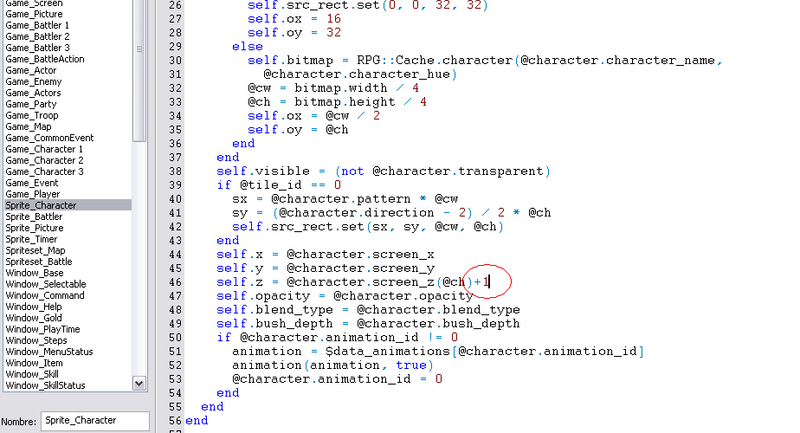
ERROR DE CABEZA CON ALGUNOS TILESETS....
Aqui la solucion... (By: Alquimista_Zieg)-
Vean la Imagen y entenderan xD
AGREGAR COPYRIGHT AL INICIAR EL JUEGO (APORTE BY Alkimista_Zieg)
Crea una nueva sobre el MAIN y Busca la linea:
COPYRIGHT_STR = "Copyright Menganito, todos los derechos reservados. Todos los scripts son propiedad de sus respectivos dueños."
Código:
#==============================================================================
# ¦ Copyright(ver 0.98)
#                      Creado por: ????
#                      Traducido por Kurogane
==============================================================================
#==============================================================================
module PLAN_COPYRIGHT
COPYRIGHT_STR = "Copyright Menganito, todos los derechos reservados. Todos los scrips son propiedad de sus respectivos dueños."
FONT_NAME     = ["Comic Sans MS"]
FONT_SIZE     =  17
FONT_BOLD     = true
FONT_ITALIC   = false
STR_COLOR     = Color.new(150, 100, 0)
DRAW_FRAME    = true
FRAME_COLOR   = Color.new(0, 0, 0)
DRAW_X        =  -3
DRAW_Y        =  -3
end#==============================================================================
# ¦ Scene_Title
#==============================================================================class Scene_Title
#--------------------------------------------------------------------------
alias plan_copyrcight_main main
def main
  if $BTEST
    battle_test
    return
  end
  @copyrcight_sprite = Sprite.new
  @copyrcight_sprite.z = 100
  bitmap = Bitmap.new(32, 32)
  bitmap.font.name = PLAN_COPYRIGHT::FONT_NAME
  bitmap.font.size = PLAN_COPYRIGHT::FONT_SIZE
  bitmap.font.bold = PLAN_COPYRIGHT::FONT_BOLD
  rect = bitmap.text_size(PLAN_COPYRIGHT::COPYRIGHT_STR)
  bitmap.dispose
  bitmap = nil
  @copyrcight_sprite.bitmap = Bitmap.new(rect.width, rect.height)
  @copyrcight_sprite.bitmap.font.name = PLAN_COPYRIGHT::FONT_NAME
  @copyrcight_sprite.bitmap.font.size = PLAN_COPYRIGHT::FONT_SIZE
  @copyrcight_sprite.bitmap.font.bold = PLAN_COPYRIGHT::FONT_BOLD
  @copyrcight_sprite.bitmap.font.italic = PLAN_COPYRIGHT::FONT_ITALIC  str = PLAN_COPYRIGHT::COPYRIGHT_STR
  if PLAN_COPYRIGHT::DRAW_FRAME
    @copyrcight_sprite.bitmap.font.color = PLAN_COPYRIGHT::FRAME_COLOR
    if defined?(@copyrcight_sprite.bitmap.draw_text_plan_frame)
      @copyrcight_sprite.bitmap.draw_text_plan_frame(0, 0, rect.width, rect.height, str)
      @copyrcight_sprite.bitmap.draw_text_plan_frame(2, 0, rect.width, rect.height, str)
      @copyrcight_sprite.bitmap.draw_text_plan_frame(0, 2, rect.width, rect.height, str)
      @copyrcight_sprite.bitmap.draw_text_plan_frame(2, 2, rect.width, rect.height, str)
      @copyrcight_sprite.bitmap.font.color = PLAN_COPYRIGHT::STR_COLOR
      @copyrcight_sprite.bitmap.draw_text_plan_frame(1, 1, rect.width, rect.height, str)
    else
      @copyrcight_sprite.bitmap.draw_text(0, 0, rect.width, rect.height, str)
      @copyrcight_sprite.bitmap.draw_text(2, 0, rect.width, rect.height, str)
      @copyrcight_sprite.bitmap.draw_text(0, 2, rect.width, rect.height, str)
      @copyrcight_sprite.bitmap.draw_text(2, 2, rect.width, rect.height, str)
      @copyrcight_sprite.bitmap.font.color = PLAN_COPYRIGHT::STR_COLOR
      @copyrcight_sprite.bitmap.draw_text(1, 1, rect.width, rect.height, str)
    end
  else
    @copyrcight_sprite.bitmap.font.color = PLAN_COPYRIGHT::STR_COLOR
    @copyrcight_sprite.bitmap.draw_text(rect, str)
  end  @copyrcight_sprite.x = 640 - rect.width + PLAN_COPYRIGHT::DRAW_X
  @copyrcight_sprite.y = 480 - rect.height + PLAN_COPYRIGHT::DRAW_Y
  plan_copyrcight_main
  @copyrcight_sprite.bitmap.dispose
  @copyrcight_sprite.dispose
end
#--------------------------------------------------------------------------
alias plan_copyrcight_update update
def update
  @copyrcight_sprite.update
  plan_copyrcight_update
end
end
Universal Message System (UMS) Aportado por Alkimista_Zieg
# *****************************************************************************
# * Universal Message System
# * v1.1
# * by Ccoa
# *****************************************************************************
# Manual de Comandos (Traducido por xXDarkDragonXx de VoidZone 4.7):
=begin
EN MENSAJE (CODIGOS) >>>>:
\b - Activa / Desactiva texto en negrita
\c - Cambia el color del texto (por defecto del RPG Maker)
\e - Pone caja de texto sobre evento i (0 = jugador, -1 no evento)
\face[name] - Cambia el gráfico de "face" a name.png (dejar en blanco [] para
no poner "face")
\fl - Pone la "face" a la izquierda
\font[name] - Cambia la fuente usada, dejar en blanco [] para regresar a fuen-
te por defecto
\fr - Pone la "face" a la derecha
\g - Muestra caja que te dice el dinero que tienes
\height - Alto de la caja de texto, solo funciona en Modo Normal
\i - Activa / Desactica texto en itílico
\ignr - No escribir nada en la línea en ques escribes este comando, solo
procesa los códigos, debe ser lo primero en la línea
\jc - Alínea la caja de texto al centro, ignorado si usas \e
\jl - Alínea la caja de texto a la izquierda, ignorado si usas \e
\jr - Alínea la caja de texto a la derecha, ignorado si usas \e
\m - toggle mode between normal and fit window to text
\n - Muestra el nombre del personaje i (i = ID del personaje en Base
de Datos > Personajes)
\nm[name] - Muestra nombre / texto en la caja de nombre, dejar en blanco []
para remover la caja de nombre
\oa - Muestra el icono y nombre de la armadura i (i = ID de armadura
en Base de Datos > Protectores)
\oi - Muestra el icono y nombre de un objeto i (i = ID de objeto
en Base de Datos > Objeto)
\os - Muestra el icono y nombre de la habilidad i (i = ID de habilidad
en Base de Datos > Habilidades)
\ow - Muestra el icono y nombre de la arma i (i = ID de arma
en Base de Datos > Armas)
\p - Pausa por i frames antes de escribir la letra siguiente (i = #
de frames)
\pt - Activa / Desactiva el símbolo de "pausa" en la caja de texto
\s - Activa / Desactiva texto con sombra
\shk - Pone la caja de texto a temblar, mientras más alto sea el número
reemplazado por i, mayor será el temblor
\skip - Activa / Desactiva el "salto" de texto
\t1 - Cambia un poco la caja de texto a una de comic de como si estu-
viera hablando normal (usa imagen talk1)
\t2 - Cambia un poco la caja de texto a una de comic de como si estu-
viera gritando (usa imagen talk2)
\tc - Alínea el texto al centro, este comando debe ponerse al
principio de una línea en el mensaje
\th - Cambia un poco la caja de texto a una de comic de como si estu-
viera pensando algo (usa imagen thought.png)
\tl - Alínea el texto a la izquierda, este comando debe ponerse al
principio de una línea en el mensaje
\tr - Alínea el texto a la derecha, este comando debe ponerse al prin-
cipio de una línea en el mensaje
\v - Muestra variable (el valor), reemplazar i por el mismo
\width - Ancho de la caja de texto, solo funciona en Modo Normal
\w - Espera por los frames indicados, y luego cierra ventana
\ws - Cambia la velocidad a la que sale el texto, reemplaza i por la
misma
\slv[name] - Pone esta ventana el nombre de la "ventana esclava", o muestra
el nombre de la misma
COMANDOS QUE NO SON CODIGOS EN MENSAJES (usar comando 'Llamar script...' para
estos):
$game_system.ums_mode = NORMAL_MODE - Cambia a Modo Normal
$game_system.ums_mode = FIT_WINDOW_TO_TEXT - Cambia al modo que el texto automá-
ticamente encaje en la caja de tex-
to
$game_system.text_skip = true - Activa el "salto" de texto
$game_system.text_skip = false
true - Desactiva el "salto" de texto (true es necesa-
rio ponerlo)
$game_system.text_mode = WRITE_FASTER - Cambia la velocidad en que el texto sale
a r?pido
$game_system.text_mode = WRITE_ALL - Cambia el modo de salto a que escriba todo
el texto
$game_system.write_speed = i - Cambia la velocidad a la que sale el texto, reem-
plaza i por la misma
$game_system.window_height = i - Cambia el alto de la ventana de texto a i (i =
el alto)
$game_system.window_width = i - Cambia el ancho de la ventana de texto a i (i =
el ancho)
$game_system.window_justification = RIGHT - Alínea la caja de texto a la derecha
$game_system.window_justification = LEFT - Alínea la caja de texto a la izquier-
da
$game_system.window_justification = CENTER - Alínea la caja de texto al centro
$game_system.face_graphic = "filename" - Cambia el gráfico de "face" a
filename.png (puedes cambiar nombre de
archivo, obiviamente, y puedes usar más
de una "face")
$game_system.face_graphic = "" - Cambia el gráfico de "face" a ninguno
$game_system.face_graphic_justification = LEFT - Pone la "face" a la izquierda
$game_system.face_graphic_justification = RIGHT - Pone la "face" a la derecha
$game_system.face_graphic_position = TOP - Pone la "face" arriba de la ventana
$game_system.face_graphic_position = CENTER - Pone la "face" centrada en la ven-
tana
$game_system.face_graphic_position = BOTTOM - Pone la "face" a lo más bajo de la
ventana de texto
$game_system.shadow_text = true - Activa texto con sombra
$game_system.shadow_text = false
true - Desactiva texto con sombra (true es necesario)
$game_system.shadow_color = Color.new(red, blue, green, alpha) - change shadow color
$game_system.message_event = what event to put the message over (0 = player, -1 = no event)
$game_system.comic_enabled = false
true - Desactiva lo del comic (true es necesario)
$game_system.comic_enabled = true - turn on comic thingy (only works with message_event not -1)
$game_system.comic_style = TALK1 - Cambia un poco la caja de texto a una de
comic de como si estuviera hablando normal
(usa imagen talk1)
$game_system.comic_style = TALK2 - Cambia un poco la caja de texto a una de
comic de como si estuviera gritando
(usa imagen talk2)
$game_system.comic_style = THOUGHT - Cambia un poco la caja de texto a una de
comic de como si estuviera pensando algo
(usa imagen thought.png)
$game_system.name = "name" - Cambia el nombre escrito en la ventana de nombre a
lo que escribas entre " "
$game_system.name = "" - Desactiva ventana de nombre
$game_system.font = "name" - Cambia nombre de fuente (obivamente reemplazar
"name" por nombre de fuente)
$game_system.font = "" - Cambia la fuente a por defecto
$game_system.text_justification = CENTER - Alínea texto al centro
$game_system.text_justification = LEFT - Alínea texto a la izquierda
$game_system.text_justification = RIGHT - Alínea texto a la derecha
$game_system.show_pause = true - Activa el símbolo de "pausa" en la caja de tex-
to
$game_system.show_pause = false - Desactiva el símbolo de "pausa" en la caja de
texto
$game_system.shake = 0 - Desactiva el temblor
$game_system.shake = i - Pone la caja de texto a temblar, mientras más alto sea
el número reemplazado por i, mayor será el temblor
$game_system.sound_effect = "" - Desactiva el sonido de letra-por-letra (sonido
es un SE)
$game_system.sound_effect = "sename" - Nombre de archivo del sonido a escuchar
en el letra-por-letra
$game_system.choice_position = ABOVE - Pone la caja de elecciones arriba
$game_system.choice_position = BOTTOM - Pone la caja de elecciones abajo
$game_system.choice_position = LEFT - Pone la caja de elecciones a la izquierda
$game_system.choice_position = RIGHT - Pone la caja de elecciones a la derecha
=end
# *****************************************************************************
# CONSTANTS
# *****************************************************************************
# Modos
NORMAL_MODE = 0 #Modo Normal, su ID
FIT_WINDOW_TO_TEXT = 1 #Modo de Encajar Texto a Caja de Texto, su ID
# Modos de "Salto" de Texto
WRITE_FASTER = 0
WRITE_ALL = 1
# Alineacions
RIGHT = 0
CENTER = 1
LEFT = 2
# Posiciones para las "faces", la caja de elecciones, etc.
ABOVE = 0 # Pone el objeto / lo deseado arriba, su ID
CENTER = 1 # Pone el objeto / lo deseado en el centro, su ID
BOTTOM = 2 # Pone el objeto / lo deseado a lo más bajo de la ventana de texto,
# su ID
SIDE = 3 # Pone el objeto / lo deseado a los lados (que lado depende de ali-
# neación, su ID
# Modo Comic
TALK1 = 0 # Hablando Normal
TALK2 = 1 # Gritando
THOUGHT = 2 # Pensativo
# *****************************************************************************
# Changes to Game_System. This allows any changes made to be saved when the
# game is saved.
# *****************************************************************************
class Game_System
attr_accessor :ums_mode # what mode the UMS is in
attr_accessor :text_skip # whether or not text skip is activated
attr_accessor :skip_mode # write the text faster while C is pressed, or just skip to the end
attr_accessor :write_speed # frame delay between characters
attr_accessor :window_height # default height of message window
attr_accessor :window_width # default width of message window
attr_accessor :window_justification # default justification of window
attr_accessor :face_graphic # current face graphic
attr_accessor :face_graphic_justification # justification of face graphic
attr_accessor :face_graphic_position # position of face graphic
attr_accessor :shadowed_text # whether or not to draw a shadow behind the text
attr_accessor :shadow_color # the shadow color
attr_accessor :choice_justification # where the choice window is located
attr_accessor :choice_position # prefered position of choice window
attr_accessor :message_event # what event to center the text over (0 player, -1 to not)
attr_accessor :comic_enabled # using "talk" icons?
attr_accessor :comic_style # what type of comic image to use
attr_accessor :name # the text for the name window
attr_accessor :font # the name of the font
attr_accessor :text_justification # the justification of the window text
attr_accessor :show_pause # whether or not to show the pause icon
attr_accessor :shake # the amount of shake for the window
attr_accessor :sound_effect # SE to play with each letter
attr_accessor :slave_windows # hash of slave windows
attr_accessor :indy_windows # hash of independent windows
attr_reader :shortcuts # user-defined shortcuts
alias ums_initialize initialize
def initialize
ums_initialize
@ums_mode = NORMAL_MODE
@skip_mode = WRITE_ALL
@text_skip = true
@write_speed = 2
@window_height = 128
@window_width = 480
@window_justification = CENTER
@face_graphic = ""
@face_graphic_justification = LEFT
@face_graphic_position = CENTER
@shadowed_text = false
@shadow_color = Color.new(0, 0, 0, 100)
@choice_justification = RIGHT
@choice_position = SIDE
@message_event = -1
@comic_enabled = false
@comic_style = TALK1
@name = ""
@Font = ""
@text_justification = LEFT
@show_pause = true
@shake = 0
@sound_effect = ""
@slave_windows = {}
@indy_windows = {}
@used_codes = ['\v', '\n', '\c', '\g', '\skip', '\m', '\height', '\width',
'\jr', '\jc', '\jl', '\face', '\fl', '\fr', '\b', '\i', '\s',
'\e', '\t1', '\t2', '\th', '\nm', '\font', '\p', '\w', '\ws',
'\oa', '\oi', '\os', '\ow', '\tl', '\tr', '\tc', '\ignr',
'\shk', '\slv', '\ind']
@shortcuts = {}
end
def add_shortcut(shortcut, code)
text = shortcut.downcase
if !@used_codes.include?(text)
@shortcuts[shortcut] = code
end
end
end
# *****************************************************************************
# Changes to Window_Message. This is the bulk of the script
# *****************************************************************************
#==============================================================================
# ** Window_Message
#------------------------------------------------------------------------------
# This message window is used to display text.
#==============================================================================
class Window_Message < Window_Base
#--------------------------------------------------------------------------
# * Object Initialization
#--------------------------------------------------------------------------
def initialize
# x-coordinate depends on justification
if $game_system.window_justification == RIGHT
x = 640 - self.width
elsif $game_system.window_justification == LEFT
x = 0
else # center
x = (640 - $game_system.window_width) / 2
end
# y-coordinate depends on height
y = 480 - $game_system.window_height - 16
super(x, y, $game_system.window_width, $game_system.window_height)
self.contents = Bitmap.new(width - 32, height - 32)
self.visible = false
self.z = 9998
@fade_in = false
@fade_out = false
@contents_showing = false
# face graphic sprite
@Face = Sprite.new
@face.opacity = 0
@face.z = self.z + 1
@face_offset = 0
# choice window
@choice_window = Window_Choice.new([])
@choice_window.back_opacity = 160
# comic sprite
@comic = Sprite.new
@comic.opacity = 0
@comic.z = self.z + 1
if $game_system.comic_style == TALK1
@comic.bitmap = RPG::Cache.windowskin("talk1")
# talk1 es el nombre del archivo en Graphics\Pictures que se usará para el
# modo comic que habla normal
elsif $game_system.comic_style == TALK2
@comic.bitmap = RPG::Cache.windowskin("talk2")
# talk2 es el nombre del archivo en Graphics\Pictures que se usará para el
# modo comic que grita
else # thought
@comic.bitmap = RPG::Cache.windowskin("thought")
# thought es el nombre del archivo en Graphics\Pictures que se usará para
# el modo comic que es pensativo
end
# name window
@name_window = Window_Name.new
@name_window.z = self.z + 1
@pause = 0
@wait = 0
@show = false
end
#--------------------------------------------------------------------------
# * Dispose
#--------------------------------------------------------------------------
def dispose
terminate_message
$game_temp.message_window_showing = false
if @input_number_window != nil
@input_number_window.dispose
end
@face.dispose
@choice_window.dispose
@comic.dispose
@name_window.dispose
super
end
#--------------------------------------------------------------------------
# * Terminate Message
#--------------------------------------------------------------------------
def terminate_message
@show = false
self.active = false
self.pause = false
self.contents.clear
# Clear showing flag
@contents_showing = false
# Call message callback
if $game_temp.message_proc != nil
$game_temp.message_proc.call
end
# Clear variables related to text, choices, and number input
$game_temp.message_text = nil
$game_temp.message_proc = nil
$game_temp.choice_start = 99
$game_temp.choice_max = 0
$game_temp.choice_cancel_type = 0
$game_temp.choice_proc = nil
$game_temp.num_input_start = 99
$game_temp.num_input_variable_id = 0
$game_temp.num_input_digits_max = 0
# Open gold window
if @gold_window != nil
@gold_window.dispose
@gold_window = nil
end
@choice_window.visible = false
@choice_window.active = false
@comic.opacity = 0
$game_system.slave_windows.each_pair {|name, window|
if window.show == true
window.dispose
$game_system.slave_windows.delete(name)
end
}
end
#--------------------------------------------------------------------------
# * Refresh
#--------------------------------------------------------------------------
def refresh
self.contents.clear
self.contents.font.color = normal_color
@show = true
@x = @y = 0
# If waiting for a message to be displayed
if $game_temp.message_text != nil
@text = $game_temp.message_text
# replace shortcuts with original code
$game_system.shortcuts.each { |shortcut, code|
@text.gsub!(shortcut, code)
}
# VERY first thing. Check to see if this is being set up as a slave
# or independent window.
if @text.index(/\\[Ss][Ll][Vv]\[(.*?)\]/) != nil
# is this a new slave window, or a request to display it?
if !$game_system.slave_windows.has_key?($1.to_s)
# there is no such slave window yet. Set it up.
@text.gsub!(/\\[Ss][Ll][Vv]\[(.*?)\]/, "")
$game_system.slave_windows[$1.to_s] = Window_Slave.new(@text)
@text = ""
@show = false
terminate_message
return
end
end
# Control text processing
begin
last_text = @text.clone
@text.gsub!(/\\[Vv]\[([0-9]+)\]/) { $game_variables[$1.to_i] }
end until @text == last_text
@text.gsub!(/\\[Nn]\[([0-9]+)\]/) do
$game_actors[$1.to_i] != nil ? $game_actors[$1.to_i].name : ""
end
# window mode
if @text.index(/\\[Mm]/) != nil
if $game_system.ums_mode == NORMAL_MODE
$game_system.ums_mode = FIT_WINDOW_TO_TEXT
else
$game_system.ums_mode = NORMAL_MODE
end
@text.gsub!(/\\[Mm]/) { "" }
end
# window height
@text.gsub!(/\\[Hh][Ee][Ii][Gg][Hh][Tt]\[([0-9]+)\]/) do
$game_system.window_height = $1.to_i
""
end
# window width
@text.gsub!(/\\[Ww][Ii][Dd][Tt][Hh]\[([0-9]+)\]/) do
$game_system.window_width = $1.to_i
""
end
# justification
@text.gsub!(/\\[Jj][Rr]/) do
$game_system.window_justification = RIGHT
reset_window
""
end
@text.gsub!(/\\[Jj][Cc]/) do
$game_system.window_justification = CENTER
reset_window
""
end
@text.gsub!(/\\[Jj][Ll]/) do
$game_system.window_justification = LEFT
reset_window
""
end
# face graphics
@text.gsub!(/\\[Ff][Aa][Cc][Ee]\[(.*?)\]/) do
$game_system.face_graphic = $1.to_s
if $1.to_s == ""
@face.opacity = 0
end
""
end
@text.gsub!(/\\[Ff][Ll]/) do
$game_system.face_graphic_justification = LEFT
""
end
@text.gsub!(/\\[Ff][Rr]/) do
$game_system.face_graphic_justification = RIGHT
""
end
# event centering
@text.gsub!(/\\[Ee]\[([0-9]+)\]/) do
$game_system.message_event = $1.to_i
""
end
# comic thingy
@text.gsub!(/\\[Tt]1/) do
$game_system.comic_style = TALK1
@comic.bitmap = RPG::Cache.windowskin("talk1.png")
""
end
@text.gsub!(/\\[Tt]2/) do
$game_system.comic_style = TALK2
@comic.bitmap = RPG::Cache.windowskin("talk2.png")
""
end
@text.gsub!(/\\[Tt][Hh]/) do
$game_system.comic_style = THOUGHT
@comic.bitmap = RPG::Cache.windowskin("thought.png")
""
end
# name window
@text.gsub!(/\\[Nn][Mm]\[(.*?)\]/) do
$game_system.name = $1.to_s
if $1.to_s == ""
@name_window.visible = false
end
""
end
# toggle pause
@text.gsub!(/\\[Pp][Tt]/) do
$game_system.show_pause = !$game_system.show_pause
""
end
# shaking
@text.gsub!(/\\[Ss][Hh][Kk]\[([0-9]+)\]/) do
$game_system.shake = $1.to_i
""
end
# Change "\\\\" to "0" for convenience
@text.gsub!(/\\\\/) { "0" }
# Change "\\C" to "1" and "\\G" to "2"
@text.gsub!(/\\[Cc]\[([0-9]+)\]/) { "1[#{$1}]" }
@text.gsub!(/\\[Gg]/) { "2" }
# text skip code
@text.gsub!(/\\[Ss][Kk][Ii][Pp]/) { "3" }
# ignore code
@text.gsub!(/\\[Ii][Gg][Nn][Rr]/) { "23" }
# bold and italics
@text.gsub!(/\\[Bb]/) { "4" }
@text.gsub!(/\\[Ii]/) { "5" }
# slave and indy windows
@text.gsub!(/\\[Ss][Ll][Vv]\[(.*?)\]/) { "24[#{$1}]" }
# shadow
@text.gsub!(/\\[Ss]/) { "6" }
# font
@text.gsub!(/\\[Ff][Oo][Nn][Tt]\[(.*?)\]/) { "7[#{$1}]" }
# pause and wait
@text.gsub!(/\\[Pp]\[([0-9]+)\]/) { "10[#{$1}]" }
@text.gsub!(/\\[Ww]\[([0-9]+)\]/) { "11[#{$1}]" }
# write speed
@text.gsub!(/\\[Ww][Ss]\[([0-9]+)\]/) { "13[#{$1}]" }
# armor, items, skills, and weapons
@text.gsub!(/\\[Oo][Aa]\[([0-9]+)\]/) {
item = $data_armors[$1.to_i]
"14[#{$1}]" + " " + item.name
}
@text.gsub!(/\\[Oo][Ii]\[([0-9]+)\]/) {
item = $data_items[$1.to_i]
"15[#{$1}]" + " " + item.name
}
@text.gsub!(/\\[Oo][Ss]\[([0-9]+)\]/) {
item = $data_skills[$1.to_i]
"16[#{$1}]" + " " + item.name
}
@text.gsub!(/\\[Oo][Ww]\[([0-9]+)\]/) {
item = $data_weapons[$1.to_i]
"17[#{$1}]" + " " + item.name
}
# text justification
@text.gsub!(/\\[Tt][Cc]/) { "20" }
@text.gsub!(/\\[Tt][Ll]/) { "21" }
@text.gsub!(/\\[Tt][Rr]/) { "22" }
# Resize the window to fit the contents?
if $game_system.ums_mode == FIT_WINDOW_TO_TEXT
width = 1
text = @text.split("\n")
height = 0
for line in text
# don't count this line's width if it has the ignr code
if !line.include?("23")
width = [width, self.contents.text_size(line).width].max
height += self.contents.text_size(line).height + 6
end
end
self.width = width + 48
self.height = height + 46
self.contents = Bitmap.new(width + 16, height + 16)
self.contents.font.color = normal_color
else
if self.width != $game_system.window_height or self.height != $game_system.window_width
self.width = $game_system.window_width
self.height = $game_system.window_height
self.contents = Bitmap.new(self.width - 32, self.height - 32)
self.contents.font.color = normal_color
end
end
reset_window
get_x_value
@count = Graphics.frame_count
@pause = 0
@ignore = false
@ascending = true
@target_x = self.x + $game_system.shake
end
# If number input
if $game_temp.num_input_variable_id > 0
digits_max = $game_temp.num_input_digits_max
number = $game_variables[$game_temp.num_input_variable_id]
@input_number_window = Window_InputNumber.new(digits_max)
@input_number_window.number = number
@input_number_window.x = self.x + 8
@input_number_window.y = self.y + $game_temp.num_input_start * 32
end
end
#--------------------------------------------------------------------------
# * Set Window Position and Opacity Level
#--------------------------------------------------------------------------
def reset_window (change_opacity = true)
# x-coordinate depends on justification
if $game_system.message_event == -1
if $game_system.window_justification == RIGHT
self.x = 640 - $game_system.window_width
elsif $game_system.window_justification == LEFT
self.x = 0
else # center
self.x = (640 - self.width) / 2
end
else
if $game_system.message_event == 0 or $game_map.events[$game_system.message_event] == nil
# center on player
event_x = $game_player.screen_x
else
# center on the event specified
event_x = $game_map.events[$game_system.message_event].screen_x
end
self.x = event_x - self.width / 2
@comic.x = self.x + (self.width / 2) + 4
end
if $game_temp.in_battle
self.y = 16
else
if $game_system.message_event == -1
case $game_system.message_position
when 0 # up
self.y = 16
when 1 # middle
self.y = (480 - $game_system.window_height) / 2
when 2 # down
self.y = 480 - $game_system.window_height - 24
end
else
if $game_system.message_event == 0 or $game_map.events[$game_system.message_event] == nil
# above player
self.y = $game_player.screen_y - self.height - 48
else
# above event specified
self.y = $game_map.events[$game_system.message_event].screen_y - self.height - 48
end
@comic.y = self.y + self.height - 2
end
end
if self.y < 0 + ($game_system.name == "" ? 0 : 16)
self.y = 0 + ($game_system.name == "" ? 0 : 16)
elsif self.y > 480 - self.height
self.y = 480 - self.height
end
if self.x < 0
self.x = 0
elsif self.x > 680 - self.width - 48
self.x = 640 - self.width
end
if change_opacity
if $game_system.message_frame == 0
self.opacity = 255
else
self.opacity = 0
end
self.back_opacity = 160
end
# face stuff
if $game_system.face_graphic != ""
# the player has chosen to show a face graphic
@face.bitmap = RPG::Cache.picture($game_system.face_graphic)
# picture y-coordinate
if $game_system.face_graphic_position == ABOVE
@face.y = self.y - @face.bitmap.height
@face_offset = 0
elsif $game_system.face_graphic_position == CENTER
delta = (@face.bitmap.height - self.height) / 2
@face.y = self.y - delta
@x = @face_offset = @face.bitmap.width + 16
elsif $game_system.face_graphic_position == BOTTOM
@face.y = self.y + self.height - @face.bitmap.height
@x = @face_offset = @face.bitmap.width + 16
else # side
delta = (@face.bitmap.height - self.height) / 2
@face.y = self.y - delta
@face_offset = 0
end
# picture x-coordinate
if $game_system.face_graphic_justification == LEFT
if $game_system.face_graphic_position == SIDE
@face.x = self.x - @face.bitmap.width
else
@face.x = self.x + 10
end
else
if $game_system.face_graphic_position == SIDE
@face.x = self.x + self.width
else
@face.x = self.x + self.width - @face.bitmap.width - 10
@x = @face_offset = 0
end
end
end
# name window
if $game_system.name != ""
@name_window.set_name($game_system.name)
@name_window.x = self.x
@name_window.y = self.y - 36
end
# If choice
if $game_temp.choice_max > 0
@choice_window.set_choices($game_temp.choices)
# determine x and y coords for choice window
if $game_system.choice_justification == LEFT
@choice_window.x = self.x
else
@choice_window.x = self.x + self.width - @choice_window.width
end
if $game_system.choice_position == ABOVE
# check to make sure there is enough room above the textbox
if self.y < @choice_window.height
# not enough room above, place below
@choice_window.y = self.y + self.height
else
# draw above
@choice_window.y = self.y - @choice_window.height
end
elsif $game_system.choice_position == BOTTOM
# check to make sure there is enough room below the textbox
if (480 - self.y - self.height) < @choice_window.height
# not enough room below, place above
@choice_window.y = self.y - @choice_window.height
else
# draw below
@choice_window.y = self.y + self.height
end
else # side
if $game_system.choice_justification == LEFT
# check to make sure there's room on the left side
if self.y < @choice_window.width
# not enough room on the side, check to make sure there's room below
if (480 - self.y - self.height) < @choice_window.height
# not enough room below, place above
@choice_window.y = self.y - @choice_window.height
else
# draw below
@choice_window.y = self.y + self.height
end
else
# place on the left side
@choice_window.y = self.y
@choice_window.x = self.x - @choice_window.width
end
else # right
# check to make sure there's room on the right side
if (680 - (self.y + self.width)) < @choice_window.width
# not enough room on the side, check to make sure there's room below
if (480 - self.y - self.height) < @choice_window.height
# not enough room below, place above
@choice_window.y = self.y - @choice_window.height
else
# draw below
@choice_window.y = self.y + self.height
end
else
# place on the left side
@choice_window.y = self.y
@choice_window.x = self.x + self.width
end
end
end
end
end
#--------------------------------------------------------------------------
# * Frame Update
#--------------------------------------------------------------------------
def update
super
if @contents_showing and $game_system.message_event != -1 and $game_system.shake == 0
reset_window(false)
end
if $game_system.shake != 0 # shake the window
if @ascending
if @target_x != self.x
self.x += 1
else
@ascending = false
@target_x = self.x - ($game_system.shake * 2)
end
else
if @target_x != self.x
self.x -= 1
else
@ascending = true
@target_x = self.x + ($game_system.shake * 2)
end
end
end
if @wait > 0
@wait -= 1
if @wait == 0
terminate_message
return
end
end
# If fade in
if @fade_in
self.contents_opacity += 24
if $game_system.face_graphic != ""
@face.opacity += 24
end
if $game_system.comic_enabled and $game_system.message_event != -1
@comic.opacity += 24
end
if $game_system.name != ""
@name_window.visible = true
end
if @input_number_window != nil
@input_number_window.contents_opacity += 24
end
if self.contents_opacity == 255
@fade_in = false
end
return
end
# write the text
if @text != nil and @text != ""
speed = $game_system.write_speed
if $game_system.text_skip
if $game_system.skip_mode == WRITE_FASTER and Input.press?(Input::C)
# the player is holding the action button, write faster
speed /= 3
elsif $game_system.skip_mode == WRITE_ALL and Input.trigger?(Input::C)
# the player pressed the action button, write all the text
while (c = @text.slice!(/./m)) != nil
write_char©
end
$game_system.slave_windows.each_value { |window| window.write_all }
return
end
end
while @ignore
c = @text.slice!(/./m)
if c != nil
write_char©
end
end
if @pause > 0
@pause -= 1
return
end
if Graphics.frame_count - @count >= speed
if $game_system.sound_effect != ""
Audio.se_play("Audio/SE/" + $game_system.sound_effect, 80, 100)
end
@count = Graphics.frame_count
c = @text.slice!(/./m)
if c != nil
write_char©
end
end
return
end
# If inputting number
if @input_number_window != nil
@input_number_window.update
# Confirm
if Input.trigger?(Input::C)
$game_system.se_play($data_system.decision_se)
$game_variables[$game_temp.num_input_variable_id] =
@input_number_window.number
$game_map.need_refresh = true
# Dispose of number input window
@input_number_window.dispose
@input_number_window = nil
terminate_message
end
return
end
if @wait != 0
return
end
# If message is being displayed and contents are all written
if @contents_showing
# if choice
if $game_temp.choice_max > 0
if !@choice_window.active
@choice_window.visible = true
@choice_window.active = true
@choice_window.index = 0
end
@choice_window.update
else
# If choice isn't being displayed, show pause sign
self.pause = $game_system.show_pause
end
# Cancel
if Input.trigger?(Input::B)
if $game_temp.choice_max > 0 and $game_temp.choice_cancel_type > 0
$game_system.se_play($data_system.cancel_se)
$game_temp.choice_proc.call($game_temp.choice_cancel_type - 1)
terminate_message
end
end
# Confirm
if Input.trigger?(Input::C)
if $game_temp.choice_max > 0
$game_system.se_play($data_system.decision_se)
$game_temp.choice_proc.call(@choice_window.index)
end
terminate_message
end
return
end
# If display wait message or choice exists when not fading out
if @fade_out == false and $game_temp.message_text != nil
@contents_showing = true
$game_temp.message_window_showing = true
reset_window
refresh
Graphics.frame_reset
if @show
self.visible = true
end
self.contents_opacity = 0
if @input_number_window != nil
@input_number_window.contents_opacity = 0
end
@fade_in = true
return
end
# If message which should be displayed is not shown, but window is visible
if self.visible
@fade_out = true
self.opacity -= 48
@name_window.opacity -= 48
@comic.opacity -= 48
@face.opacity -= 48
if self.opacity == 0
self.visible = false
@face.opacity = 0
@choice_window.visible = false
@choice_window.active = false
@comic.opacity = 0
@name_window.visible = false
@fade_out = false
$game_temp.message_window_showing = false
end
return
end
end
#--------------------------------------------------------------------------
# * Process and write the given character
#--------------------------------------------------------------------------
def write_char©
if c == "0"
# Return to original text
c = "\\"
end
# If \C[n]
if c == "1"
# Change text color
@text.sub!(/\[([0-9]+)\]/, "")
color = $1.to_i
if color >= 0 and color <= 7
self.contents.font.color = text_color(color)
end
# go to next text
return
end
# If \G
if c == "2"
# Make gold window
if @gold_window == nil
@gold_window = Window_Gold.new
@gold_window.x = 560 - @gold_window.width
if $game_temp.in_battle
@gold_window.y = 192
else
@gold_window.y = self.y >= 128 ? 32 : 384
end
@gold_window.opacity = self.opacity
@gold_window.back_opacity = self.back_opacity
end
# go to next text
return
end
# If \skip
if c == "3"
# toggle text skipping
$game_system.text_skip = !$game_system.text_skip
# go to next text
return
end
# If \b
if c == "4"
# toggle bold
self.contents.font.bold = !self.contents.font.bold
# go to next text
return
end
# If \i
if c == "5"
# toggle italics
self.contents.font.italic = !self.contents.font.italic
# go to next text
return
end
# If \s
if c == "6"
# toggle shadow
$game_system.shadowed_text = !$game_system.shadowed_text
# go to next text
return
end
# If \font
if c == "7"
# change font
@text.sub!(/\[(.*?)\]/, "")
font = $1.to_s
$game_system.font = font
if font == ""
self.contents.font.name = Font.default_name
else
self.contents.font.name = font
end
# go to next text
return
end
# If \p[n]
if c == "10"
@text.sub!(/\[([0-9]+)\]/, "")
@pause = $1.to_i
# go to next text
return
end
# If \w[n]
if c == "11"
@text.sub!(/\[([0-9]+)\]/, "")
@wait = $1.to_i
# go to next text
return
end
# If \ws[n]
if c == "13"
@text.sub!(/\[([0-9]+)\]/, "")
$game_system.write_speed = $1.to_i
# go to next text
return
end
# If \oa[n]
if c == "14"
@text.sub!(/\[([0-9]+)\]/, "")
index = $1.to_i
@text.sub!(" ", "")
item = $data_armors[index]
# draw the icon
icon = RPG::Cache.icon(item.icon_name)
self.contents.blt(@x + 2, (@y * 32) + 4, icon, Rect.new(0, 0, 24, 24))
@x += 24
# go to next text
return
end
# If \oi[n]
if c == "15"
@text.sub!(/\[([0-9]+)\]/, "")
index = $1.to_i
@text.sub!(" ", "")
item = $data_items[index]
# draw the icon
icon = RPG::Cache.icon(item.icon_name)
self.contents.blt(@x + 2, (@y * 32) + 4, icon, Rect.new(0, 0, 24, 24))
@x += 24
# go to next text
return
end
# If \os[n]
if c == "16"
@text.sub!(/\[([0-9]+)\]/, "")
index = $1.to_i
@text.sub!(" ", "")
item = $data_skills[index]
# draw the icon
icon = RPG::Cache.icon(item.icon_name)
self.contents.blt(@x + 2, (@y * 32) + 4, icon, Rect.new(0, 0, 24, 24))
@x += 24
# go to next text
return
end
# If \ow[n]
if c == "17"
@text.sub!(/\[([0-9]+)\]/, "")
index = $1.to_i
@text.sub!(" ", "")
item = $data_weapons[index]
# draw the icon
icon = RPG::Cache.icon(item.icon_name)
self.contents.blt(@x + 2, (@y * 32) + 4, icon, Rect.new(0, 0, 24, 24))
@x += 24
# go to next text
return
end
# If \tc
if c == "20"
# center justify
$game_system.text_justification = CENTER
get_x_value
# go to next text
return
end
# If \tl
if c == "21"
# left justify
$game_system.text_justification = LEFT
get_x_value
# go to next text
return
end
# If \tr
if c == "22"
# right justify
$game_system.text_justification = RIGHT
get_x_value
# go to next text
return
end
# If \ignr
if c == "23"
# set ignore flage
@ignore = true
# go to next text
return
end
# if \slv
if c == "24"
# we need to show a slave window
@text.sub!(/\[(.*?)\]/, "")
name = $1.to_s
$game_system.slave_windows[name].show = true
end
# If new line text
if c == "\n"
# Add 1 to y
if !@ignore
@y += 1
end
if @text != ""
get_x_value
end
@ignore = false
# go to next text
return
end
if @ignore
return
end
# Draw text
if $game_system.shadowed_text
old_color = self.contents.font.color.clone
self.contents.font.color = $game_system.shadow_color
self.contents.draw_text(6 + @x, 32 * @y + 2, 40, 32, c)
self.contents.font.color = old_color
end
self.contents.draw_text(4 + @x, 32 * @y, 40, 32, c)
# Add x to drawn text width
@x += self.contents.text_size©.width
end
def get_x_value
# text justification - offset for first line
if $game_system.text_justification == CENTER
# get the length of the current line
w = self.contents.text_size(@text.split("\n")[0]).width
@x = (self.width - w - 48) / 2
elsif $game_system.text_justification == RIGHT
# get the length of the current line
w = self.contents.text_size(@text.split("\n")[0]).width
@x = self.width - w - 48
else # left
if $game_system.face_graphic == ""
@x = 0
else
@x = @face_offset
end
end
end
end
class Interpreter
#--------------------------------------------------------------------------
# * Show Text
#--------------------------------------------------------------------------
def command_101
# If other text has been set to message_text
if $game_temp.message_text != nil
# End
return false
end
# Set message end waiting flag and callback
@message_waiting = true
$game_temp.message_proc = Proc.new { @message_waiting = false }
# Set message text on first line
$game_temp.message_text = @list[@index].parameters[0] + "\n"
line_count = 1
# Loop
loop do
# If next event command text is on the second line or after
if @list[@index + 1].code == 401
# Add the second line or after to message_text
$game_temp.message_text += @list[@index + 1].parameters[0] + "\n"
line_count += 1
# If event command is not on the second line or after
else
# If next event command is show choices
if @list[@index+1].code == 102
# If choices fit on screen
#if @list[@index+1].parameters[0].size <= 4 - line_count
# Advance index
@index += 1
# Choices setup
$game_temp.choice_start = line_count
setup_choices(@list[@index].parameters)
#end
# If next event command is input number
elsif @list[@index+1].code == 103
# If number input window fits on screen
if line_count < 4
# Advance index
@index += 1
# Number input setup
$game_temp.num_input_start = line_count
$game_temp.num_input_variable_id = @list[@index].parameters[0]
$game_temp.num_input_digits_max = @list[@index].parameters[1]
end
end
# Continue
return true
end
# Advance index
@index += 1
end
end
#--------------------------------------------------------------------------
# * Setup Choices
#--------------------------------------------------------------------------
def setup_choices(parameters)
# Set choice item count to choice_max
$game_temp.choice_max = parameters[0].size
# Set choice to message_text
$game_temp.choices = parameters[0]
# Set cancel processing
$game_temp.choice_cancel_type = parameters[1]
# Set callback
current_indent = @list[@index].indent
$game_temp.choice_proc = Proc.new { |n| @branch[current_indent] = n }
end
#--------------------------------------------------------------------------
# * Script
#--------------------------------------------------------------------------
def command_355
# Set first line to script
script = @list[@index].parameters[0] + "\n"
# Loop
loop do
# If next event command is second line of script or after
if @list[@index + 1].code == 655
# Add second line or after to script
script += @list[@index + 1].parameters[0] + "\n"
# If event command is not second line or after
else
# Abort loop
break
end
# Advance index
@index += 1
end
# Evaluation
result = eval(script)
# Continue
return true
end
end
#==============================================================================
# ** Window_Choice
#------------------------------------------------------------------------------
# This message window is used to display choices.
#==============================================================================
class Window_Choice < Window_Selectable
def initialize (choices)
super(0, 0, 32, choices.size * 32)
self.visible = false
self.active = false
@index = 0
@item_max = choices.size
@choices = choices
self.contents = Bitmap.new(32, 32)
end
def refresh
# determine necessary width
width = 64
for line in @choices
width = [width, (self.contents.text_size(line).width + 48)].max
end
self.width = width
self.height = @choices.size * 32 + 32
self.contents = Bitmap.new(width - 32, height - 32)
# draw choices
y = 0
for line in @choices
self.contents.draw_text(4, y * 32, width, 32, line)
y += 1
end
end
def set_choices(choices)
@choices = choices
@item_max = @choices.size
refresh
end
end
#==============================================================================
# ** Window_Name
#------------------------------------------------------------------------------
# This window is used to display names above the message window. Uncomment
# and modify the various sections to customize.
#==============================================================================
class Window_Name < Window_Base
def initialize
super(0, 0, 32, 64)
self.contents = Bitmap.new(32, 32)
self.opacity = 0
self.visible = false
end
def set_name(name)
@name = name
refresh
end
def refresh
if @name == nil
return
end
self.width = self.contents.text_size(@name).width + 48
self.contents = Bitmap.new(width - 32, height - 32)
# uncomment this and change the font to give the name window a fancy font
#self.contents.font.name = "Ariel"
self.contents.font.color = Color.new(0, 0, 0, 255)
self.contents.draw_text(0, 0, self.width, 32, @name)
self.contents.draw_text(0, 2, self.width, 32, @name)
self.contents.draw_text(2, 0, self.width, 32, @name)
self.contents.draw_text(2, 2, self.width, 32, @name)
# change the color to give the name window a seperate color
self.contents.font.color = normal_color
self.contents.draw_text(1, 1, self.width, 32, @name)
end
end
#==============================================================================
# ** Game_Temp
#------------------------------------------------------------------------------
# This class handles temporary data that is not included with save data.
# Refer to "$game_temp" for the instance of this class.
#==============================================================================
class Game_Temp
attr_accessor :choices
end
class Scene_Map
alias ums_update update
def update
$game_system.slave_windows.each_value { |window| window.update }
ums_update
end
end
#==============================================================================
# ** Window_Slave
#------------------------------------------------------------------------------
# These are slave windows to the main message window. They will close when
# the user terminates them. Initial settings are identical to the main
# message window, with one exception. When in normal mode, it will apear
# above if the main message is below, below if it is above or centered. Use
# message codes to change the settings for this window.
#==============================================================================
class Window_Slave < Window_Base
attr_accessor :show
def write_all
@write_all = true
end
#--------------------------------------------------------------------------
# * Object Initialization
#--------------------------------------------------------------------------
def initialize (text)
super(0, 0, 33, 33)
@text = text
# x-coordinate depends on justification
if @justification == RIGHT
self.x = 640 - self.width
elsif @justification == LEFT
self.x = 0
else # center
self.x = (640 - self.width) / 2
end
# y-coordinate depends on height
self.y = 480 - $game_system.window_height - 16
self.contents = Bitmap.new(width - 32, height - 32)
self.visible = false
self.z = 9998
@fade_in = false
@fade_out = false
@contents_showing = false
# face graphic sprite
@Face = Sprite.new
@face.opacity = 0
@face.z = self.z + 1
@face_offset = 0
# choice window
@choice_window = Window_Choice.new([])
@choice_window.back_opacity = 160
@comic_style = $game_system.comic_style
@name = $game_system.name
# comic sprite
@comic = Sprite.new
@comic.opacity = 0
@comic.z = self.z + 1
if @comic_style == TALK1
@comic.bitmap = RPG::Cache.windowskin("talk1")
elsif @comic_style == TALK2
@comic.bitmap = RPG::Cache.windowskin("talk2")
else # thought
@comic.bitmap = RPG::Cache.windowskin("thought")
end
@pause = 0
@wait = 0
@mode = $game_system.ums_mode
self.height = $game_system.window_height
self.width = $game_system.window_width
@justification = $game_system.window_justification
@face_graphic = $game_system.face_graphic
@face_graphic_justification = $game_system.face_graphic_justification
@message_event = $game_system.message_event
if $game_system.message_position == 2 # down
@message_position = 0
else
@message_postion = 2
end
@face_graphic_position = $game_system.face_graphic_position
if $game_system.font == ""
@Font = Font.default_name
else
@Font = $game_system.font
end
@text_justification = $game_system.text_justification
@shake = $game_system.shake
refresh
end
#--------------------------------------------------------------------------
# * Dispose
#--------------------------------------------------------------------------
def dispose
terminate_message
$game_temp.message_window_showing = false
if @input_number_window != nil
@input_number_window.dispose
end
@face.dispose
@choice_window.dispose
@comic.dispose
if @name_window != nil
@name_window.dispose
end
super
end
#--------------------------------------------------------------------------
# * Terminate Message
#--------------------------------------------------------------------------
def terminate_message
self.active = false
self.pause = false
self.contents.clear
# Clear showing flag
@contents_showing = false
# Call message callback
if $game_temp.message_proc != nil
$game_temp.message_proc.call
end
# Clear variables related to text, choices, and number input
$game_temp.message_text = nil
$game_temp.message_proc = nil
$game_temp.choice_start = 99
$game_temp.choice_max = 0
$game_temp.choice_cancel_type = 0
$game_temp.choice_proc = nil
$game_temp.num_input_start = 99
$game_temp.num_input_variable_id = 0
$game_temp.num_input_digits_max = 0
# Open gold window
if @gold_window != nil
@gold_window.dispose
@gold_window = nil
end
@choice_window.visible = false
@choice_window.active = false
@comic.opacity = 0
end
#--------------------------------------------------------------------------
# * Refresh
#--------------------------------------------------------------------------
def refresh
self.contents.clear
self.contents.font.color = normal_color
@x = @y = 0
# If waiting for a message to be displayed
if @text != nil
# replace shortcuts with original code
$game_system.shortcuts.each { |shortcut, code|
@text.gsub!(shortcut, code)
}
# Control text processing
begin
last_text = @text.clone
@text.gsub!(/\\[Vv]\[([0-9]+)\]/) { $game_variables[$1.to_i] }
end until @text == last_text
@text.gsub!(/\\[Nn]\[([0-9]+)\]/) do
$game_actors[$1.to_i] != nil ? $game_actors[$1.to_i].name : ""
end
# window mode
if @text.index(/\\[Mm]/) != nil
if $game_system.ums_mode == NORMAL_MODE
@mode = FIT_WINDOW_TO_TEXT
else
@mode = NORMAL_MODE
end
@text.gsub!(/\\[Mm]/) { "" }
end
# window height
@text.gsub!(/\\[Hh][Ee][Ii][Gg][Hh][Tt]\[([0-9]+)\]/) do
self.height = $1.to_i
""
end
# window width
@text.gsub!(/\\[Ww][Ii][Dd][Tt][Hh]\[([0-9]+)\]/) do
self.width = $1.to_i
""
end
# justification
@text.gsub!(/\\[Jj][Rr]/) do
@justification = RIGHT
reset_window
""
end
@text.gsub!(/\\[Jj][Cc]/) do
@justification = CENTER
reset_window
""
end
@text.gsub!(/\\[Jj][Ll]/) do
@justification = LEFT
reset_window
""
end
# face graphics
@text.gsub!(/\\[Ff][Aa][Cc][Ee]\[(.*?)\]/) do
@face_graphic = $1.to_s
if $1.to_s == ""
@face.opacity = 0
end
""
end
@text.gsub!(/\\[Ff][Ll]/) do
@face_graphic_justification = LEFT
""
end
@text.gsub!(/\\[Ff][Rr]/) do
@face_graphic_justification = RIGHT
""
end
# event centering
@text.gsub!(/\\[Ee]\[([0-9]+)\]/) do
@message_event = $1.to_i
""
end
# comic thingy
@text.gsub!(/\\[Tt]1/) do
@comic_style = TALK1
@comic.bitmap = RPG::Cache.windowskin("talk1.png")
""
end
@text.gsub!(/\\[Tt]2/) do
@comic_style = TALK2
@comic.bitmap = RPG::Cache.windowskin("talk2.png")
""
end
@text.gsub!(/\\[Tt][Hh]/) do
@comic_style = THOUGHT
@comic.bitmap = RPG::Cache.windowskin("thought.png")
""
end
# name window
@text.gsub!(/\\[Nn][Mm]\[(.*?)\]/) do
@name = $1.to_s
if $1.to_s == "" and @name_window != nil
@name_window.visible = false
end
""
end
if @name != ""
# name window
@name_window = Window_Name.new
@name_window.z = self.z + 1
@name_window.set_name(@name)
end
# shaking
@text.gsub!(/\\[Ss][Hh][Kk]\[([0-9]+)\]/) do
@shake = $1.to_i
""
end
# Change "\\\\" to "0" for convenience
@text.gsub!(/\\\\/) { "0" }
# Change "\\C" to "1" and "\\G" to "2"
@text.gsub!(/\\[Cc]\[([0-9]+)\]/) { "1[#{$1}]" }
@text.gsub!(/\\[Gg]/) { "2" }
# text skip code
@text.gsub!(/\\[Ss][Kk][Ii][Pp]/) { "3" }
# ignore code
@text.gsub!(/\\[Ii][Gg][Nn][Rr]/) { "23" }
# bold and italics
@text.gsub!(/\\[Bb]/) { "4" }
@text.gsub!(/\\[Ii]/) { "5" }
# shadow
@text.gsub!(/\\[Ss]/) { "6" }
# font
@text.gsub!(/\\[Ff][Oo][Nn][Tt]\[(.*?)\]/) { "7[#{$1}]" }
# pause and wait
@text.gsub!(/\\[Pp]\[([0-9]+)\]/) { "10[#{$1}]" }
@text.gsub!(/\\[Ww]\[([0-9]+)\]/) { "11[#{$1}]" }
# write speed
@text.gsub!(/\\[Ww][Ss]\[([0-9]+)\]/) { "13[#{$1}]" }
# armor, items, skills, and weapons
@text.gsub!(/\\[Oo][Aa]\[([0-9]+)\]/) {
item = $data_armors[$1.to_i]
"14[#{$1}]" + " " + item.name
}
@text.gsub!(/\\[Oo][Ii]\[([0-9]+)\]/) {
item = $data_items[$1.to_i]
"15[#{$1}]" + " " + item.name
}
@text.gsub!(/\\[Oo][Ss]\[([0-9]+)\]/) {
item = $data_skills[$1.to_i]
"16[#{$1}]" + " " + item.name
}
@text.gsub!(/\\[Oo][Ww]\[([0-9]+)\]/) {
item = $data_weapons[$1.to_i]
"17[#{$1}]" + " " + item.name
}
# text justification
@text.gsub!(/\\[Tt][Cc]/) { "20" }
@text.gsub!(/\\[Tt][Ll]/) { "21" }
@text.gsub!(/\\[Tt][Rr]/) { "22" }
# Resize the window to fit the contents?
if @mode == FIT_WINDOW_TO_TEXT
width = 1
text = @text.split("\n")
height = 0
for line in text
# don't count this line's width if it has the ignr code
if !line.include?("23")
width = [width, self.contents.text_size(line).width].max
height += self.contents.text_size(line).height + 6
end
end
self.width = width + 48
self.height = height + 46
self.contents = Bitmap.new(width + 16, height + 16)
else
if self.width != $game_system.window_height or self.height != $game_system.window_width
self.width = $game_system.window_width
self.height = $game_system.window_height
self.contents = Bitmap.new(self.width - 32, self.height - 32)
end
end
reset_window
get_x_value
@count = Graphics.frame_count
@pause = 0
@ignore = false
end
# If number input
if $game_temp.num_input_variable_id > 0
digits_max = $game_temp.num_input_digits_max
number = $game_variables[$game_temp.num_input_variable_id]
@input_number_window = Window_InputNumber.new(digits_max)
@input_number_window.number = number
@input_number_window.x = self.x + 8
@input_number_window.y = self.y + $game_temp.num_input_start * 32
end
end
#--------------------------------------------------------------------------
# * Set Window Position and Opacity Level
#--------------------------------------------------------------------------
def reset_window (change_opacity = true)
# x-coordinate depends on justification
if @message_event == -1
if @justification == RIGHT
self.x = 640 - self.width
elsif @justification == LEFT
self.x = 0
else # center
self.x = (640 - self.width) / 2
end
else
if @message_event == 0 or $game_map.events[@message_event] == nil
# center on player
event_x = $game_player.screen_x
else
# center on the event specified
event_x = $game_map.events[@message_event].screen_x
end
self.x = event_x - self.width / 2
@comic.x = self.x + (self.width / 2) + 4
end
if $game_temp.in_battle
self.y = 16
else
if @message_event == -1
case @message_position
when 0 # up
self.y = 16
when 1 # middle
self.y = (480 - self.height) / 2
when 2 # down
self.y = 480 - self.height - 24
end
else
if @message_event == 0 or $game_map.events[@message_event] == nil
# above player
self.y = $game_player.screen_y - self.height - 48
else
# above event specified
self.y = $game_map.events[@message_event].screen_y - self.height - 48
end
@comic.y = self.y + self.height - 2
end
end
if self.y < 0 + (@name == "" ? 0 : 16)
self.y = 0 + (@name == "" ? 0 : 16)
elsif self.y > 480 - self.height
self.y = 480 - self.height
end
if self.x < 0
self.x = 0
elsif self.x > 680 - self.width - 48
self.x = 640 - self.width
end
if change_opacity
if $game_system.message_frame == 0
self.opacity = 255
else
self.opacity = 0
end
self.back_opacity = 160
end
# face stuff
if @face_graphic != ""
# the player has chosen to show a face graphic
@face.bitmap = RPG::Cache.picture(@face_graphic)
# picture y-coordinate
if @face_graphic_position == ABOVE
@face.y = self.y - @face.bitmap.height
@face_offset = 0
elsif @face_graphic_position == CENTER
delta = (@face.bitmap.height - self.height) / 2
@face.y = self.y - delta
@x = @face_offset = @face.bitmap.width + 16
elsif @face_graphic_position == BOTTOM
@face.y = self.y + self.height - @face.bitmap.height
@x = @face_offset = @face.bitmap.width + 16
else # side
delta = (@face.bitmap.height - self.height) / 2
@face.y = self.y - delta
@face_offset = 0
end
# picture x-coordinate
if @face_graphic_justification == LEFT
if @face_graphic_position == SIDE
@face.x = self.x - @face.bitmap.width
else
@face.x = self.x + 10
end
else
if @face_graphic_position == SIDE
@face.x = self.x + self.width
else
@face.x = self.x + self.width - @face.bitmap.width - 10
@x = @face_offset = 0
end
end
end
# name window
if @name != "" and @name != nil
@name_window.set_name(@name)
@name_window.x = self.x
@name_window.y = self.y - 36
end
# If choice
if $game_temp.choice_max > 0
@choice_window.set_choices($game_temp.choices)
# determine x and y coords for choice window
if $game_system.choice_justification == LEFT
@choice_window.x = self.x
else
@choice_window.x = self.x + self.width - @choice_window.width
end
if $game_system.choice_position == ABOVE
# check to make sure there is enough room above the textbox
if self.y < @choice_window.height
# not enough room above, place below
@choice_window.y = self.y + self.height
else
# draw above
@choice_window.y = self.y - @choice_window.height
end
elsif $game_system.choice_position == BOTTOM
# check to make sure there is enough room below the textbox
if (480 - self.y - self.height) < @choice_window.height
# not enough room below, place above
@choice_window.y = self.y - @choice_window.height
else
# draw below
@choice_window.y = self.y + self.height
end
else # side
if $game_system.choice_justification == LEFT
# check to make sure there's room on the left side
if self.y < @choice_window.width
# not enough room on the side, check to make sure there's room below
if (480 - self.y - self.height) < @choice_window.height
# not enough room below, place above
@choice_window.y = self.y - @choice_window.height
else
# draw below
@choice_window.y = self.y + self.height
end
else
# place on the left side
@choice_window.y = self.y
@choice_window.x = self.x - @choice_window.width
end
else # right
# check to make sure there's room on the right side
if (680 - (self.y + self.width)) < @choice_window.width
# not enough room on the side, check to make sure there's room below
if (480 - self.y - self.height) < @choice_window.height
# not enough room below, place above
@choice_window.y = self.y - @choice_window.height
else
# draw below
@choice_window.y = self.y + self.height
end
else
# place on the left side
@choice_window.y = self.y
@choice_window.x = self.x + self.width
end
end
end
end
end
#--------------------------------------------------------------------------
# * Frame Update
#--------------------------------------------------------------------------
def update
super
if !@show
return
else
self.visible = true
if @face_graphic != ""
@face.opacity = 255
end
if $game_system.comic_enabled and @message_event != -1
@comic.opacity = 255
end
if @name != ""
@name_window.visible = true
end
if @input_number_window != nil
@input_number_window.contents_opacity = 255
end
reset_window
end
if @contents_showing and $game_system.message_event != -1 and @shake == 0
reset_window(false)
end
if $game_system.shake != 0 # shake the window
if @ascending
if @target_x != self.x
self.x += 1
else
@ascending = false
@target_x = self.x - ($game_system.shake * 2)
end
else
if @target_x != self.x
self.x -= 1
else
@ascending = true
@target_x = self.x + ($game_system.shake * 2)
end
end
end
if @wait > 0
@wait -= 1
if @wait == 0
terminate_message
return
end
end
# If fade in
if @fade_in
self.contents_opacity += 24
if @face_graphic != ""
@face.opacity += 24
end
if $game_system.comic_enabled and @message_event != -1
@comic.opacity += 24
end
if @name != ""
@name_window.visible = true
end
if @input_number_window != nil
@input_number_window.contents_opacity += 24
end
if self.contents_opacity == 255
@fade_in = false
end
return
end
# write the text
if @text != nil and @text != ""
speed = $game_system.write_speed
if $game_system.text_skip
if $game_system.skip_mode == WRITE_FASTER and Input.press?(Input::C)
# the player is holding the action button, write faster
speed /= 3
elsif $game_system.skip_mode == WRITE_ALL and @write_all
# the player pressed the action button, write all the text
while (c = @text.slice!(/./m)) != nil
write_char©
end
return
end
end
while @ignore
c = @text.slice!(/./m)
if c != nil
write_char©
end
end
if @pause > 0
@pause -= 1
return
end
if Graphics.frame_count - @count >= speed
if $game_system.sound_effect != ""
Audio.se_play("Audio/SE/" + $game_system.sound_effect, 80, 100)
end
@count = Graphics.frame_count
c = @text.slice!(/./m)
if c != nil
write_char©
end
end
return
end
# If inputting number
if @input_number_window != nil
@input_number_window.update
# Confirm
if Input.trigger?(Input::C)
$game_system.se_play($data_system.decision_se)
$game_variables[$game_temp.num_input_variable_id] =
@input_number_window.number
$game_map.need_refresh = true
# Dispose of number input window
@input_number_window.dispose
@input_number_window = nil
terminate_message
end
return
end
if @wait != 0
return
end
# If message is being displayed and contents are all written
if @contents_showing
# if choice
if $game_temp.choice_max > 0
if !@choice_window.active
@choice_window.visible = true
@choice_window.active = true
@choice_window.index = 0
end
@choice_window.update
else
# If choice isn't being displayed, show pause sign
self.pause = true
end
return
end
end
#--------------------------------------------------------------------------
# * Process and write the given character
#--------------------------------------------------------------------------
def write_char©
if c == "0"
# Return to original text
c = "\\"
end
# If \C[n]
if c == "1"
# Change text color
@text.sub!(/\[([0-9]+)\]/, "")
color = $1.to_i
if color >= 0 and color <= 7
self.contents.font.color = text_color(color)
end
# go to next text
return
end
# If \G
if c == "2"
# Make gold window
if @gold_window == nil
@gold_window = Window_Gold.new
@gold_window.x = 560 - @gold_window.width
if $game_temp.in_battle
@gold_window.y = 192
else
@gold_window.y = self.y >= 128 ? 32 : 384
end
@gold_window.opacity = self.opacity
@gold_window.back_opacity = self.back_opacity
end
# go to next text
return
end
# If \skip
if c == "3"
# toggle text skipping
#$game_system.text_skip = !$game_system.text_skip
# go to next text
return
end
# If \b
if c == "4"
# toggle bold
self.contents.font.bold = !self.contents.font.bold
# go to next text
return
end
# If \i
if c == "5"
# toggle italics
self.contents.font.italic = !self.contents.font.italic
# go to next text
return
end
# If \s
if c == "6"
# toggle shadow
#$game_system.shadowed_text = !$game_system.shadowed_text
# go to next text
return
end
# If \font
if c == "7"
# change font
@text.sub!(/\[(.*?)\]/, "")
font = $1.to_s
@Font = font
if font == ""
self.contents.font.name = Font.default_name
else
self.contents.font.name = font
end
# go to next text
return
end
# If \p[n]
if c == "10"
@text.sub!(/\[([0-9]+)\]/, "")
@pause = $1.to_i
# go to next text
return
end
# If \w[n]
if c == "11"
@text.sub!(/\[([0-9]+)\]/, "")
@wait = $1.to_i
# go to next text
return
end
# If \ws[n]
if c == "13"
@text.sub!(/\[([0-9]+)\]/, "")
$game_system.write_speed = $1.to_i
# go to next text
return
end
# If \oa[n]
if c == "14"
@text.sub!(/\[([0-9]+)\]/, "")
index = $1.to_i
@text.sub!(" ", "")
item = $data_armors[index]
# draw the icon
icon = RPG::Cache.icon(item.icon_name)
self.contents.blt(@x + 2, (@y * 32) + 4, icon, Rect.new(0, 0, 24, 24))
@x += 24
# go to next text
return
end
# If \oi[n]
if c == "15"
@text.sub!(/\[([0-9]+)\]/, "")
index = $1.to_i
@text.sub!(" ", "")
item = $data_items[index]
# draw the icon
icon = RPG::Cache.icon(item.icon_name)
self.contents.blt(@x + 2, (@y * 32) + 4, icon, Rect.new(0, 0, 24, 24))
@x += 24
# go to next text
return
end
# If \os[n]
if c == "16"
@text.sub!(/\[([0-9]+)\]/, "")
index = $1.to_i
@text.sub!(" ", "")
item = $data_skills[index]
# draw the icon
icon = RPG::Cache.icon(item.icon_name)
self.contents.blt(@x + 2, (@y * 32) + 4, icon, Rect.new(0, 0, 24, 24))
@x += 24
# go to next text
return
end
# If \ow[n]
if c == "17"
@text.sub!(/\[([0-9]+)\]/, "")
index = $1.to_i
@text.sub!(" ", "")
item = $data_weapons[index]
# draw the icon
icon = RPG::Cache.icon(item.icon_name)
self.contents.blt(@x + 2, (@y * 32) + 4, icon, Rect.new(0, 0, 24, 24))
@x += 24
# go to next text
return
end
# If \tc
if c == "20"
# center justify
@text_justification = CENTER
get_x_value
# go to next text
return
end
# If \tl
if c == "21"
# left justify
@text_justification = LEFT
get_x_value
# go to next text
return
end
# If \tr
if c == "22"
# right justify
@text_justification = RIGHT
get_x_value
# go to next text
return
end
# If \ignr
if c == "23"
# set ignore flage
@ignore = true
# go to next text
return
end
# If new line text
if c == "\n"
# Add 1 to y
if !@ignore
@y += 1
end
if @text != ""
get_x_value
end
@ignore = false
# go to next text
return
end
if @ignore
return
end
# Draw text
if $game_system.shadowed_text
old_color = self.contents.font.color.clone
self.contents.font.color = $game_system.shadow_color
self.contents.draw_text(6 + @x, 32 * @y + 2, 40, 32, c)
self.contents.font.color = old_color
end
self.contents.draw_text(4 + @x, 32 * @y, 40, 32, c)
# Add x to drawn text width
@x += self.contents.text_size©.width
end
def get_x_value
# text justification - offset for first line
if @text_justification == CENTER
# get the length of the current line
w = self.contents.text_size(@text.split("\n")[0]).width
@x = (self.width - w - 48) / 2
elsif @text_justification == RIGHT
# get the length of the current line
w = self.contents.text_size(@text.split("\n")[0]).width
@x = self.width - w - 48
else # left
if @face_graphic == ""
@x = 0
else
@x = @face_offset
end
end
end
end
Clasificación de Magias (Aportado por Alkimista_Zieg)
Descripción:
Este script sirve para clasificar las magias segun los tipos que sean.
Instrucciones:
Poner encima de Main el siguiente script:
Código:
#==============================================================================
# Script: Clasificacion de Habilidades y Magias.
# ==> Hecho por: KCG
# ==> Traducido por: Lancelot
#==============================================================================
# Intrucciones:
#- Vete a base de datos y ve a Sistema
#- Crea 4 nuevos atributos y llamalos "Tecnica", "Magia Negra", "Magia Blanca",
#- "Hechizo"
#- Ahora vete a la seccion de Habilidades y le agregas los atributos creados a
# las habilidades y magias. Ej: a la magia Cura le ponemos el atributo
# "Magia Blanca" y asi con todos.
#==============================================================================
module KGC
# Agregar los atributos o elementos que deseas.
SG_ELEMENTS = ["Tecnica", "Magia Negra", "Magia Blanca", "Hechizo", 0]
#------------------------------------------------------------------------------
# Poner el nombre que va a corresponder a cada seccion.
SG_NAME = ["Tecnicas", "M.Negras", "M.Blancas", "Hechizos", "Mostrar todos"]
#------------------------------------------------------------------------------
# Poner la ayuda que va a corresponder a cada seccion.
SG_HELP = ["Muestra todas las Tecnicas que posees",
"Muestra todas las Magias de ataque que posees",
"Muestra todas las Magias Curativas que posees",
"Muestra todos los Hechizos y Embrujos que posees",
"Muestra todas las Tecnicas, Magias y Hechizos que posees"]
#------------------------------------------------------------------------------
# Esto corresponde cuando estas en batalla.
# Agregar los atributos o elementos que deseas.
SG_ELEMENTS_BATTLE = ["Tecnica", "Magia Negra", "Magia Blanca", "Hechizo", 0]
#------------------------------------------------------------------------------
# Poner el nombre que va a corresponder a cada seccion.
SG_NAME_BATTLE = ["Tecnicas", "M.Negras", "M.Blancas", "Hechizos", "Mostrar todos"]
#------------------------------------------------------------------------------
# Poner la ayuda que va a corresponder a cada seccion.
SG_HELP_BATTLE = ["Muestra todas las Tecnicas que posees",
"Muestra todas las Magias de ataque que posees",
"Muestra todas las Magias Curativas que posees",
"Muestra todos los Hechizos y Embrujos que posees",
"Muestra todas las Tecnicas, Magias y Hechizos que posees"]
end
#==============================================================================
$game_special_elements = {}
$imported = {}
$data_states = load_data("Data/States.rxdata")
$data_system = load_data("Data/System.rxdata")
$imported["SkillGrouping"] = true
#==============================================================================
module KGC
SKILL_GROUP = []; SG_BATTLE = []
for i in 0...SG_ELEMENTS.size
if SG_ELEMENTS == 0
SKILL_GROUP = 0
next
end
key = "skill_group_#{i}}"
$game_special_elements[key] = $data_system.elements.index(SG_ELEMENTS)
SKILL_GROUP = $game_special_elements[key]
end
for i in 0...SG_ELEMENTS_BATTLE.size
if SG_ELEMENTS_BATTLE == 0
SG_BATTLE = 0
next
end
key = "skill_group_battle_#{i}}"
$game_special_elements[key] = $data_system.elements.index(SG_ELEMENTS_BATTLE)
SG_BATTLE = $game_special_elements[key]
end
end
#==============================================================================
# Window_Skill
#==============================================================================
class Window_Skill < Window_Selectable
#--------------------------------------------------------------------------
alias initialize_KGC_SkillGrouping initialize
def initialize(actor)
@group = $game_temp.in_battle ? KGC::SG_BATTLE : KGC::SKILL_GROUP
initialize_KGC_SkillGrouping(actor)
unless $game_temp.in_battle
self.y += 64
self.height -= 64
end
self.index = -1
self.active = false
end
#--------------------------------------------------------------------------
def refresh(skillkind = 0)
if self.contents != nil
self.contents.dispose
self.contents = nil
end
@data = []
if @group[skillkind] != 0
for i in [email protected]
if $data_skills[@actor.skills].element_set.include?(@group[skillkind])
@data.push($data_skills[@actor.skills])
end
end
else
for i in [email protected]
@data.push($data_skills[@actor.skills])
end
end
@item_max = @data.size
if @item_max > 0
self.contents = Bitmap.new(width - 32, row_max * 32)
self.contents.font.name = $fontface
self.contents.font.size = $fontsize
for i in 0...@item_max
draw_item(i)
end
end
end
end
#==============================================================================
# ¦ Window_SkillStatus
#------------------------------------------------------------------------------
class Window_SkillStatus < Window_Base
#--------------------------------------------------------------------------
# - Inicio de Objetos...
# actor : Personaje
#--------------------------------------------------------------------------
def initialize(actor)
super(0, 128, 640, 64)
self.contents = Bitmap.new(width - 32, height - 32)
self.contents.font.name = $fontface
self.contents.font.size = $fontsize
@actor = actor
refresh
end
#--------------------------------------------------------------------------
# - Actualizacion
#--------------------------------------------------------------------------
def refresh
self.contents.clear
draw_actor_name(@actor, 4, 0)
draw_actor_state(@actor, 140, 0)
draw_actor_hp(@actor, 284, 0)
draw_actor_sp(@actor, 460, 0)
end
end
#==============================================================================
# Window_SkillGroup
#==============================================================================
class Window_SkillGroup < Window_Selectable
#--------------------------------------------------------------------------
def initialize
super(0, 64, 640, 64)
self.contents = Bitmap.new(width - 32, height - 32)
@commands = []
for name in ($game_temp.in_battle ? KGC::SG_NAME_BATTLE : KGC::SG_NAME)
@commands.push(name)
end
@item_max = @commands.size
@column_max = @commands.size
@item_width = (width - 32) / @commands.size
self.index = 0
if $game_temp.in_battle
@help_text = KGC::SG_HELP_BATTLE
self.y = 0 unless $imported["HelpExtension"]
else
@help_text = KGC::SG_HELP
end
self.z = 2000
refresh
end
#--------------------------------------------------------------------------
def refresh
for i in [email protected]
rect = Rect.new(@item_width * i, 0, @item_width, 32)
self.contents.fill_rect(rect, Color.new(0, 0, 0, 0))
self.contents.font.color = system_color
self.contents.font.name = $fontface
self.contents.font.size = $fontsize
self.contents.draw_text(rect, @commands, 1)
end
end
#--------------------------------------------------------------------------
def update_cursor_rect
if index != -1
self.cursor_rect.set(@item_width * index, 0, @item_width, 32)
end
end
#--------------------------------------------------------------------------
def update_help
@help_window.set_text(@help_text[self.index])
end
end
#==============================================================================
# Scene_Skill
#==============================================================================
class Scene_Skill
#--------------------------------------------------------------------------
alias main_KGC_SkillGrouping main
def main
@group_window = Window_SkillGroup.new
if $imported["MenuAlter"] && KGC::MA_MENU_TRANSPARENT
@group_window.back_opacity = 160
end
@group_window.y = 64
main_KGC_SkillGrouping
@group_window.dispose
end
#--------------------------------------------------------------------------
def update
unless @window_initialize
@status_window.y = 128
@target_window.z = 2100
@group_window.help_window = @help_window
if $imported["MenuAlter"] && KGC::MA_MENU_TRANSPARENT
@help_window.back_opacity = 160
end
@window_initialize = true
end
@help_window.update
@status_window.update
@skill_window.update
@target_window.update
@group_window.update
if @skill_window.active
update_skill
return
end
if @target_window.active
update_target
return
end
if @group_window.active
update_group
return
end
end
#--------------------------------------------------------------------------
alias update_skill_KGC_SkillGrouping update_skill
def update_skill
if Input.trigger?(Input::B)
$game_system.se_play($data_system.cancel_se)
@group_window.active = true
@group_window.visible = true
@skill_window.active = false
@skill_window.index = -1
return
end
update_skill_KGC_SkillGrouping
end
#--------------------------------------------------------------------------
def update_target
if Input.trigger?(Input::B)
$game_system.se_play($data_system.cancel_se)
@skill_window.active = true
@target_window.visible = false
@target_window.active = false
return
end
if Input.trigger?(Input::C)
unless @actor.skill_can_use?(@skill.id)
$game_system.se_play($data_system.buzzer_se)
return
end
if @target_window.index == -1
used = false
for i in $game_party.actors
used |= i.skill_effect(@actor, @skill)
end
end
if @target_window.index <= -2
target = $game_party.actors[@target_window.index + 10]
used = target.skill_effect(@actor, @skill)
end
if @target_window.index >= 0
target = $game_party.actors[@target_window.index]
used = target.skill_effect(@actor, @skill)
end
if used
$game_system.se_play(@skill.menu_se)
if $imported["SPCostAlter"]
use_sp
else
@actor.sp -= @skill.sp_cost
end
@status_window.refresh
@skill_window.refresh(@group_window.index)
@target_window.refresh
if $game_party.all_dead?
$scene = Scene_Gameover.new
return
end
if @skill.common_event_id > 0
$game_temp.common_event_id = @skill.common_event_id
$scene = Scene_Map.new
return
end
else
$game_system.se_play($data_system.buzzer_se)
end
return
end
end
#--------------------------------------------------------------------------
def update_group
if @now_skillkind != @group_window.index
@skill_window.refresh(@group_window.index)
@now_skillkind = @group_window.index
end
if Input.trigger?(Input::B)
$game_system.se_play($data_system.cancel_se)
$scene = Scene_Menu.new(1)
return
end
if Input.trigger?(Input::C)
$game_system.se_play($data_system.decision_se)
@skill_window.active = true
@skill_window.index = 0
@group_window.active = false
@group_window.visible = false if $imported["HelpExtension"]
return
end
if Input.trigger?(Input::R)
$game_system.se_play($data_system.cursor_se)
@actor_index += 1
@actor_index %= $game_party.actors.size
$scene = Scene_Skill.new(@actor_index)
return
end
if Input.trigger?(Input::L)
$game_system.se_play($data_system.cursor_se)
@actor_index += $game_party.actors.size - 1
@actor_index %= $game_party.actors.size
$scene = Scene_Skill.new(@actor_index)
return
end
end
end
#==============================================================================
# Scene_Battle
#==============================================================================
class Scene_Battle
#--------------------------------------------------------------------------
def update_phase3_skill_select
@skill_window.visible = true
if @skill_group_select
@help_window.visible = false unless $imported["HelpExtension"]
@skill_window.active = false
@skill_group_window.visible = true
@skill_group_window.active = true
else
@help_window.visible = true unless $imported["HelpExtension"]
@skill_window.active = true
@skill_group_window.visible = false
@skill_group_window.active = false
end
@skill_window.update
@skill_group_window.update
if @now_skillkind != @skill_group_window.index
@skill_window.refresh(@skill_group_window.index)
@now_skillkind = @skill_group_window.index
end
if Input.trigger?(Input::B)
$game_system.se_play($data_system.cancel_se)
if @skill_group_select
end_skill_select
else
@skill_group_select = true
@skill_window.index = -1
end
return
end
if Input.trigger?(Input::C)
if @skill_group_select
$game_system.se_play($data_system.decision_se)
@skill_group_select = false
@skill_window.index = 0
else
@skill = @skill_window.skill
if @skill == nil || !@active_battler.skill_can_use?(@skill.id)
$game_system.se_play($data_system.buzzer_se)
return
end
if @help_window2 != nil
@help_window2.visible = false
else
@help_window.visible = false
end
$game_system.se_play($data_system.decision_se)
@active_battler.current_action.skill_id = @skill.id
@skill_window.visible = false
if @skill.scope == 1
start_enemy_select
elsif @skill.scope == 3 or @skill.scope == 5
start_actor_select
else
end_skill_select
phase3_next_actor
end
end
return
end
end
#--------------------------------------------------------------------------
alias start_skill_select_KGC_SkillGrouping start_skill_select
def start_skill_select
start_skill_select_KGC_SkillGrouping
@skill_group_window = Window_SkillGroup.new
@skill_group_window.back_opacity = 160
@skill_group_window.y = @help_window2 != nil ? 64 : 0
@skill_group_select = true
@now_skillkind = nil
if @help_window2 != nil
@skill_group_window.help_window = @help_window2
elsif $imported["HelpExtension"]
@skill_group_window.help_window = @help_window
end
end
#--------------------------------------------------------------------------
alias end_skill_select_KGC_SkillGrouping end_skill_select
def end_skill_select
end_skill_select_KGC_SkillGrouping
@skill_group_window.dispose
@skill_group_window = nil
end
end
Todas las instrucciones de cómo utilizarlo están traducidas al principio del propio script...
Creditos: KCG (traducido por Lancelot).
Script para Guardar con el teclado (Explicación dentro del Spoiler) Aportado por Alkimista_Zieg
Introduccion:
Muy facil esto sirve para grabar cuando sea(solo en el mapa) y cargar en el mapa,
muy facil solo nesecitas presionar CTRL + F5(grabada N1) o CTRL + F7(Grabada N2) y para cargar en la grabada n1 solo presiona F6 y la grabada n2 F8
Script:
Remplaza el scene_map por este:
Código:
#==============================================================================
# ? Scene_Map
#------------------------------------------------------------------------------
class Scene_Map
# ------------------------------------
def main
@spriteset = Spriteset_Map.new
@message_window = Window_Message.new
Graphics.transition
loop do
Graphics.update
Input.update
update
if $scene != self
break
end
end
Graphics.freeze
@spriteset.dispose
@message_window.dispose
if $scene.is_a?(Scene_Title)
Graphics.transition
Graphics.freeze
end
end
# ------------------------------------
def update
loop do
$game_map.update
$game_system.map_interpreter.update
$game_player.update
$game_system.update
$game_screen.update
unless $game_temp.player_transferring
break
end
transfer_player
if $game_temp.transition_processing
break
end
end
@spriteset.update
@message_window.update
if $game_temp.gameover
$scene = Scene_Gameover.new
return
end
if $game_temp.to_title
$scene = Scene_Title.new
return
end
if $game_temp.transition_processing
$game_temp.transition_processing = false
if $game_temp.transition_name == ""
Graphics.transition(20)
else
Graphics.transition(40, "Graphics/Transitions/" +
$game_temp.transition_name)
end
end
if $game_temp.message_window_showing
return
end
if $game_player.encounter_count == 0 and $game_map.encounter_list != []
unless $game_system.map_interpreter.running? or
$game_system.encounter_disabled
$game_temp.battle_calling = true
$game_temp.battle_can_escape = true
$game_temp.battle_can_lose = false
$game_temp.battle_proc = nil
n = rand($game_map.encounter_list.size)
$game_temp.battle_troop_id = $game_map.encounter_list[n]
end
end
if Input.trigger?(Input::B)
unless $game_system.map_interpreter.running? or
$game_system.menu_disabled
$game_temp.menu_calling = true
$game_temp.menu_beep = true
end
end
if $DEBUG and Input.press?(Input::F9)
$game_temp.debug_calling = true
end
if Input.press?(Input::CTRL) and Input.press?(Input::F5)
on_decision("F´s Grabada")
return
end
if Input.press?(Input::F6)
on_decision_load("F´s Grabada")
return
end
if Input.press?(Input::CTRL) and Input.press?(Input::F7)
on_decision("F´s Grabada2")
return
end
if Input.press?(Input::F8)
on_decision_load("F´s Grabada2")
return
end
unless $game_player.moving?
if $game_temp.battle_calling
call_battle
elsif $game_temp.shop_calling
call_shop
elsif $game_temp.name_calling
call_name
elsif $game_temp.menu_calling
call_menu
elsif $game_temp.save_calling
call_save
elsif $game_temp.debug_calling
call_debug
end
end
end
# ------------------------------------
def call_battle
$game_temp.battle_calling = false
$game_temp.menu_calling = false
$game_temp.menu_beep = false
$game_player.make_encounter_count
$game_temp.map_bgm = $game_system.playing_bgm
$game_system.bgm_stop
$game_system.se_play($data_system.battle_start_se)
$game_system.bgm_play($game_system.battle_bgm)
$game_player.straighten
$scene = Scene_Battle.new
end
# ------------------------------------
def call_shop
$game_temp.shop_calling = false
$game_player.straighten
$scene = Scene_Shop.new
end
# ------------------------------------
def call_name
$game_temp.name_calling = false
$game_player.straighten
$scene = Scene_Name.new
end
# ------------------------------------
def call_menu
$game_temp.menu_calling = false
if $game_temp.menu_beep
$game_system.se_play($data_system.decision_se)
$game_temp.menu_beep = false
end
$game_player.straighten
$scene = Scene_Menu.new
end
# ------------------------------------
def call_save
$game_player.straighten
$scene = Scene_Save.new
end
# ------------------------------------
def call_debug
$game_temp.debug_calling = false
$game_system.se_play($data_system.decision_se)
$game_player.straighten
$scene = Scene_Debug.new
end
# ------------------------------------
def transfer_player
$game_temp.player_transferring = false
if $game_map.map_id != $game_temp.player_new_map_id
$game_map.setup($game_temp.player_new_map_id)
end
$game_player.moveto($game_temp.player_new_x, $game_temp.player_new_y)
case $game_temp.player_new_direction
when 2
$game_player.turn_down
when 4
$game_player.turn_left
when 6
$game_player.turn_right
when 8
$game_player.turn_up
end
$game_player.straighten
$game_map.update
@spriteset.dispose
@spriteset = Spriteset_Map.new
if $game_temp.transition_processing
$game_temp.transition_processing = false
Graphics.transition(20)
end
$game_map.autoplay
Graphics.frame_reset
Input.update
end
# ------------------------------------
def on_decision_load(filename)
$game_system.se_play($data_system.load_se)
file = File.open(filename, "rb")
read_save_data(file)
file.close
$game_system.bgm_play($game_system.playing_bgm)
$game_system.bgs_play($game_system.playing_bgs)
$game_map.setup($game_map.map_id)
$game_player.center($game_player.x, $game_player.y)
$game_map.update
$scene = Scene_Map.new
end
def on_decision(filename)
file = File.open(filename, "wb")
write_save_data(file)
file.close
end
def write_save_data(file)
characters = []
for i in 0...$game_party.actors.size
actor = $game_party.actors
characters.push([actor.character_name, actor.character_hue])
end
Marshal.dump(characters, file)
Marshal.dump(Graphics.frame_count, file)
$game_system.save_count += 1
$game_system.magic_number = $data_system.magic_number
Marshal.dump($game_system, file)
Marshal.dump($game_switches, file)
Marshal.dump($game_variables, file)
Marshal.dump($game_self_switches, file)
Marshal.dump($game_screen, file)
Marshal.dump($game_actors, file)
Marshal.dump($game_party, file)
Marshal.dump($game_troop, file)
Marshal.dump($game_map, file)
Marshal.dump($game_player, file)
$game_map.setup($game_map.map_id)
$game_player.center($game_player.x, $game_player.y)
end
def read_save_data(file)
characters = Marshal.load(file)
Graphics.frame_count = Marshal.load(file)
$game_system = Marshal.load(file)
$game_switches = Marshal.load(file)
$game_variables = Marshal.load(file)
$game_self_switches = Marshal.load(file)
$game_screen = Marshal.load(file)
$game_actors = Marshal.load(file)
$game_party = Marshal.load(file)
$game_troop = Marshal.load(file)
$game_map = Marshal.load(file)
$game_player = Marshal.load(file)
$game_map.setup($game_map.map_id)
$game_player.center($game_player.x, $game_player.y)
$game_party.refresh
end
end
Créditos: Bahamut_12
Agregar un Vídeo a tu Juego (Aportado por Alkimista_Zieg)
Este Script hace que se puedan reproducir videos en el juego. Soporta cualquier formato de video siempre cuando se tengan los codecs correspondientes instalados.
El único bug que aun perdura en esta versión del script es que los videos no se pueden reproducir a pantalla completa, solo en modo ventana. Se intenta remediar, ya que por ejemplo, en esta versión la pantalla se coloca en modo ventana un segundo, luego vuelve a modo pantalla completa y reproduce el video en este modo (un salto sin importancia).
Para utilizar este script, despúes de haberlo instalado, debes colocar en una accion "Añadir Script", y dentro de ahi, pegar el siguiente codigo, cambiando pelicula.avi, por el nombre y la extension de tu pelicula (la pelicula, debe estar en una carpeta del juego que debes crear con el nombre de "Movies", junto a Graphics, Data y Audio) :
Scene_Movie.new("pelicula.avi")
Para instalar este script crea una clase encima de "Main" llamada "Scene_Movie" y pega dentro el siguiente script:
Código:
#begin code
class Scene_Movie
def initialize(movie)
@readini = Win32API.new 'kernel32', 'GetPrivateProfileStringA', %w(p p p p l p), 'l'
@movie_name = Dir.getwd()+"\\Movies\\"+movie
main
end
def main
game_name = "\0" * 256
@readini.call('Game','Title','',game_name,255,".\\Game.ini")
game_name.delete!("\0")
@wnd = Win32API.new('user32','FindWindowEx','%w(l,l,p,p)','L')
@temp = @wnd.call(0,0,nil,game_name).to_s
movie = Win32API.new('winmm','mciSendString','%w(p,p,l,l)','V')
movie.call("open \""+@movie_name+"\" alias FILE style 1073741824 parent " + @temp.to_s,0,0,0)
@Message = Win32API.new('user32','SendMessage','%w(l,l,l,l)','V')
@detector = Win32API.new('user32','GetSystemMetrics','%w(l)','L')
@width = @detector.call(0)
if @width == 640
fullscreen
Graphics.update
sleep(1)
Graphics.update
sleep(1)
Graphics.update
sleep(1)
end
status = " " * 255
movie.call("play FILE",0,0,0)
loop do
sleep(0.1)
@message.call(@temp.to_i,11,0,0)
Graphics.update
@message.call(@temp.to_i,11,1,0)
Input.update
movie.call("status FILE mode",status,255,0)
true_status = status.unpack("aaaa")
if true_status.to_s != "play"
break
end
if Input.trigger?(Input::B)
Input.update
break
end
end
movie.call("close FILE",0,0,0)
bail
end
def bail
if @width == 640
fullscreen
end
end
end
def fullscreen()
$full.call(18,0,0,0)
$full.call(13,0,0,0)
$full.call(18,0,2,0)
$full.call(13,0,2,0)
end
$full = Win32API.new('user32','keybd_event','%w(l,l,l,l)','')
#end code
Esto es todo, sobre los videos en el RpgMakerXp...
Poder Aleatorio, Scripts y Engines (Aportado por ¡Kiwy!)
Version I
Bueno... en mi juego que empese a hacer (no es muy bueno pero ira mejorando xDD ) pense en hacer una habilidad con fuerza aleatoria y para eso hise este proceso muy simple xDD
Materiales:
-Una variable que no uses (esta puede ser llamada Aleatorio o azar o como quieras y que si quieres usarla en un juego de cofres aleatorios puedas usarla hay tambien
 )
)
-Un evento común, corriente y silvestre :O
-Una habilidad xD (u objeto si quieres, es el mismo proceso)
Ahora comensamos:
-Crearemos una habilidad de cualquier nombre (yo le puse Tiro Nieve) y llamaremos a un evento común, Ponle sus PM que gaste y no pongas nada en poder, sino no seria tan aleatorio el poder xDD .
-Ahora vamos al evento común y le ponemos nombre si quieres (no importa pero te podria ser útil recordar el nombre)
y ahora haremos esto:
<>Operaciones de variable:[0001: Aleatorios] = Aleatorio (XX.. XX)
Las XX son donde pondremos los numeros aleatorios, yo puse 20 y 60.
Ahora usamos nuestro querido Condiciones y efectos y debe quedar asi :
<>Condiciones y efectos: Variable [0001: Aleatorios]<=24
Y ahora ponemos Operacion de variable:[0001: Aleatorios] = 20
Eso es para redondear, Ponelo si quieres pero sino terminara muy raro xD...
Terminara quedando asi:
<>Operaciones de variable:[0001: Aleatorios] = Aleatorio (20.. 60)
<>Condiciones y efectos: Variable [0001: Aleatorios]<=24
<>Operacion de variable:[0001: Aleatorios] = 20
<>
: FIN
Ahora hay que hacer condiciones y efectos a la misma variable y poner >=26 y adentro una condicion y efecto igual pero de <=34 y adentro pones la operacion de variable = a 30 (osea, Habrá daños de 20, 25 y 30.)
Para terminar más rapido porque me llaman para salir del computador dejare la imagen de lo que falta:
Spoiler

Por si no se ve http://i161.photobucket.com/albums/t206/Ni.../Aleatorium.png
Puedes poner el aleatorio que quieras y hasta cual quieras y hara el daño de forma aleatoria, todos tienen la misma posibilidad de que salgan si la haces como la hice xDD (si tienes muy mala suerte te saldra siempre 20 xD)
Ya lo probe y me funciono (si no hubiera funcionado no lo postearia xDD aunque me salio solo 20, 25 y 30
 nion-head27: )
No se si habia uno de estos aqui y si lo habia disculpas

Ojala les guste dado que es el primero que hago (y que no he visto xD)
No pongo un demo porque creo que es muy basico xDD (¿¿¿o no???)
Version II.
Basicamente lo mismo, solo que enves de 20 a 60, será de 1 a 10 (o lo que quieras).
Los mismos condiciones y efectos, la diferencia es que enves de daño: variable será en forzar accion, necesitaremos tantas habilidades como numeros será la variable (1 a 10).
Creditos: A ¡Kiwy!
Lugares donde se posteo (según se yo xD): http://planetarpg.com.ar/foro/index....st=0#entry9501
PD:Con esta version II puedes hacer que solo dañe al ultimo blanco, cosa que en la version I no se puede.
Guardar Forzado (Aportado por Alkimista_Zieg)
Este script sirve para que te lleve a la pantalla de guardar del menu y no te deje salir de ella hasta que guardes el juego. Para instalarlo en tu juego, simplemente coloca el siguiente script encima de main:
Código:
#==============================================================================
# ** Scene_ForceSave2
#------------------------------------------------------------------------------
# This class performs save screen processing and there's no cancelling out.
#==============================================================================
class Scene_ForceSave2 < Scene_File
#--------------------------------------------------------------------------
# * Object Initialization
#--------------------------------------------------------------------------
def initialize
super("Which file would you like to save to?")
end
#--------------------------------------------------------------------------
# * Decision Processing
#--------------------------------------------------------------------------
def on_decision(filename)
# Play save SE
$game_system.se_play($data_system.save_se)
# Write save data
file = File.open(filename, "wb")
write_save_data(file)
file.close
# If called from event
if $game_temp.save_calling
# Clear save call flag
$game_temp.save_calling = false
# Switch to map screen
$scene = Scene_Map.new
return
end
# Switch to map screen
$scene = Scene_Map.new
end
#--------------------------------------------------------------------------
# * Cancel Processing
#--------------------------------------------------------------------------
def on_cancel
# Play cancel SE
$game_system.se_play($data_system.cancel_se)
# If called from event
if $game_temp.save_calling
# Clear save call flag
$game_temp.save_calling = false
# Will not go to menu. It will redirect to this scene until the player has saved.
$scene = Scene_ForceSave2.new
return
end
# Will not go to menu.
$scene = Scene_ForceSave2.new
end
#--------------------------------------------------------------------------
# * Write Save Data
# file : write file object (opened)
#--------------------------------------------------------------------------
def write_save_data(file)
# Make character data for drawing save file
characters = []
for i in 0...$game_party.actors.size
actor = $game_party.actors
characters.push([actor.character_name, actor.character_hue])
end
# Write character data for drawing save file
Marshal.dump(characters, file)
# Wrire frame count for measuring play time
Marshal.dump(Graphics.frame_count, file)
# Increase save count by 1
$game_system.save_count += 1
# Save magic number
# (A random value will be written each time saving with editor)
$game_system.magic_number = $data_system.magic_number
# Write each type of game object
Marshal.dump($game_system, file)
Marshal.dump($game_switches, file)
Marshal.dump($game_variables, file)
Marshal.dump($game_self_switches, file)
Marshal.dump($game_screen, file)
Marshal.dump($game_actors, file)
Marshal.dump($game_party, file)
Marshal.dump($game_troop, file)
Marshal.dump($game_map, file)
Marshal.dump($game_player, file)
end
end
Para llamar al script desde un evento usa el comando Llamar Script (pagina 3) y escribe ahi lo siguiente:
$scene = Scene_ForceSave2
Créditos: punkid89
Tutoriales:
TUTORIAL DE CORRER Echo por xXDarkMotXx
Creamos un nuevo Evento Común lo llamáis como queráis en proceso paralelo y con un interruptor de comienzo vació.(De está forma hacemos que:Lo podamos iniciar cuándo queramos).
Dentro del Evento Común ponemos:
<>Condiciones y efectos: Pulsar Tecla Z (De está forma,hacemos que en este caso al pulsar la tecla Z(puede ser la que querais) haga algo)
: <>Mover evento : Personaje(ignorar si pyong (54).gif puede)(De está forma seleccionamos al personaje para moverlo)
: :<>Cambiar velocidad: 5.(De está forma subimos la velocidad del evento o personaje que hayamos asignado)
<>
: Excepción
: <>Mover evento : Personaje(ignorar si pyong (54).gif puede)(De está forma seleccionamos al personaje para moverlo)
: :<>Cambiar velocidad: 4.(De está forma bajamos la velocidad del evento o personaje que hayamos asignado)
<>
: FIN
<>
Bueno, por el momento he agregado esto, pero ya mañana agregaré mas cosas (es solo una cuestión de tiempo)
Bueno, si alguien quiere aportar, que aporte y yo lo pegare en éste post para facilitarle a los News para que encuentren las cosas ^^
Los recursos se actualizarán siempre que aparezca un aporte nuevo en qualquier tema, Jay y yo nos encargaremos de eso, y si alguien más quiere colaborar, que lo diga.
Recursos [Charas, Battlers...]
Recursos de Kingdom Hearts
Charas:Descarga
Armas:Descarga
Battle:Descarga
Facesets:Descarga
Monsters:Descarga
Chipsets:Descarga
Title:Descarga
Game Over:Descarga
Recursos de todo Tipo:
[Pincha para descargar] Recursos RPG Maker XP
Recursos de Pokemon (Aportado por xXdarkmotXx)
http://rapidshare.com/files/43688190...sos_X.zip.html
Paquete de Charas de Ragnarok (Aportado por xXDarkMotXx)
http://www.savefile.com/files/1051350
Charas Final Fantasy (Aportado por xXDarkMotXx)
Aquí para descargar Chocobos (aportado por xavi_metralla)
Mirrors:
megaupload
rapidshare
sendspace
4share
2 tilesets de naruto y un chara de batalla (aportado por xXDarkmotXx)
Scripts de Batallas
Scripts Para las Batallas
Spoiler
Con este Script tu batalla cambiara hasì:
Debès poner esta imagen en PICTURES de tu juego
DESCARGAR
---------------------------------------------------------------------------------------------------------------------------------------------------------------------------------
Este Script cambia tu comando de batalla que se verà algo hasì:
Debès pegar esto en PICTURES de tu juego:
DESCARGAR
-------------------------------------------------------------------------------------------------------------------------------------------------------------------------------
Este SCRIPT lo que hase es que no se vea el recuadro donde se encuentran los jugadores:
DESCARGAR----------------------------------------------------------------------------------------------------------------------------------------------------------------------
Estos son por el Momentos los mejores Scripts COMUNES...Aportado por: SavioWED
Scripts de Menu:
Menu ITIGO:
DESCARGAR
-----------------------------------------------------------------------------------------------------------------------------------------------------------------------------------------
Menu Status
DESCARGAR----------------------------------------------------------------------------------------------------------------------------------------------------------------------------
Menu SKILL
DESCARGAR--------------------------------------------------------------------------------------------------------------------------------------------------------------------------
Menu Guardar:
DESCARGAR-------------------------------------------------------------------------------------------------------------------------------------------------------------------------
Menu de Equipamento
DESCARGAR-----------------------------------------------------------------------------------------------------------------------------------------------------------------------------
Menu ITEM
DESCARGAR------------------------------------------------------------------------------------------------------------------------------------------------------------------------
Menu COMPRAR
DESCARGAR------------------------------------------------------------------------------------------------------------------------------------------------------------------------
Menu END
DESCARGAR---------------------------------------------------------------------------------------------------------------------------------------------------------------------
Menu de Elecciòn de Nombre
DESCARGAR--------------------------------------------------------------------------------------------------------------------------------------------------------------------------
Para el MAPA
DESCARGAR-----------------------------------------------------------------------------------------------------------------------------------------------------------
Iconos de VIDA para el mapa
DESCARGAR Aportado por: SavioWED
Inventario en el Mapa (Aportado por Alkimista_Zieg)
Este script muestra los objetos que tienes en el inventario, y te permite utilizarlos en el mapa. Es útil para ARPGs.
Instrucciones:
Pegar encima de Main.
Controles:
Q, A: Desplazarse por la lista de objetos.
S: Utilizar objeto. Tendrá efecto sólo sobre el Personaje 1.
Script:
Código:
############################################################################
################# Objetos en mapa #########################
############################################################################
################# Creado por #########################
################# Rudy_Guillan #########################
################# 15-6-2007 #########################
############################################################################
$obj_index = 0
class Scene_Map
alias guil_main main
def main
@objects_window = Window_Objects.new
guil_main
@objects_window.dispose
end
alias guil_update update
def update
@objects_window.update
@data = []
for i in 1...$data_items.size
if $game_party.item_number(i) > 0
@data.push($data_items)
end
end
if Input.trigger?(Input::L)
if @data.size != 0
if $obj_index == 0
$obj_index = @data.size - 1
$game_system.se_play($data_system.equip_se)
else
$obj_index -= 1
$game_system.se_play($data_system.equip_se)
end
end
end
if Input.trigger?(Input::X)
if @data.size != 0
if $obj_index == @data.size - 1
$game_system.se_play($data_system.equip_se)
$obj_index = 0
else
$game_system.se_play($data_system.equip_se)
$obj_index += 1
end
end
end
if Input.trigger?(Input::Y)
@item = @data[$obj_index]
$game_party.actors[0].item_effect(@item)
$game_temp.common_event_id = @item.common_event_id
$game_system.se_play(@item.menu_se)
if @item.consumable
$game_party.lose_item(@item.id, 1)
end
end
guil_update
end
end
class Window_Objects < Window_Base
def initialize
super(-16, -16, 147, 147)
self.contents = Bitmap.new(width - 32, height - 32)
self.opacity = 0
self.contents.font.size = 15
refresh
end
def refresh
self.contents.clear
@data = []
@number = []
for i in 1...$data_items.size
if $game_party.item_number(i) > 0
@data.push($data_items)
@number.push($game_party.item_number(i))
end
end
if @data.size != 0
if $obj_index >= @data.size
$obj_index = @data.size - 1
end
@icon1 = Sprite.new
if $obj_index - 2 >= 0
@icon1.bitmap = RPG::Cache.icon(@data[$obj_index - 2].icon_name)
else
if $obj_index == 0
@icon1.bitmap = RPG::Cache.icon(@data[@data.size - 2].icon_name)
else
@icon1.bitmap = RPG::Cache.icon(@data[@data.size - 1].icon_name)
end
end
@icon1.zoom_x = 0.5
@icon1.zoom_y = 0.5
@icon1.x = 90
@icon1.y = 0
@icon2 = Sprite.new
if $obj_index - 1 >= 0
@icon2.bitmap = RPG::Cache.icon(@data[$obj_index - 1].icon_name)
else
if $obj_index == 1
@icon2.bitmap = RPG::Cache.icon(@data[0].icon_name)
else
@icon2.bitmap = RPG::Cache.icon(@data[@data.size - 1].icon_name)
end
end
@icon2.x = 70
@icon2.y = 25
@icon3 = Sprite.new
@icon3.bitmap = RPG::Cache.icon(@data[$obj_index].icon_name)
@icon3.zoom_x = 1.5
@icon3.zoom_y = 1.5
@icon3.x = 50
@icon3.y = 50
if @data[$obj_index].consumable
self.contents.draw_text(88, 65, 25, 32, "x" + "#{@number[$obj_index]}")
end
@icon4 = Sprite.new
if $obj_index + 1 < @data.size
@icon4.bitmap = RPG::Cache.icon(@data[$obj_index + 1].icon_name)
else
@icon4.bitmap = RPG::Cache.icon(@data[0].icon_name)
end
@icon4.x = 25
@icon4.y = 70
@icon5 = Sprite.new
if $obj_index + 2 < @data.size
@icon5.bitmap = RPG::Cache.icon(@data[$obj_index + 2].icon_name)
else
if $obj_index + 1 < @data.size
@icon5.bitmap = RPG::Cache.icon(@data[0].icon_name)
else
if @data[1]
@icon5.bitmap = RPG::Cache.icon(@data[1].icon_name)
else
@icon5.bitmap = RPG::Cache.icon(@data[0].icon_name)
end
end
end
@icon5.zoom_x = 0.5
@icon5.zoom_y = 0.5
@icon5.x = 0
@icon5.y = 90
end
end
def update
if @icon1 != nil
@icon1.dispose
@icon1.bitmap.dispose
end
if @icon2 != nil
@icon2.dispose
@icon2.bitmap.dispose
end
if @icon3 != nil
@icon3.dispose
@icon3.bitmap.dispose
end
if @icon4 != nil
@icon4.dispose
@icon4.bitmap.dispose
end
if @icon5 != nil
@icon5.dispose
@icon5.bitmap.dispose
end
refresh
end
end
Incompatibilidades:
Ninguna conocida.
Créditos:
Rudy Guillan.
Gradient Bars (Aportado por Alkimista_Zieg) (Explicación dentro del Spoiler]
Introduccion
Debido a mi reciente obsesion de encontrar un buen script para barras, que no cause tanto lag o que al menos sean bonitas... Se me ocurrio intentar usar un metodo ya existente para crear unas barras propias. Este es el resultado.
Caracteristicas
* Facil de incorporar a tu proyecto, solo copiar y pegar
* Pocas lineas de codigo y menos lag con respecto a otros scripts
* Altamente personalizable, no tendras que preocuparte de encontrar otro juego con las mismas barras
* Mas de 6 estilos diferentes
Script
Código:
#=============================================================
===============#
# ** Plug & Play Gradient Bars ( Silent's Edition )
# - Barras de HP, SP y EXP dibujadas a Pixel
#----------------------------------------------------------------------------#
# * - Version - 1.0b
# * - Fecha - 10 de Octubre, 2007
#----------------------------------------------------------------------------#
# * Introduccion - Buscando y buscando...(?) encontre unos metodos faciles de
# usar para hacer un degradado con barras O____O, pero solo estaba el metodo
# y un ejemplo, no podia solo pegarse en el editor y usarlos, requeria algo
# de trabajo para poder sacar algo decente de ahí...
# Entonces un dia de aburrimiento me puse a boludear con los metodos e hice
# estas barritas que quedaron bastante bonitas a mi parecer xD
#
# * Instrucciones - Pegar sobre Main, configurar el modulo como mas te guste
# y nada mas
, procura no editar debajo del modulo a menos que sepas lo# que estas haciendo.
#
# * Creditos - No es necesario que me den creditos ya que los metodos
# ( lineas 40 - 68 ) de degradados usados no son mios... aunque tampoco
# se quien es el autor verdadero o_o.
#
#
#============================================================================#
# Modulo Personalizable
#----------------------------------------------------------------------------#
# Estilo de Colores en las barras
ESTILO = 1 # 0 : Standard, 1 : Lightness, 2 : Darkness
# Cantidad de Colores para Degradado
GRADIENTES = 2 # 0 : Solo un Color, 1 : Dos Colores, 2 : Tres Colores
#----------------------------------------------------------------------------#
# Fin del Modulo Personalizable
#============================================================================#
# ** Adicion de metodos a la clase Bitmap
# - Metodos encontrados en www.creationasylum.net
#============================================================================#
class Bitmap
#--------------------------------------------------------------------------#
# * Metodo para dibujar barra
#--------------------------------------------------------------------------#
def grade(x, y, width, height, start, finish)
for i in 0..width
r = start.red * (width - i) / width + finish.red * i / width
g = start.green * (width - i) / width + finish.green * i / width
b = start.blue * (width - i) / width + finish.blue * i / width
a = start.alpha * (width - i) / width + finish.alpha * i / width
fill_rect(x + i, y, 1, height, Color.new(r, g, b, a))
end
end
#--------------------------------------------------------------------------#
# * Metodo para dibujar gradiente
#--------------------------------------------------------------------------#
def draw_gradient(x, y, width, height, colors)
gradient_width = ((width * 1.0) / (colors.size - 1))
if colors.size == 1
grade(x, y, width, height, colors[0], colors[0])
return
end
for i in 0..(colors.size - 2)
x_var = (x + (i * gradient_width))
grade(x_var, y, gradient_width, height, colors, colors[i + 1])
end
end
#----------------------------------------------------------------------------#
end
#============================================================================#
# ** Agregados y Ediciones a Window_Base
# - Metodos para crear las barras, edición de los metodos draw_hp, draw_sp
# y draw_exp para mostrar las barras automaticamente
#============================================================================#
class Window_Base < Window
#--------------------------------------------------------------------------#
# * Metodo para barra de Hit Points / HP
#--------------------------------------------------------------------------#
def draw_hp_bar(actor, x, y, width = 120)
hp = actor.hp
max_hp = actor.maxhp
percentage = ((hp * 1.0) / max_hp)
bar_width = (percentage * width)
empty_width = (width - bar_width+1)
gray = Color.new(50, 50, 50, 255)
if ESTILO == 0
hp1 = Color.new(80, 0, 0, 255)
hp2 = Color.new(189, 0, 0, 255)
hp3 = Color.new(218, 197, 7, 255)
elsif ESTILO == 1
hp1 = Color.new(120, 0, 0, 255)
hp2 = Color.new(219, 0, 0, 255)
hp3 = Color.new(238, 197, 7, 255)
else
hp1 = Color.new(40, 0, 0, 255)
hp2 = Color.new(149, 0, 0, 255)
hp3 = Color.new(178, 197, 7, 255)
end
self.contents.draw_gradient(x + bar_width, y,empty_width - 1,8, [gray])
#------------------------------------------------------------------------#
case GRADIENTES
when 0
self.contents.draw_gradient(x, y, bar_width, 8, [hp1])
when 1
if hp == max_hp or hp >= max_hp / 2
self.contents.draw_gradient(x, y,bar_width, 8, [hp1, hp2])
else
self.contents.draw_gradient(x, y, bar_width, 8, [hp1])
end
when 2
if hp == max_hp or hp >= max_hp / 2
self.contents.draw_gradient(x, y, bar_width, 8, [hp1, hp2, hp3])
elsif hp >= max_hp / 3
self.contents.draw_gradient(x, y, bar_width, 8, [hp1, hp2])
else
self.contents.draw_gradient(x, y, bar_width, 8, [hp1])
end
end
#------------------------------------------------------------------------#
self.contents.fill_rect(x, y, width, 1, Color.new(0, 0, 0, 255))
self.contents.fill_rect(x, y, 1, 8, Color.new(0, 0, 0, 255))
self.contents.fill_rect(x + width, y, 1, 8, Color.new(0, 0, 0, 255))
self.contents.fill_rect(x, y + 8, width, 1, Color.new(0, 0, 0, 255))
end
#--------------------------------------------------------------------------#
# * Metodo para barra de Stamina Points / SP
#--------------------------------------------------------------------------#
def draw_sp_bar(actor, x, y, width = 120)
sp = actor.sp
max_sp = actor.maxsp
percentage = ((sp * 1.0) / max_sp)
bar_width = (percentage * width)
empty_width = (width - bar_width+1)
gray = Color.new(50, 50, 50, 255)
if ESTILO == 0
sp1 = Color.new(0, 0, 60, 255)
sp2 = Color.new(0, 0, 140, 255)
sp3 = Color.new(152, 255, 200, 255)
elsif ESTILO == 1
sp1 = Color.new(0, 0, 100, 255)
sp2 = Color.new(0, 0, 180, 255)
sp3 = Color.new(152, 255, 200, 255)
else
sp1 = Color.new(0, 0, 20, 255)
sp2 = Color.new(0, 0, 100, 255)
sp3 = Color.new(112, 255, 160, 255)
end
self.contents.draw_gradient(x + bar_width, y, empty_width - 1, 8, [gray])
#------------------------------------------------------------------------#
case GRADIENTES
when 0
self.contents.draw_gradient(x, y, bar_width, 8, [sp1])
when 1
if sp == max_sp or sp >= max_sp / 2
self.contents.draw_gradient(x, y, bar_width, 8, [sp1, sp2])
else sp >= max_sp / 3
self.contents.draw_gradient(x, y, bar_width, 8, [sp1])
end
when 2
if sp == max_sp or sp >= max_sp / 2
self.contents.draw_gradient(x, y, bar_width, 8, [sp1, sp2, sp3])
elsif sp >= max_sp / 3
self.contents.draw_gradient(x, y, bar_width, 8, [sp1, sp2])
else
self.contents.draw_gradient(x, y, bar_width, 8, [sp1])
end
end
#------------------------------------------------------------------------#
self.contents.fill_rect(x, y, width, 1, Color.new(0, 0, 0, 255))
self.contents.fill_rect(x, y, 1, 8, Color.new(0, 0, 0, 255))
self.contents.fill_rect(x + width, y, 1, 8,Color.new(0, 0, 0, 255))
self.contents.fill_rect(x, y + 8,width, 1, Color.new(0, 0, 0, 255))
end
#--------------------------------------------------------------------------#
# * Metodo para barra de Experience / Exp
#--------------------------------------------------------------------------#
def draw_exp_bar(actor, x, y, width = 140)
exp = actor.exp_s.to_i
max_exp = actor.next_exp_s.to_i
percentage = ((exp * 1.0) / max_exp)
bar_width = (percentage * width)
empty_width = (width - bar_width+1)
gray = Color.new(50,50,50,255)
if ESTILO == 0
exp1 = Color.new(20, 100, 20, 255)
exp2 = Color.new(100, 180, 100, 255)
exp3 = Color.new(180, 255, 180, 255)
elsif ESTILO == 1
exp1 = Color.new(40, 120, 40, 255)
exp2 = Color.new(120, 200, 120, 255)
exp3 = Color.new(200, 255, 200, 255)
else
exp1 = Color.new(0, 100, 0, 255)
exp2 = Color.new(80, 180, 80, 255)
exp3 = Color.new(160, 255, 160, 255)
end
self.contents.draw_gradient(x + bar_width, y,empty_width - 1,8, [gray])
case GRADIENTES
when 0
self.contents.draw_gradient(x, y, bar_width, 8, [exp1])
when 1
if exp == max_exp or exp >= max_exp / 2
self.contents.draw_gradient(x, y, bar_width, 8, [exp1, exp2])
else
self.contents.draw_gradient(x, y, bar_width, 8, [exp1])
end
when 2
if exp == max_exp or exp >= max_exp / 2
self.contents.draw_gradient(x, y, bar_width, 8, [exp1, exp2, exp3])
elsif exp >= max_exp / 3
self.contents.draw_gradient(x, y, bar_width, 8, [exp1, exp2])
else
self.contents.draw_gradient(x, y, bar_width, 8, [exp1])
end
end
#------------------------------------------------------------------------#
self.contents.fill_rect(x, y, width, 1, Color.new(0, 0, 0, 255))
self.contents.fill_rect(x, y,1,8,Color.new(0, 0, 0, 255))
self.contents.fill_rect(x + width, y, 1, 8, Color.new(0, 0, 0, 255))
self.contents.fill_rect(x, y + 8, width, 1, Color.new(0,0,0,255))
end
#--------------------------------------------------------------------------#
# * Draw EXP Editado
#--------------------------------------------------------------------------#
def draw_actor_exp(actor, x, y)
self.contents.font.color = system_color
draw_exp_bar(actor, x, y + 13)
self.contents.draw_text(x, y, 24, 32, "E")
self.contents.font.color = normal_color
self.contents.draw_text(x + 24, y, 84, 32, actor.exp_s, 2)
self.contents.draw_text(x + 108, y, 12, 32, "/", 1)
self.contents.draw_text(x + 120, y, 84, 32, actor.next_exp_s)
end
#--------------------------------------------------------------------------#
# * Draw HP Editado
#--------------------------------------------------------------------------#
def draw_actor_hp(actor, x, y, width = 144)
self.contents.font.color = system_color
if width - 32 >= 108
hp_x = x + width - 108
flag = true
elsif width - 32 >= 48
hp_x = x + width - 48
flag = false
end
draw_hp_bar(actor, hp_x - 36, y + 13)
self.contents.draw_text(x, y, 32, 32, $data_system.words.hp)
self.contents.font.color = actor.hp == 0 ? knockout_color :
actor.hp <= actor.maxhp / 4 ? crisis_color : normal_color
self.contents.draw_text(hp_x, y, 48, 32, actor.hp.to_s, 2)
if flag
self.contents.font.color = normal_color
self.contents.draw_text(hp_x + 48, y, 12, 32, "/", 1)
self.contents.draw_text(hp_x + 60, y, 48, 32, actor.maxhp.to_s)
end
end
#--------------------------------------------------------------------------#
# * Draw SP Editado
#--------------------------------------------------------------------------#
def draw_actor_sp(actor, x, y, width = 144)
self.contents.font.color = system_color
if width - 32 >= 108
sp_x = x + width - 108
flag = true
elsif width - 32 >= 48
sp_x = x + width - 48
flag = false
end
draw_sp_bar(actor, sp_x - 36, y + 13)
self.contents.draw_text(x, y, 32, 32, $data_system.words.sp)
self.contents.font.color = actor.sp == 0 ? knockout_color :
actor.sp <= actor.maxsp / 4 ? crisis_color : normal_color
self.contents.draw_text(sp_x, y, 48, 32, actor.sp.to_s, 2)
if flag
self.contents.font.color = normal_color
self.contents.draw_text(sp_x + 48, y, 12, 32, "/", 1)
self.contents.draw_text(sp_x + 60, y, 48, 32, actor.maxsp.to_s)
end
end
#----------------------------------------------------------------------------#
end
Intrucciones
Solo lo copias y lo pegas arriba de Main.
Scripts Varios:
Objetos y Nombre del Mapa
Este script , es para cuando entràs a un mapa se vea en ese recuadro el nombrè del mapa:
Para eso nesesitàs tener esto en PICTURES de tu juego
DESCARGAR-------------------------------------------------------------------------------------------------------------------------------------------------------------------
Este script es para cuando abrìs un cofre aparesca algo hasì:
DESCARGAR-------------------------------------------------------------------------------------------------------------------------------------------------------
ERROR DE CABEZA CON ALGUNOS TILESETS....
Aqui la solucion... (By: Alquimista_Zieg)-
Vean la Imagen y entenderan xD
AGREGAR COPYRIGHT AL INICIAR EL JUEGO (APORTE BY Alkimista_Zieg)
Crea una nueva sobre el MAIN y Busca la linea:
COPYRIGHT_STR = "Copyright Menganito, todos los derechos reservados. Todos los scripts son propiedad de sus respectivos dueños."
Código:
#==============================================================================
# ¦ Copyright(ver 0.98)
# Creado por: ????
# Traducido por Kurogane
==============================================================================
#==============================================================================
module PLAN_COPYRIGHT
COPYRIGHT_STR = "Copyright Menganito, todos los derechos reservados. Todos los scrips son propiedad de sus respectivos dueños."
FONT_NAME = ["Comic Sans MS"]
FONT_SIZE = 17
FONT_BOLD = true
FONT_ITALIC = false
STR_COLOR = Color.new(150, 100, 0)
DRAW_FRAME = true
FRAME_COLOR = Color.new(0, 0, 0)
DRAW_X = -3
DRAW_Y = -3
end#==============================================================================
# ¦ Scene_Title
#==============================================================================class Scene_Title
#--------------------------------------------------------------------------
alias plan_copyrcight_main main
def main
if $BTEST
battle_test
return
end
@copyrcight_sprite = Sprite.new
@copyrcight_sprite.z = 100
bitmap = Bitmap.new(32, 32)
bitmap.font.name = PLAN_COPYRIGHT::FONT_NAME
bitmap.font.size = PLAN_COPYRIGHT::FONT_SIZE
bitmap.font.bold = PLAN_COPYRIGHT::FONT_BOLD
rect = bitmap.text_size(PLAN_COPYRIGHT::COPYRIGHT_STR)
bitmap.dispose
bitmap = nil
@copyrcight_sprite.bitmap = Bitmap.new(rect.width, rect.height)
@copyrcight_sprite.bitmap.font.name = PLAN_COPYRIGHT::FONT_NAME
@copyrcight_sprite.bitmap.font.size = PLAN_COPYRIGHT::FONT_SIZE
@copyrcight_sprite.bitmap.font.bold = PLAN_COPYRIGHT::FONT_BOLD
@copyrcight_sprite.bitmap.font.italic = PLAN_COPYRIGHT::FONT_ITALIC str = PLAN_COPYRIGHT::COPYRIGHT_STR
if PLAN_COPYRIGHT::DRAW_FRAME
@copyrcight_sprite.bitmap.font.color = PLAN_COPYRIGHT::FRAME_COLOR
if defined?(@copyrcight_sprite.bitmap.draw_text_plan_frame)
@copyrcight_sprite.bitmap.draw_text_plan_frame(0, 0, rect.width, rect.height, str)
@copyrcight_sprite.bitmap.draw_text_plan_frame(2, 0, rect.width, rect.height, str)
@copyrcight_sprite.bitmap.draw_text_plan_frame(0, 2, rect.width, rect.height, str)
@copyrcight_sprite.bitmap.draw_text_plan_frame(2, 2, rect.width, rect.height, str)
@copyrcight_sprite.bitmap.font.color = PLAN_COPYRIGHT::STR_COLOR
@copyrcight_sprite.bitmap.draw_text_plan_frame(1, 1, rect.width, rect.height, str)
else
@copyrcight_sprite.bitmap.draw_text(0, 0, rect.width, rect.height, str)
@copyrcight_sprite.bitmap.draw_text(2, 0, rect.width, rect.height, str)
@copyrcight_sprite.bitmap.draw_text(0, 2, rect.width, rect.height, str)
@copyrcight_sprite.bitmap.draw_text(2, 2, rect.width, rect.height, str)
@copyrcight_sprite.bitmap.font.color = PLAN_COPYRIGHT::STR_COLOR
@copyrcight_sprite.bitmap.draw_text(1, 1, rect.width, rect.height, str)
end
else
@copyrcight_sprite.bitmap.font.color = PLAN_COPYRIGHT::STR_COLOR
@copyrcight_sprite.bitmap.draw_text(rect, str)
end @copyrcight_sprite.x = 640 - rect.width + PLAN_COPYRIGHT::DRAW_X
@copyrcight_sprite.y = 480 - rect.height + PLAN_COPYRIGHT::DRAW_Y
plan_copyrcight_main
@copyrcight_sprite.bitmap.dispose
@copyrcight_sprite.dispose
end
#--------------------------------------------------------------------------
alias plan_copyrcight_update update
def update
@copyrcight_sprite.update
plan_copyrcight_update
end
end
Universal Message System (UMS) Aportado por Alkimista_Zieg
# *****************************************************************************
# * Universal Message System
# * v1.1
# * by Ccoa
# *****************************************************************************
# Manual de Comandos (Traducido por xXDarkDragonXx de VoidZone 4.7):
=begin
EN MENSAJE (CODIGOS) >>>>:
\b - Activa / Desactiva texto en negrita
\c - Cambia el color del texto (por defecto del RPG Maker)
\e - Pone caja de texto sobre evento i (0 = jugador, -1 no evento)
\face[name] - Cambia el gráfico de "face" a name.png (dejar en blanco [] para
no poner "face")
\fl - Pone la "face" a la izquierda
\font[name] - Cambia la fuente usada, dejar en blanco [] para regresar a fuen-
te por defecto
\fr - Pone la "face" a la derecha
\g - Muestra caja que te dice el dinero que tienes
\height - Alto de la caja de texto, solo funciona en Modo Normal
\i - Activa / Desactica texto en itílico
\ignr - No escribir nada en la línea en ques escribes este comando, solo
procesa los códigos, debe ser lo primero en la línea
\jc - Alínea la caja de texto al centro, ignorado si usas \e
\jl - Alínea la caja de texto a la izquierda, ignorado si usas \e
\jr - Alínea la caja de texto a la derecha, ignorado si usas \e
\m - toggle mode between normal and fit window to text
\n - Muestra el nombre del personaje i (i = ID del personaje en Base
de Datos > Personajes)
\nm[name] - Muestra nombre / texto en la caja de nombre, dejar en blanco []
para remover la caja de nombre
\oa - Muestra el icono y nombre de la armadura i (i = ID de armadura
en Base de Datos > Protectores)
\oi - Muestra el icono y nombre de un objeto i (i = ID de objeto
en Base de Datos > Objeto)
\os - Muestra el icono y nombre de la habilidad i (i = ID de habilidad
en Base de Datos > Habilidades)
\ow - Muestra el icono y nombre de la arma i (i = ID de arma
en Base de Datos > Armas)
\p - Pausa por i frames antes de escribir la letra siguiente (i = #
de frames)
\pt - Activa / Desactiva el símbolo de "pausa" en la caja de texto
\s - Activa / Desactiva texto con sombra
\shk - Pone la caja de texto a temblar, mientras más alto sea el número
reemplazado por i, mayor será el temblor
\skip - Activa / Desactiva el "salto" de texto
\t1 - Cambia un poco la caja de texto a una de comic de como si estu-
viera hablando normal (usa imagen talk1)
\t2 - Cambia un poco la caja de texto a una de comic de como si estu-
viera gritando (usa imagen talk2)
\tc - Alínea el texto al centro, este comando debe ponerse al
principio de una línea en el mensaje
\th - Cambia un poco la caja de texto a una de comic de como si estu-
viera pensando algo (usa imagen thought.png)
\tl - Alínea el texto a la izquierda, este comando debe ponerse al
principio de una línea en el mensaje
\tr - Alínea el texto a la derecha, este comando debe ponerse al prin-
cipio de una línea en el mensaje
\v - Muestra variable (el valor), reemplazar i por el mismo
\width - Ancho de la caja de texto, solo funciona en Modo Normal
\w - Espera por los frames indicados, y luego cierra ventana
\ws - Cambia la velocidad a la que sale el texto, reemplaza i por la
misma
\slv[name] - Pone esta ventana el nombre de la "ventana esclava", o muestra
el nombre de la misma
COMANDOS QUE NO SON CODIGOS EN MENSAJES (usar comando 'Llamar script...' para
estos):
$game_system.ums_mode = NORMAL_MODE - Cambia a Modo Normal
$game_system.ums_mode = FIT_WINDOW_TO_TEXT - Cambia al modo que el texto automá-
ticamente encaje en la caja de tex-
to
$game_system.text_skip = true - Activa el "salto" de texto
$game_system.text_skip = false
true - Desactiva el "salto" de texto (true es necesa-
rio ponerlo)
$game_system.text_mode = WRITE_FASTER - Cambia la velocidad en que el texto sale
a r?pido
$game_system.text_mode = WRITE_ALL - Cambia el modo de salto a que escriba todo
el texto
$game_system.write_speed = i - Cambia la velocidad a la que sale el texto, reem-
plaza i por la misma
$game_system.window_height = i - Cambia el alto de la ventana de texto a i (i =
el alto)
$game_system.window_width = i - Cambia el ancho de la ventana de texto a i (i =
el ancho)
$game_system.window_justification = RIGHT - Alínea la caja de texto a la derecha
$game_system.window_justification = LEFT - Alínea la caja de texto a la izquier-
da
$game_system.window_justification = CENTER - Alínea la caja de texto al centro
$game_system.face_graphic = "filename" - Cambia el gráfico de "face" a
filename.png (puedes cambiar nombre de
archivo, obiviamente, y puedes usar más
de una "face")
$game_system.face_graphic = "" - Cambia el gráfico de "face" a ninguno
$game_system.face_graphic_justification = LEFT - Pone la "face" a la izquierda
$game_system.face_graphic_justification = RIGHT - Pone la "face" a la derecha
$game_system.face_graphic_position = TOP - Pone la "face" arriba de la ventana
$game_system.face_graphic_position = CENTER - Pone la "face" centrada en la ven-
tana
$game_system.face_graphic_position = BOTTOM - Pone la "face" a lo más bajo de la
ventana de texto
$game_system.shadow_text = true - Activa texto con sombra
$game_system.shadow_text = false
true - Desactiva texto con sombra (true es necesario)
$game_system.shadow_color = Color.new(red, blue, green, alpha) - change shadow color
$game_system.message_event = what event to put the message over (0 = player, -1 = no event)
$game_system.comic_enabled = false
true - Desactiva lo del comic (true es necesario)
$game_system.comic_enabled = true - turn on comic thingy (only works with message_event not -1)
$game_system.comic_style = TALK1 - Cambia un poco la caja de texto a una de
comic de como si estuviera hablando normal
(usa imagen talk1)
$game_system.comic_style = TALK2 - Cambia un poco la caja de texto a una de
comic de como si estuviera gritando
(usa imagen talk2)
$game_system.comic_style = THOUGHT - Cambia un poco la caja de texto a una de
comic de como si estuviera pensando algo
(usa imagen thought.png)
$game_system.name = "name" - Cambia el nombre escrito en la ventana de nombre a
lo que escribas entre " "
$game_system.name = "" - Desactiva ventana de nombre
$game_system.font = "name" - Cambia nombre de fuente (obivamente reemplazar
"name" por nombre de fuente)
$game_system.font = "" - Cambia la fuente a por defecto
$game_system.text_justification = CENTER - Alínea texto al centro
$game_system.text_justification = LEFT - Alínea texto a la izquierda
$game_system.text_justification = RIGHT - Alínea texto a la derecha
$game_system.show_pause = true - Activa el símbolo de "pausa" en la caja de tex-
to
$game_system.show_pause = false - Desactiva el símbolo de "pausa" en la caja de
texto
$game_system.shake = 0 - Desactiva el temblor
$game_system.shake = i - Pone la caja de texto a temblar, mientras más alto sea
el número reemplazado por i, mayor será el temblor
$game_system.sound_effect = "" - Desactiva el sonido de letra-por-letra (sonido
es un SE)
$game_system.sound_effect = "sename" - Nombre de archivo del sonido a escuchar
en el letra-por-letra
$game_system.choice_position = ABOVE - Pone la caja de elecciones arriba
$game_system.choice_position = BOTTOM - Pone la caja de elecciones abajo
$game_system.choice_position = LEFT - Pone la caja de elecciones a la izquierda
$game_system.choice_position = RIGHT - Pone la caja de elecciones a la derecha
=end
# *****************************************************************************
# CONSTANTS
# *****************************************************************************
# Modos
NORMAL_MODE = 0 #Modo Normal, su ID
FIT_WINDOW_TO_TEXT = 1 #Modo de Encajar Texto a Caja de Texto, su ID
# Modos de "Salto" de Texto
WRITE_FASTER = 0
WRITE_ALL = 1
# Alineacions
RIGHT = 0
CENTER = 1
LEFT = 2
# Posiciones para las "faces", la caja de elecciones, etc.
ABOVE = 0 # Pone el objeto / lo deseado arriba, su ID
CENTER = 1 # Pone el objeto / lo deseado en el centro, su ID
BOTTOM = 2 # Pone el objeto / lo deseado a lo más bajo de la ventana de texto,
# su ID
SIDE = 3 # Pone el objeto / lo deseado a los lados (que lado depende de ali-
# neación, su ID
# Modo Comic
TALK1 = 0 # Hablando Normal
TALK2 = 1 # Gritando
THOUGHT = 2 # Pensativo
# *****************************************************************************
# Changes to Game_System. This allows any changes made to be saved when the
# game is saved.
# *****************************************************************************
class Game_System
attr_accessor :ums_mode # what mode the UMS is in
attr_accessor :text_skip # whether or not text skip is activated
attr_accessor :skip_mode # write the text faster while C is pressed, or just skip to the end
attr_accessor :write_speed # frame delay between characters
attr_accessor :window_height # default height of message window
attr_accessor :window_width # default width of message window
attr_accessor :window_justification # default justification of window
attr_accessor :face_graphic # current face graphic
attr_accessor :face_graphic_justification # justification of face graphic
attr_accessor :face_graphic_position # position of face graphic
attr_accessor :shadowed_text # whether or not to draw a shadow behind the text
attr_accessor :shadow_color # the shadow color
attr_accessor :choice_justification # where the choice window is located
attr_accessor :choice_position # prefered position of choice window
attr_accessor :message_event # what event to center the text over (0 player, -1 to not)
attr_accessor :comic_enabled # using "talk" icons?
attr_accessor :comic_style # what type of comic image to use
attr_accessor :name # the text for the name window
attr_accessor :font # the name of the font
attr_accessor :text_justification # the justification of the window text
attr_accessor :show_pause # whether or not to show the pause icon
attr_accessor :shake # the amount of shake for the window
attr_accessor :sound_effect # SE to play with each letter
attr_accessor :slave_windows # hash of slave windows
attr_accessor :indy_windows # hash of independent windows
attr_reader :shortcuts # user-defined shortcuts
alias ums_initialize initialize
def initialize
ums_initialize
@ums_mode = NORMAL_MODE
@skip_mode = WRITE_ALL
@text_skip = true
@write_speed = 2
@window_height = 128
@window_width = 480
@window_justification = CENTER
@face_graphic = ""
@face_graphic_justification = LEFT
@face_graphic_position = CENTER
@shadowed_text = false
@shadow_color = Color.new(0, 0, 0, 100)
@choice_justification = RIGHT
@choice_position = SIDE
@message_event = -1
@comic_enabled = false
@comic_style = TALK1
@name = ""
@Font = ""
@text_justification = LEFT
@show_pause = true
@shake = 0
@sound_effect = ""
@slave_windows = {}
@indy_windows = {}
@used_codes = ['\v', '\n', '\c', '\g', '\skip', '\m', '\height', '\width',
'\jr', '\jc', '\jl', '\face', '\fl', '\fr', '\b', '\i', '\s',
'\e', '\t1', '\t2', '\th', '\nm', '\font', '\p', '\w', '\ws',
'\oa', '\oi', '\os', '\ow', '\tl', '\tr', '\tc', '\ignr',
'\shk', '\slv', '\ind']
@shortcuts = {}
end
def add_shortcut(shortcut, code)
text = shortcut.downcase
if !@used_codes.include?(text)
@shortcuts[shortcut] = code
end
end
end
# *****************************************************************************
# Changes to Window_Message. This is the bulk of the script
# *****************************************************************************
#==============================================================================
# ** Window_Message
#------------------------------------------------------------------------------
# This message window is used to display text.
#==============================================================================
class Window_Message < Window_Base
#--------------------------------------------------------------------------
# * Object Initialization
#--------------------------------------------------------------------------
def initialize
# x-coordinate depends on justification
if $game_system.window_justification == RIGHT
x = 640 - self.width
elsif $game_system.window_justification == LEFT
x = 0
else # center
x = (640 - $game_system.window_width) / 2
end
# y-coordinate depends on height
y = 480 - $game_system.window_height - 16
super(x, y, $game_system.window_width, $game_system.window_height)
self.contents = Bitmap.new(width - 32, height - 32)
self.visible = false
self.z = 9998
@fade_in = false
@fade_out = false
@contents_showing = false
# face graphic sprite
@Face = Sprite.new
@face.opacity = 0
@face.z = self.z + 1
@face_offset = 0
# choice window
@choice_window = Window_Choice.new([])
@choice_window.back_opacity = 160
# comic sprite
@comic = Sprite.new
@comic.opacity = 0
@comic.z = self.z + 1
if $game_system.comic_style == TALK1
@comic.bitmap = RPG::Cache.windowskin("talk1")
# talk1 es el nombre del archivo en Graphics\Pictures que se usará para el
# modo comic que habla normal
elsif $game_system.comic_style == TALK2
@comic.bitmap = RPG::Cache.windowskin("talk2")
# talk2 es el nombre del archivo en Graphics\Pictures que se usará para el
# modo comic que grita
else # thought
@comic.bitmap = RPG::Cache.windowskin("thought")
# thought es el nombre del archivo en Graphics\Pictures que se usará para
# el modo comic que es pensativo
end
# name window
@name_window = Window_Name.new
@name_window.z = self.z + 1
@pause = 0
@wait = 0
@show = false
end
#--------------------------------------------------------------------------
# * Dispose
#--------------------------------------------------------------------------
def dispose
terminate_message
$game_temp.message_window_showing = false
if @input_number_window != nil
@input_number_window.dispose
end
@face.dispose
@choice_window.dispose
@comic.dispose
@name_window.dispose
super
end
#--------------------------------------------------------------------------
# * Terminate Message
#--------------------------------------------------------------------------
def terminate_message
@show = false
self.active = false
self.pause = false
self.contents.clear
# Clear showing flag
@contents_showing = false
# Call message callback
if $game_temp.message_proc != nil
$game_temp.message_proc.call
end
# Clear variables related to text, choices, and number input
$game_temp.message_text = nil
$game_temp.message_proc = nil
$game_temp.choice_start = 99
$game_temp.choice_max = 0
$game_temp.choice_cancel_type = 0
$game_temp.choice_proc = nil
$game_temp.num_input_start = 99
$game_temp.num_input_variable_id = 0
$game_temp.num_input_digits_max = 0
# Open gold window
if @gold_window != nil
@gold_window.dispose
@gold_window = nil
end
@choice_window.visible = false
@choice_window.active = false
@comic.opacity = 0
$game_system.slave_windows.each_pair {|name, window|
if window.show == true
window.dispose
$game_system.slave_windows.delete(name)
end
}
end
#--------------------------------------------------------------------------
# * Refresh
#--------------------------------------------------------------------------
def refresh
self.contents.clear
self.contents.font.color = normal_color
@show = true
@x = @y = 0
# If waiting for a message to be displayed
if $game_temp.message_text != nil
@text = $game_temp.message_text
# replace shortcuts with original code
$game_system.shortcuts.each { |shortcut, code|
@text.gsub!(shortcut, code)
}
# VERY first thing. Check to see if this is being set up as a slave
# or independent window.
if @text.index(/\\[Ss][Ll][Vv]\[(.*?)\]/) != nil
# is this a new slave window, or a request to display it?
if !$game_system.slave_windows.has_key?($1.to_s)
# there is no such slave window yet. Set it up.
@text.gsub!(/\\[Ss][Ll][Vv]\[(.*?)\]/, "")
$game_system.slave_windows[$1.to_s] = Window_Slave.new(@text)
@text = ""
@show = false
terminate_message
return
end
end
# Control text processing
begin
last_text = @text.clone
@text.gsub!(/\\[Vv]\[([0-9]+)\]/) { $game_variables[$1.to_i] }
end until @text == last_text
@text.gsub!(/\\[Nn]\[([0-9]+)\]/) do
$game_actors[$1.to_i] != nil ? $game_actors[$1.to_i].name : ""
end
# window mode
if @text.index(/\\[Mm]/) != nil
if $game_system.ums_mode == NORMAL_MODE
$game_system.ums_mode = FIT_WINDOW_TO_TEXT
else
$game_system.ums_mode = NORMAL_MODE
end
@text.gsub!(/\\[Mm]/) { "" }
end
# window height
@text.gsub!(/\\[Hh][Ee][Ii][Gg][Hh][Tt]\[([0-9]+)\]/) do
$game_system.window_height = $1.to_i
""
end
# window width
@text.gsub!(/\\[Ww][Ii][Dd][Tt][Hh]\[([0-9]+)\]/) do
$game_system.window_width = $1.to_i
""
end
# justification
@text.gsub!(/\\[Jj][Rr]/) do
$game_system.window_justification = RIGHT
reset_window
""
end
@text.gsub!(/\\[Jj][Cc]/) do
$game_system.window_justification = CENTER
reset_window
""
end
@text.gsub!(/\\[Jj][Ll]/) do
$game_system.window_justification = LEFT
reset_window
""
end
# face graphics
@text.gsub!(/\\[Ff][Aa][Cc][Ee]\[(.*?)\]/) do
$game_system.face_graphic = $1.to_s
if $1.to_s == ""
@face.opacity = 0
end
""
end
@text.gsub!(/\\[Ff][Ll]/) do
$game_system.face_graphic_justification = LEFT
""
end
@text.gsub!(/\\[Ff][Rr]/) do
$game_system.face_graphic_justification = RIGHT
""
end
# event centering
@text.gsub!(/\\[Ee]\[([0-9]+)\]/) do
$game_system.message_event = $1.to_i
""
end
# comic thingy
@text.gsub!(/\\[Tt]1/) do
$game_system.comic_style = TALK1
@comic.bitmap = RPG::Cache.windowskin("talk1.png")
""
end
@text.gsub!(/\\[Tt]2/) do
$game_system.comic_style = TALK2
@comic.bitmap = RPG::Cache.windowskin("talk2.png")
""
end
@text.gsub!(/\\[Tt][Hh]/) do
$game_system.comic_style = THOUGHT
@comic.bitmap = RPG::Cache.windowskin("thought.png")
""
end
# name window
@text.gsub!(/\\[Nn][Mm]\[(.*?)\]/) do
$game_system.name = $1.to_s
if $1.to_s == ""
@name_window.visible = false
end
""
end
# toggle pause
@text.gsub!(/\\[Pp][Tt]/) do
$game_system.show_pause = !$game_system.show_pause
""
end
# shaking
@text.gsub!(/\\[Ss][Hh][Kk]\[([0-9]+)\]/) do
$game_system.shake = $1.to_i
""
end
# Change "\\\\" to "0" for convenience
@text.gsub!(/\\\\/) { "0" }
# Change "\\C" to "1" and "\\G" to "2"
@text.gsub!(/\\[Cc]\[([0-9]+)\]/) { "1[#{$1}]" }
@text.gsub!(/\\[Gg]/) { "2" }
# text skip code
@text.gsub!(/\\[Ss][Kk][Ii][Pp]/) { "3" }
# ignore code
@text.gsub!(/\\[Ii][Gg][Nn][Rr]/) { "23" }
# bold and italics
@text.gsub!(/\\[Bb]/) { "4" }
@text.gsub!(/\\[Ii]/) { "5" }
# slave and indy windows
@text.gsub!(/\\[Ss][Ll][Vv]\[(.*?)\]/) { "24[#{$1}]" }
# shadow
@text.gsub!(/\\[Ss]/) { "6" }
# font
@text.gsub!(/\\[Ff][Oo][Nn][Tt]\[(.*?)\]/) { "7[#{$1}]" }
# pause and wait
@text.gsub!(/\\[Pp]\[([0-9]+)\]/) { "10[#{$1}]" }
@text.gsub!(/\\[Ww]\[([0-9]+)\]/) { "11[#{$1}]" }
# write speed
@text.gsub!(/\\[Ww][Ss]\[([0-9]+)\]/) { "13[#{$1}]" }
# armor, items, skills, and weapons
@text.gsub!(/\\[Oo][Aa]\[([0-9]+)\]/) {
item = $data_armors[$1.to_i]
"14[#{$1}]" + " " + item.name
}
@text.gsub!(/\\[Oo][Ii]\[([0-9]+)\]/) {
item = $data_items[$1.to_i]
"15[#{$1}]" + " " + item.name
}
@text.gsub!(/\\[Oo][Ss]\[([0-9]+)\]/) {
item = $data_skills[$1.to_i]
"16[#{$1}]" + " " + item.name
}
@text.gsub!(/\\[Oo][Ww]\[([0-9]+)\]/) {
item = $data_weapons[$1.to_i]
"17[#{$1}]" + " " + item.name
}
# text justification
@text.gsub!(/\\[Tt][Cc]/) { "20" }
@text.gsub!(/\\[Tt][Ll]/) { "21" }
@text.gsub!(/\\[Tt][Rr]/) { "22" }
# Resize the window to fit the contents?
if $game_system.ums_mode == FIT_WINDOW_TO_TEXT
width = 1
text = @text.split("\n")
height = 0
for line in text
# don't count this line's width if it has the ignr code
if !line.include?("23")
width = [width, self.contents.text_size(line).width].max
height += self.contents.text_size(line).height + 6
end
end
self.width = width + 48
self.height = height + 46
self.contents = Bitmap.new(width + 16, height + 16)
self.contents.font.color = normal_color
else
if self.width != $game_system.window_height or self.height != $game_system.window_width
self.width = $game_system.window_width
self.height = $game_system.window_height
self.contents = Bitmap.new(self.width - 32, self.height - 32)
self.contents.font.color = normal_color
end
end
reset_window
get_x_value
@count = Graphics.frame_count
@pause = 0
@ignore = false
@ascending = true
@target_x = self.x + $game_system.shake
end
# If number input
if $game_temp.num_input_variable_id > 0
digits_max = $game_temp.num_input_digits_max
number = $game_variables[$game_temp.num_input_variable_id]
@input_number_window = Window_InputNumber.new(digits_max)
@input_number_window.number = number
@input_number_window.x = self.x + 8
@input_number_window.y = self.y + $game_temp.num_input_start * 32
end
end
#--------------------------------------------------------------------------
# * Set Window Position and Opacity Level
#--------------------------------------------------------------------------
def reset_window (change_opacity = true)
# x-coordinate depends on justification
if $game_system.message_event == -1
if $game_system.window_justification == RIGHT
self.x = 640 - $game_system.window_width
elsif $game_system.window_justification == LEFT
self.x = 0
else # center
self.x = (640 - self.width) / 2
end
else
if $game_system.message_event == 0 or $game_map.events[$game_system.message_event] == nil
# center on player
event_x = $game_player.screen_x
else
# center on the event specified
event_x = $game_map.events[$game_system.message_event].screen_x
end
self.x = event_x - self.width / 2
@comic.x = self.x + (self.width / 2) + 4
end
if $game_temp.in_battle
self.y = 16
else
if $game_system.message_event == -1
case $game_system.message_position
when 0 # up
self.y = 16
when 1 # middle
self.y = (480 - $game_system.window_height) / 2
when 2 # down
self.y = 480 - $game_system.window_height - 24
end
else
if $game_system.message_event == 0 or $game_map.events[$game_system.message_event] == nil
# above player
self.y = $game_player.screen_y - self.height - 48
else
# above event specified
self.y = $game_map.events[$game_system.message_event].screen_y - self.height - 48
end
@comic.y = self.y + self.height - 2
end
end
if self.y < 0 + ($game_system.name == "" ? 0 : 16)
self.y = 0 + ($game_system.name == "" ? 0 : 16)
elsif self.y > 480 - self.height
self.y = 480 - self.height
end
if self.x < 0
self.x = 0
elsif self.x > 680 - self.width - 48
self.x = 640 - self.width
end
if change_opacity
if $game_system.message_frame == 0
self.opacity = 255
else
self.opacity = 0
end
self.back_opacity = 160
end
# face stuff
if $game_system.face_graphic != ""
# the player has chosen to show a face graphic
@face.bitmap = RPG::Cache.picture($game_system.face_graphic)
# picture y-coordinate
if $game_system.face_graphic_position == ABOVE
@face.y = self.y - @face.bitmap.height
@face_offset = 0
elsif $game_system.face_graphic_position == CENTER
delta = (@face.bitmap.height - self.height) / 2
@face.y = self.y - delta
@x = @face_offset = @face.bitmap.width + 16
elsif $game_system.face_graphic_position == BOTTOM
@face.y = self.y + self.height - @face.bitmap.height
@x = @face_offset = @face.bitmap.width + 16
else # side
delta = (@face.bitmap.height - self.height) / 2
@face.y = self.y - delta
@face_offset = 0
end
# picture x-coordinate
if $game_system.face_graphic_justification == LEFT
if $game_system.face_graphic_position == SIDE
@face.x = self.x - @face.bitmap.width
else
@face.x = self.x + 10
end
else
if $game_system.face_graphic_position == SIDE
@face.x = self.x + self.width
else
@face.x = self.x + self.width - @face.bitmap.width - 10
@x = @face_offset = 0
end
end
end
# name window
if $game_system.name != ""
@name_window.set_name($game_system.name)
@name_window.x = self.x
@name_window.y = self.y - 36
end
# If choice
if $game_temp.choice_max > 0
@choice_window.set_choices($game_temp.choices)
# determine x and y coords for choice window
if $game_system.choice_justification == LEFT
@choice_window.x = self.x
else
@choice_window.x = self.x + self.width - @choice_window.width
end
if $game_system.choice_position == ABOVE
# check to make sure there is enough room above the textbox
if self.y < @choice_window.height
# not enough room above, place below
@choice_window.y = self.y + self.height
else
# draw above
@choice_window.y = self.y - @choice_window.height
end
elsif $game_system.choice_position == BOTTOM
# check to make sure there is enough room below the textbox
if (480 - self.y - self.height) < @choice_window.height
# not enough room below, place above
@choice_window.y = self.y - @choice_window.height
else
# draw below
@choice_window.y = self.y + self.height
end
else # side
if $game_system.choice_justification == LEFT
# check to make sure there's room on the left side
if self.y < @choice_window.width
# not enough room on the side, check to make sure there's room below
if (480 - self.y - self.height) < @choice_window.height
# not enough room below, place above
@choice_window.y = self.y - @choice_window.height
else
# draw below
@choice_window.y = self.y + self.height
end
else
# place on the left side
@choice_window.y = self.y
@choice_window.x = self.x - @choice_window.width
end
else # right
# check to make sure there's room on the right side
if (680 - (self.y + self.width)) < @choice_window.width
# not enough room on the side, check to make sure there's room below
if (480 - self.y - self.height) < @choice_window.height
# not enough room below, place above
@choice_window.y = self.y - @choice_window.height
else
# draw below
@choice_window.y = self.y + self.height
end
else
# place on the left side
@choice_window.y = self.y
@choice_window.x = self.x + self.width
end
end
end
end
end
#--------------------------------------------------------------------------
# * Frame Update
#--------------------------------------------------------------------------
def update
super
if @contents_showing and $game_system.message_event != -1 and $game_system.shake == 0
reset_window(false)
end
if $game_system.shake != 0 # shake the window
if @ascending
if @target_x != self.x
self.x += 1
else
@ascending = false
@target_x = self.x - ($game_system.shake * 2)
end
else
if @target_x != self.x
self.x -= 1
else
@ascending = true
@target_x = self.x + ($game_system.shake * 2)
end
end
end
if @wait > 0
@wait -= 1
if @wait == 0
terminate_message
return
end
end
# If fade in
if @fade_in
self.contents_opacity += 24
if $game_system.face_graphic != ""
@face.opacity += 24
end
if $game_system.comic_enabled and $game_system.message_event != -1
@comic.opacity += 24
end
if $game_system.name != ""
@name_window.visible = true
end
if @input_number_window != nil
@input_number_window.contents_opacity += 24
end
if self.contents_opacity == 255
@fade_in = false
end
return
end
# write the text
if @text != nil and @text != ""
speed = $game_system.write_speed
if $game_system.text_skip
if $game_system.skip_mode == WRITE_FASTER and Input.press?(Input::C)
# the player is holding the action button, write faster
speed /= 3
elsif $game_system.skip_mode == WRITE_ALL and Input.trigger?(Input::C)
# the player pressed the action button, write all the text
while (c = @text.slice!(/./m)) != nil
write_char©
end
$game_system.slave_windows.each_value { |window| window.write_all }
return
end
end
while @ignore
c = @text.slice!(/./m)
if c != nil
write_char©
end
end
if @pause > 0
@pause -= 1
return
end
if Graphics.frame_count - @count >= speed
if $game_system.sound_effect != ""
Audio.se_play("Audio/SE/" + $game_system.sound_effect, 80, 100)
end
@count = Graphics.frame_count
c = @text.slice!(/./m)
if c != nil
write_char©
end
end
return
end
# If inputting number
if @input_number_window != nil
@input_number_window.update
# Confirm
if Input.trigger?(Input::C)
$game_system.se_play($data_system.decision_se)
$game_variables[$game_temp.num_input_variable_id] =
@input_number_window.number
$game_map.need_refresh = true
# Dispose of number input window
@input_number_window.dispose
@input_number_window = nil
terminate_message
end
return
end
if @wait != 0
return
end
# If message is being displayed and contents are all written
if @contents_showing
# if choice
if $game_temp.choice_max > 0
if !@choice_window.active
@choice_window.visible = true
@choice_window.active = true
@choice_window.index = 0
end
@choice_window.update
else
# If choice isn't being displayed, show pause sign
self.pause = $game_system.show_pause
end
# Cancel
if Input.trigger?(Input::B)
if $game_temp.choice_max > 0 and $game_temp.choice_cancel_type > 0
$game_system.se_play($data_system.cancel_se)
$game_temp.choice_proc.call($game_temp.choice_cancel_type - 1)
terminate_message
end
end
# Confirm
if Input.trigger?(Input::C)
if $game_temp.choice_max > 0
$game_system.se_play($data_system.decision_se)
$game_temp.choice_proc.call(@choice_window.index)
end
terminate_message
end
return
end
# If display wait message or choice exists when not fading out
if @fade_out == false and $game_temp.message_text != nil
@contents_showing = true
$game_temp.message_window_showing = true
reset_window
refresh
Graphics.frame_reset
if @show
self.visible = true
end
self.contents_opacity = 0
if @input_number_window != nil
@input_number_window.contents_opacity = 0
end
@fade_in = true
return
end
# If message which should be displayed is not shown, but window is visible
if self.visible
@fade_out = true
self.opacity -= 48
@name_window.opacity -= 48
@comic.opacity -= 48
@face.opacity -= 48
if self.opacity == 0
self.visible = false
@face.opacity = 0
@choice_window.visible = false
@choice_window.active = false
@comic.opacity = 0
@name_window.visible = false
@fade_out = false
$game_temp.message_window_showing = false
end
return
end
end
#--------------------------------------------------------------------------
# * Process and write the given character
#--------------------------------------------------------------------------
def write_char©
if c == "0"
# Return to original text
c = "\\"
end
# If \C[n]
if c == "1"
# Change text color
@text.sub!(/\[([0-9]+)\]/, "")
color = $1.to_i
if color >= 0 and color <= 7
self.contents.font.color = text_color(color)
end
# go to next text
return
end
# If \G
if c == "2"
# Make gold window
if @gold_window == nil
@gold_window = Window_Gold.new
@gold_window.x = 560 - @gold_window.width
if $game_temp.in_battle
@gold_window.y = 192
else
@gold_window.y = self.y >= 128 ? 32 : 384
end
@gold_window.opacity = self.opacity
@gold_window.back_opacity = self.back_opacity
end
# go to next text
return
end
# If \skip
if c == "3"
# toggle text skipping
$game_system.text_skip = !$game_system.text_skip
# go to next text
return
end
# If \b
if c == "4"
# toggle bold
self.contents.font.bold = !self.contents.font.bold
# go to next text
return
end
# If \i
if c == "5"
# toggle italics
self.contents.font.italic = !self.contents.font.italic
# go to next text
return
end
# If \s
if c == "6"
# toggle shadow
$game_system.shadowed_text = !$game_system.shadowed_text
# go to next text
return
end
# If \font
if c == "7"
# change font
@text.sub!(/\[(.*?)\]/, "")
font = $1.to_s
$game_system.font = font
if font == ""
self.contents.font.name = Font.default_name
else
self.contents.font.name = font
end
# go to next text
return
end
# If \p[n]
if c == "10"
@text.sub!(/\[([0-9]+)\]/, "")
@pause = $1.to_i
# go to next text
return
end
# If \w[n]
if c == "11"
@text.sub!(/\[([0-9]+)\]/, "")
@wait = $1.to_i
# go to next text
return
end
# If \ws[n]
if c == "13"
@text.sub!(/\[([0-9]+)\]/, "")
$game_system.write_speed = $1.to_i
# go to next text
return
end
# If \oa[n]
if c == "14"
@text.sub!(/\[([0-9]+)\]/, "")
index = $1.to_i
@text.sub!(" ", "")
item = $data_armors[index]
# draw the icon
icon = RPG::Cache.icon(item.icon_name)
self.contents.blt(@x + 2, (@y * 32) + 4, icon, Rect.new(0, 0, 24, 24))
@x += 24
# go to next text
return
end
# If \oi[n]
if c == "15"
@text.sub!(/\[([0-9]+)\]/, "")
index = $1.to_i
@text.sub!(" ", "")
item = $data_items[index]
# draw the icon
icon = RPG::Cache.icon(item.icon_name)
self.contents.blt(@x + 2, (@y * 32) + 4, icon, Rect.new(0, 0, 24, 24))
@x += 24
# go to next text
return
end
# If \os[n]
if c == "16"
@text.sub!(/\[([0-9]+)\]/, "")
index = $1.to_i
@text.sub!(" ", "")
item = $data_skills[index]
# draw the icon
icon = RPG::Cache.icon(item.icon_name)
self.contents.blt(@x + 2, (@y * 32) + 4, icon, Rect.new(0, 0, 24, 24))
@x += 24
# go to next text
return
end
# If \ow[n]
if c == "17"
@text.sub!(/\[([0-9]+)\]/, "")
index = $1.to_i
@text.sub!(" ", "")
item = $data_weapons[index]
# draw the icon
icon = RPG::Cache.icon(item.icon_name)
self.contents.blt(@x + 2, (@y * 32) + 4, icon, Rect.new(0, 0, 24, 24))
@x += 24
# go to next text
return
end
# If \tc
if c == "20"
# center justify
$game_system.text_justification = CENTER
get_x_value
# go to next text
return
end
# If \tl
if c == "21"
# left justify
$game_system.text_justification = LEFT
get_x_value
# go to next text
return
end
# If \tr
if c == "22"
# right justify
$game_system.text_justification = RIGHT
get_x_value
# go to next text
return
end
# If \ignr
if c == "23"
# set ignore flage
@ignore = true
# go to next text
return
end
# if \slv
if c == "24"
# we need to show a slave window
@text.sub!(/\[(.*?)\]/, "")
name = $1.to_s
$game_system.slave_windows[name].show = true
end
# If new line text
if c == "\n"
# Add 1 to y
if !@ignore
@y += 1
end
if @text != ""
get_x_value
end
@ignore = false
# go to next text
return
end
if @ignore
return
end
# Draw text
if $game_system.shadowed_text
old_color = self.contents.font.color.clone
self.contents.font.color = $game_system.shadow_color
self.contents.draw_text(6 + @x, 32 * @y + 2, 40, 32, c)
self.contents.font.color = old_color
end
self.contents.draw_text(4 + @x, 32 * @y, 40, 32, c)
# Add x to drawn text width
@x += self.contents.text_size©.width
end
def get_x_value
# text justification - offset for first line
if $game_system.text_justification == CENTER
# get the length of the current line
w = self.contents.text_size(@text.split("\n")[0]).width
@x = (self.width - w - 48) / 2
elsif $game_system.text_justification == RIGHT
# get the length of the current line
w = self.contents.text_size(@text.split("\n")[0]).width
@x = self.width - w - 48
else # left
if $game_system.face_graphic == ""
@x = 0
else
@x = @face_offset
end
end
end
end
class Interpreter
#--------------------------------------------------------------------------
# * Show Text
#--------------------------------------------------------------------------
def command_101
# If other text has been set to message_text
if $game_temp.message_text != nil
# End
return false
end
# Set message end waiting flag and callback
@message_waiting = true
$game_temp.message_proc = Proc.new { @message_waiting = false }
# Set message text on first line
$game_temp.message_text = @list[@index].parameters[0] + "\n"
line_count = 1
# Loop
loop do
# If next event command text is on the second line or after
if @list[@index + 1].code == 401
# Add the second line or after to message_text
$game_temp.message_text += @list[@index + 1].parameters[0] + "\n"
line_count += 1
# If event command is not on the second line or after
else
# If next event command is show choices
if @list[@index+1].code == 102
# If choices fit on screen
#if @list[@index+1].parameters[0].size <= 4 - line_count
# Advance index
@index += 1
# Choices setup
$game_temp.choice_start = line_count
setup_choices(@list[@index].parameters)
#end
# If next event command is input number
elsif @list[@index+1].code == 103
# If number input window fits on screen
if line_count < 4
# Advance index
@index += 1
# Number input setup
$game_temp.num_input_start = line_count
$game_temp.num_input_variable_id = @list[@index].parameters[0]
$game_temp.num_input_digits_max = @list[@index].parameters[1]
end
end
# Continue
return true
end
# Advance index
@index += 1
end
end
#--------------------------------------------------------------------------
# * Setup Choices
#--------------------------------------------------------------------------
def setup_choices(parameters)
# Set choice item count to choice_max
$game_temp.choice_max = parameters[0].size
# Set choice to message_text
$game_temp.choices = parameters[0]
# Set cancel processing
$game_temp.choice_cancel_type = parameters[1]
# Set callback
current_indent = @list[@index].indent
$game_temp.choice_proc = Proc.new { |n| @branch[current_indent] = n }
end
#--------------------------------------------------------------------------
# * Script
#--------------------------------------------------------------------------
def command_355
# Set first line to script
script = @list[@index].parameters[0] + "\n"
# Loop
loop do
# If next event command is second line of script or after
if @list[@index + 1].code == 655
# Add second line or after to script
script += @list[@index + 1].parameters[0] + "\n"
# If event command is not second line or after
else
# Abort loop
break
end
# Advance index
@index += 1
end
# Evaluation
result = eval(script)
# Continue
return true
end
end
#==============================================================================
# ** Window_Choice
#------------------------------------------------------------------------------
# This message window is used to display choices.
#==============================================================================
class Window_Choice < Window_Selectable
def initialize (choices)
super(0, 0, 32, choices.size * 32)
self.visible = false
self.active = false
@index = 0
@item_max = choices.size
@choices = choices
self.contents = Bitmap.new(32, 32)
end
def refresh
# determine necessary width
width = 64
for line in @choices
width = [width, (self.contents.text_size(line).width + 48)].max
end
self.width = width
self.height = @choices.size * 32 + 32
self.contents = Bitmap.new(width - 32, height - 32)
# draw choices
y = 0
for line in @choices
self.contents.draw_text(4, y * 32, width, 32, line)
y += 1
end
end
def set_choices(choices)
@choices = choices
@item_max = @choices.size
refresh
end
end
#==============================================================================
# ** Window_Name
#------------------------------------------------------------------------------
# This window is used to display names above the message window. Uncomment
# and modify the various sections to customize.
#==============================================================================
class Window_Name < Window_Base
def initialize
super(0, 0, 32, 64)
self.contents = Bitmap.new(32, 32)
self.opacity = 0
self.visible = false
end
def set_name(name)
@name = name
refresh
end
def refresh
if @name == nil
return
end
self.width = self.contents.text_size(@name).width + 48
self.contents = Bitmap.new(width - 32, height - 32)
# uncomment this and change the font to give the name window a fancy font
#self.contents.font.name = "Ariel"
self.contents.font.color = Color.new(0, 0, 0, 255)
self.contents.draw_text(0, 0, self.width, 32, @name)
self.contents.draw_text(0, 2, self.width, 32, @name)
self.contents.draw_text(2, 0, self.width, 32, @name)
self.contents.draw_text(2, 2, self.width, 32, @name)
# change the color to give the name window a seperate color
self.contents.font.color = normal_color
self.contents.draw_text(1, 1, self.width, 32, @name)
end
end
#==============================================================================
# ** Game_Temp
#------------------------------------------------------------------------------
# This class handles temporary data that is not included with save data.
# Refer to "$game_temp" for the instance of this class.
#==============================================================================
class Game_Temp
attr_accessor :choices
end
class Scene_Map
alias ums_update update
def update
$game_system.slave_windows.each_value { |window| window.update }
ums_update
end
end
#==============================================================================
# ** Window_Slave
#------------------------------------------------------------------------------
# These are slave windows to the main message window. They will close when
# the user terminates them. Initial settings are identical to the main
# message window, with one exception. When in normal mode, it will apear
# above if the main message is below, below if it is above or centered. Use
# message codes to change the settings for this window.
#==============================================================================
class Window_Slave < Window_Base
attr_accessor :show
def write_all
@write_all = true
end
#--------------------------------------------------------------------------
# * Object Initialization
#--------------------------------------------------------------------------
def initialize (text)
super(0, 0, 33, 33)
@text = text
# x-coordinate depends on justification
if @justification == RIGHT
self.x = 640 - self.width
elsif @justification == LEFT
self.x = 0
else # center
self.x = (640 - self.width) / 2
end
# y-coordinate depends on height
self.y = 480 - $game_system.window_height - 16
self.contents = Bitmap.new(width - 32, height - 32)
self.visible = false
self.z = 9998
@fade_in = false
@fade_out = false
@contents_showing = false
# face graphic sprite
@Face = Sprite.new
@face.opacity = 0
@face.z = self.z + 1
@face_offset = 0
# choice window
@choice_window = Window_Choice.new([])
@choice_window.back_opacity = 160
@comic_style = $game_system.comic_style
@name = $game_system.name
# comic sprite
@comic = Sprite.new
@comic.opacity = 0
@comic.z = self.z + 1
if @comic_style == TALK1
@comic.bitmap = RPG::Cache.windowskin("talk1")
elsif @comic_style == TALK2
@comic.bitmap = RPG::Cache.windowskin("talk2")
else # thought
@comic.bitmap = RPG::Cache.windowskin("thought")
end
@pause = 0
@wait = 0
@mode = $game_system.ums_mode
self.height = $game_system.window_height
self.width = $game_system.window_width
@justification = $game_system.window_justification
@face_graphic = $game_system.face_graphic
@face_graphic_justification = $game_system.face_graphic_justification
@message_event = $game_system.message_event
if $game_system.message_position == 2 # down
@message_position = 0
else
@message_postion = 2
end
@face_graphic_position = $game_system.face_graphic_position
if $game_system.font == ""
@Font = Font.default_name
else
@Font = $game_system.font
end
@text_justification = $game_system.text_justification
@shake = $game_system.shake
refresh
end
#--------------------------------------------------------------------------
# * Dispose
#--------------------------------------------------------------------------
def dispose
terminate_message
$game_temp.message_window_showing = false
if @input_number_window != nil
@input_number_window.dispose
end
@face.dispose
@choice_window.dispose
@comic.dispose
if @name_window != nil
@name_window.dispose
end
super
end
#--------------------------------------------------------------------------
# * Terminate Message
#--------------------------------------------------------------------------
def terminate_message
self.active = false
self.pause = false
self.contents.clear
# Clear showing flag
@contents_showing = false
# Call message callback
if $game_temp.message_proc != nil
$game_temp.message_proc.call
end
# Clear variables related to text, choices, and number input
$game_temp.message_text = nil
$game_temp.message_proc = nil
$game_temp.choice_start = 99
$game_temp.choice_max = 0
$game_temp.choice_cancel_type = 0
$game_temp.choice_proc = nil
$game_temp.num_input_start = 99
$game_temp.num_input_variable_id = 0
$game_temp.num_input_digits_max = 0
# Open gold window
if @gold_window != nil
@gold_window.dispose
@gold_window = nil
end
@choice_window.visible = false
@choice_window.active = false
@comic.opacity = 0
end
#--------------------------------------------------------------------------
# * Refresh
#--------------------------------------------------------------------------
def refresh
self.contents.clear
self.contents.font.color = normal_color
@x = @y = 0
# If waiting for a message to be displayed
if @text != nil
# replace shortcuts with original code
$game_system.shortcuts.each { |shortcut, code|
@text.gsub!(shortcut, code)
}
# Control text processing
begin
last_text = @text.clone
@text.gsub!(/\\[Vv]\[([0-9]+)\]/) { $game_variables[$1.to_i] }
end until @text == last_text
@text.gsub!(/\\[Nn]\[([0-9]+)\]/) do
$game_actors[$1.to_i] != nil ? $game_actors[$1.to_i].name : ""
end
# window mode
if @text.index(/\\[Mm]/) != nil
if $game_system.ums_mode == NORMAL_MODE
@mode = FIT_WINDOW_TO_TEXT
else
@mode = NORMAL_MODE
end
@text.gsub!(/\\[Mm]/) { "" }
end
# window height
@text.gsub!(/\\[Hh][Ee][Ii][Gg][Hh][Tt]\[([0-9]+)\]/) do
self.height = $1.to_i
""
end
# window width
@text.gsub!(/\\[Ww][Ii][Dd][Tt][Hh]\[([0-9]+)\]/) do
self.width = $1.to_i
""
end
# justification
@text.gsub!(/\\[Jj][Rr]/) do
@justification = RIGHT
reset_window
""
end
@text.gsub!(/\\[Jj][Cc]/) do
@justification = CENTER
reset_window
""
end
@text.gsub!(/\\[Jj][Ll]/) do
@justification = LEFT
reset_window
""
end
# face graphics
@text.gsub!(/\\[Ff][Aa][Cc][Ee]\[(.*?)\]/) do
@face_graphic = $1.to_s
if $1.to_s == ""
@face.opacity = 0
end
""
end
@text.gsub!(/\\[Ff][Ll]/) do
@face_graphic_justification = LEFT
""
end
@text.gsub!(/\\[Ff][Rr]/) do
@face_graphic_justification = RIGHT
""
end
# event centering
@text.gsub!(/\\[Ee]\[([0-9]+)\]/) do
@message_event = $1.to_i
""
end
# comic thingy
@text.gsub!(/\\[Tt]1/) do
@comic_style = TALK1
@comic.bitmap = RPG::Cache.windowskin("talk1.png")
""
end
@text.gsub!(/\\[Tt]2/) do
@comic_style = TALK2
@comic.bitmap = RPG::Cache.windowskin("talk2.png")
""
end
@text.gsub!(/\\[Tt][Hh]/) do
@comic_style = THOUGHT
@comic.bitmap = RPG::Cache.windowskin("thought.png")
""
end
# name window
@text.gsub!(/\\[Nn][Mm]\[(.*?)\]/) do
@name = $1.to_s
if $1.to_s == "" and @name_window != nil
@name_window.visible = false
end
""
end
if @name != ""
# name window
@name_window = Window_Name.new
@name_window.z = self.z + 1
@name_window.set_name(@name)
end
# shaking
@text.gsub!(/\\[Ss][Hh][Kk]\[([0-9]+)\]/) do
@shake = $1.to_i
""
end
# Change "\\\\" to "0" for convenience
@text.gsub!(/\\\\/) { "0" }
# Change "\\C" to "1" and "\\G" to "2"
@text.gsub!(/\\[Cc]\[([0-9]+)\]/) { "1[#{$1}]" }
@text.gsub!(/\\[Gg]/) { "2" }
# text skip code
@text.gsub!(/\\[Ss][Kk][Ii][Pp]/) { "3" }
# ignore code
@text.gsub!(/\\[Ii][Gg][Nn][Rr]/) { "23" }
# bold and italics
@text.gsub!(/\\[Bb]/) { "4" }
@text.gsub!(/\\[Ii]/) { "5" }
# shadow
@text.gsub!(/\\[Ss]/) { "6" }
# font
@text.gsub!(/\\[Ff][Oo][Nn][Tt]\[(.*?)\]/) { "7[#{$1}]" }
# pause and wait
@text.gsub!(/\\[Pp]\[([0-9]+)\]/) { "10[#{$1}]" }
@text.gsub!(/\\[Ww]\[([0-9]+)\]/) { "11[#{$1}]" }
# write speed
@text.gsub!(/\\[Ww][Ss]\[([0-9]+)\]/) { "13[#{$1}]" }
# armor, items, skills, and weapons
@text.gsub!(/\\[Oo][Aa]\[([0-9]+)\]/) {
item = $data_armors[$1.to_i]
"14[#{$1}]" + " " + item.name
}
@text.gsub!(/\\[Oo][Ii]\[([0-9]+)\]/) {
item = $data_items[$1.to_i]
"15[#{$1}]" + " " + item.name
}
@text.gsub!(/\\[Oo][Ss]\[([0-9]+)\]/) {
item = $data_skills[$1.to_i]
"16[#{$1}]" + " " + item.name
}
@text.gsub!(/\\[Oo][Ww]\[([0-9]+)\]/) {
item = $data_weapons[$1.to_i]
"17[#{$1}]" + " " + item.name
}
# text justification
@text.gsub!(/\\[Tt][Cc]/) { "20" }
@text.gsub!(/\\[Tt][Ll]/) { "21" }
@text.gsub!(/\\[Tt][Rr]/) { "22" }
# Resize the window to fit the contents?
if @mode == FIT_WINDOW_TO_TEXT
width = 1
text = @text.split("\n")
height = 0
for line in text
# don't count this line's width if it has the ignr code
if !line.include?("23")
width = [width, self.contents.text_size(line).width].max
height += self.contents.text_size(line).height + 6
end
end
self.width = width + 48
self.height = height + 46
self.contents = Bitmap.new(width + 16, height + 16)
else
if self.width != $game_system.window_height or self.height != $game_system.window_width
self.width = $game_system.window_width
self.height = $game_system.window_height
self.contents = Bitmap.new(self.width - 32, self.height - 32)
end
end
reset_window
get_x_value
@count = Graphics.frame_count
@pause = 0
@ignore = false
end
# If number input
if $game_temp.num_input_variable_id > 0
digits_max = $game_temp.num_input_digits_max
number = $game_variables[$game_temp.num_input_variable_id]
@input_number_window = Window_InputNumber.new(digits_max)
@input_number_window.number = number
@input_number_window.x = self.x + 8
@input_number_window.y = self.y + $game_temp.num_input_start * 32
end
end
#--------------------------------------------------------------------------
# * Set Window Position and Opacity Level
#--------------------------------------------------------------------------
def reset_window (change_opacity = true)
# x-coordinate depends on justification
if @message_event == -1
if @justification == RIGHT
self.x = 640 - self.width
elsif @justification == LEFT
self.x = 0
else # center
self.x = (640 - self.width) / 2
end
else
if @message_event == 0 or $game_map.events[@message_event] == nil
# center on player
event_x = $game_player.screen_x
else
# center on the event specified
event_x = $game_map.events[@message_event].screen_x
end
self.x = event_x - self.width / 2
@comic.x = self.x + (self.width / 2) + 4
end
if $game_temp.in_battle
self.y = 16
else
if @message_event == -1
case @message_position
when 0 # up
self.y = 16
when 1 # middle
self.y = (480 - self.height) / 2
when 2 # down
self.y = 480 - self.height - 24
end
else
if @message_event == 0 or $game_map.events[@message_event] == nil
# above player
self.y = $game_player.screen_y - self.height - 48
else
# above event specified
self.y = $game_map.events[@message_event].screen_y - self.height - 48
end
@comic.y = self.y + self.height - 2
end
end
if self.y < 0 + (@name == "" ? 0 : 16)
self.y = 0 + (@name == "" ? 0 : 16)
elsif self.y > 480 - self.height
self.y = 480 - self.height
end
if self.x < 0
self.x = 0
elsif self.x > 680 - self.width - 48
self.x = 640 - self.width
end
if change_opacity
if $game_system.message_frame == 0
self.opacity = 255
else
self.opacity = 0
end
self.back_opacity = 160
end
# face stuff
if @face_graphic != ""
# the player has chosen to show a face graphic
@face.bitmap = RPG::Cache.picture(@face_graphic)
# picture y-coordinate
if @face_graphic_position == ABOVE
@face.y = self.y - @face.bitmap.height
@face_offset = 0
elsif @face_graphic_position == CENTER
delta = (@face.bitmap.height - self.height) / 2
@face.y = self.y - delta
@x = @face_offset = @face.bitmap.width + 16
elsif @face_graphic_position == BOTTOM
@face.y = self.y + self.height - @face.bitmap.height
@x = @face_offset = @face.bitmap.width + 16
else # side
delta = (@face.bitmap.height - self.height) / 2
@face.y = self.y - delta
@face_offset = 0
end
# picture x-coordinate
if @face_graphic_justification == LEFT
if @face_graphic_position == SIDE
@face.x = self.x - @face.bitmap.width
else
@face.x = self.x + 10
end
else
if @face_graphic_position == SIDE
@face.x = self.x + self.width
else
@face.x = self.x + self.width - @face.bitmap.width - 10
@x = @face_offset = 0
end
end
end
# name window
if @name != "" and @name != nil
@name_window.set_name(@name)
@name_window.x = self.x
@name_window.y = self.y - 36
end
# If choice
if $game_temp.choice_max > 0
@choice_window.set_choices($game_temp.choices)
# determine x and y coords for choice window
if $game_system.choice_justification == LEFT
@choice_window.x = self.x
else
@choice_window.x = self.x + self.width - @choice_window.width
end
if $game_system.choice_position == ABOVE
# check to make sure there is enough room above the textbox
if self.y < @choice_window.height
# not enough room above, place below
@choice_window.y = self.y + self.height
else
# draw above
@choice_window.y = self.y - @choice_window.height
end
elsif $game_system.choice_position == BOTTOM
# check to make sure there is enough room below the textbox
if (480 - self.y - self.height) < @choice_window.height
# not enough room below, place above
@choice_window.y = self.y - @choice_window.height
else
# draw below
@choice_window.y = self.y + self.height
end
else # side
if $game_system.choice_justification == LEFT
# check to make sure there's room on the left side
if self.y < @choice_window.width
# not enough room on the side, check to make sure there's room below
if (480 - self.y - self.height) < @choice_window.height
# not enough room below, place above
@choice_window.y = self.y - @choice_window.height
else
# draw below
@choice_window.y = self.y + self.height
end
else
# place on the left side
@choice_window.y = self.y
@choice_window.x = self.x - @choice_window.width
end
else # right
# check to make sure there's room on the right side
if (680 - (self.y + self.width)) < @choice_window.width
# not enough room on the side, check to make sure there's room below
if (480 - self.y - self.height) < @choice_window.height
# not enough room below, place above
@choice_window.y = self.y - @choice_window.height
else
# draw below
@choice_window.y = self.y + self.height
end
else
# place on the left side
@choice_window.y = self.y
@choice_window.x = self.x + self.width
end
end
end
end
end
#--------------------------------------------------------------------------
# * Frame Update
#--------------------------------------------------------------------------
def update
super
if !@show
return
else
self.visible = true
if @face_graphic != ""
@face.opacity = 255
end
if $game_system.comic_enabled and @message_event != -1
@comic.opacity = 255
end
if @name != ""
@name_window.visible = true
end
if @input_number_window != nil
@input_number_window.contents_opacity = 255
end
reset_window
end
if @contents_showing and $game_system.message_event != -1 and @shake == 0
reset_window(false)
end
if $game_system.shake != 0 # shake the window
if @ascending
if @target_x != self.x
self.x += 1
else
@ascending = false
@target_x = self.x - ($game_system.shake * 2)
end
else
if @target_x != self.x
self.x -= 1
else
@ascending = true
@target_x = self.x + ($game_system.shake * 2)
end
end
end
if @wait > 0
@wait -= 1
if @wait == 0
terminate_message
return
end
end
# If fade in
if @fade_in
self.contents_opacity += 24
if @face_graphic != ""
@face.opacity += 24
end
if $game_system.comic_enabled and @message_event != -1
@comic.opacity += 24
end
if @name != ""
@name_window.visible = true
end
if @input_number_window != nil
@input_number_window.contents_opacity += 24
end
if self.contents_opacity == 255
@fade_in = false
end
return
end
# write the text
if @text != nil and @text != ""
speed = $game_system.write_speed
if $game_system.text_skip
if $game_system.skip_mode == WRITE_FASTER and Input.press?(Input::C)
# the player is holding the action button, write faster
speed /= 3
elsif $game_system.skip_mode == WRITE_ALL and @write_all
# the player pressed the action button, write all the text
while (c = @text.slice!(/./m)) != nil
write_char©
end
return
end
end
while @ignore
c = @text.slice!(/./m)
if c != nil
write_char©
end
end
if @pause > 0
@pause -= 1
return
end
if Graphics.frame_count - @count >= speed
if $game_system.sound_effect != ""
Audio.se_play("Audio/SE/" + $game_system.sound_effect, 80, 100)
end
@count = Graphics.frame_count
c = @text.slice!(/./m)
if c != nil
write_char©
end
end
return
end
# If inputting number
if @input_number_window != nil
@input_number_window.update
# Confirm
if Input.trigger?(Input::C)
$game_system.se_play($data_system.decision_se)
$game_variables[$game_temp.num_input_variable_id] =
@input_number_window.number
$game_map.need_refresh = true
# Dispose of number input window
@input_number_window.dispose
@input_number_window = nil
terminate_message
end
return
end
if @wait != 0
return
end
# If message is being displayed and contents are all written
if @contents_showing
# if choice
if $game_temp.choice_max > 0
if !@choice_window.active
@choice_window.visible = true
@choice_window.active = true
@choice_window.index = 0
end
@choice_window.update
else
# If choice isn't being displayed, show pause sign
self.pause = true
end
return
end
end
#--------------------------------------------------------------------------
# * Process and write the given character
#--------------------------------------------------------------------------
def write_char©
if c == "0"
# Return to original text
c = "\\"
end
# If \C[n]
if c == "1"
# Change text color
@text.sub!(/\[([0-9]+)\]/, "")
color = $1.to_i
if color >= 0 and color <= 7
self.contents.font.color = text_color(color)
end
# go to next text
return
end
# If \G
if c == "2"
# Make gold window
if @gold_window == nil
@gold_window = Window_Gold.new
@gold_window.x = 560 - @gold_window.width
if $game_temp.in_battle
@gold_window.y = 192
else
@gold_window.y = self.y >= 128 ? 32 : 384
end
@gold_window.opacity = self.opacity
@gold_window.back_opacity = self.back_opacity
end
# go to next text
return
end
# If \skip
if c == "3"
# toggle text skipping
#$game_system.text_skip = !$game_system.text_skip
# go to next text
return
end
# If \b
if c == "4"
# toggle bold
self.contents.font.bold = !self.contents.font.bold
# go to next text
return
end
# If \i
if c == "5"
# toggle italics
self.contents.font.italic = !self.contents.font.italic
# go to next text
return
end
# If \s
if c == "6"
# toggle shadow
#$game_system.shadowed_text = !$game_system.shadowed_text
# go to next text
return
end
# If \font
if c == "7"
# change font
@text.sub!(/\[(.*?)\]/, "")
font = $1.to_s
@Font = font
if font == ""
self.contents.font.name = Font.default_name
else
self.contents.font.name = font
end
# go to next text
return
end
# If \p[n]
if c == "10"
@text.sub!(/\[([0-9]+)\]/, "")
@pause = $1.to_i
# go to next text
return
end
# If \w[n]
if c == "11"
@text.sub!(/\[([0-9]+)\]/, "")
@wait = $1.to_i
# go to next text
return
end
# If \ws[n]
if c == "13"
@text.sub!(/\[([0-9]+)\]/, "")
$game_system.write_speed = $1.to_i
# go to next text
return
end
# If \oa[n]
if c == "14"
@text.sub!(/\[([0-9]+)\]/, "")
index = $1.to_i
@text.sub!(" ", "")
item = $data_armors[index]
# draw the icon
icon = RPG::Cache.icon(item.icon_name)
self.contents.blt(@x + 2, (@y * 32) + 4, icon, Rect.new(0, 0, 24, 24))
@x += 24
# go to next text
return
end
# If \oi[n]
if c == "15"
@text.sub!(/\[([0-9]+)\]/, "")
index = $1.to_i
@text.sub!(" ", "")
item = $data_items[index]
# draw the icon
icon = RPG::Cache.icon(item.icon_name)
self.contents.blt(@x + 2, (@y * 32) + 4, icon, Rect.new(0, 0, 24, 24))
@x += 24
# go to next text
return
end
# If \os[n]
if c == "16"
@text.sub!(/\[([0-9]+)\]/, "")
index = $1.to_i
@text.sub!(" ", "")
item = $data_skills[index]
# draw the icon
icon = RPG::Cache.icon(item.icon_name)
self.contents.blt(@x + 2, (@y * 32) + 4, icon, Rect.new(0, 0, 24, 24))
@x += 24
# go to next text
return
end
# If \ow[n]
if c == "17"
@text.sub!(/\[([0-9]+)\]/, "")
index = $1.to_i
@text.sub!(" ", "")
item = $data_weapons[index]
# draw the icon
icon = RPG::Cache.icon(item.icon_name)
self.contents.blt(@x + 2, (@y * 32) + 4, icon, Rect.new(0, 0, 24, 24))
@x += 24
# go to next text
return
end
# If \tc
if c == "20"
# center justify
@text_justification = CENTER
get_x_value
# go to next text
return
end
# If \tl
if c == "21"
# left justify
@text_justification = LEFT
get_x_value
# go to next text
return
end
# If \tr
if c == "22"
# right justify
@text_justification = RIGHT
get_x_value
# go to next text
return
end
# If \ignr
if c == "23"
# set ignore flage
@ignore = true
# go to next text
return
end
# If new line text
if c == "\n"
# Add 1 to y
if !@ignore
@y += 1
end
if @text != ""
get_x_value
end
@ignore = false
# go to next text
return
end
if @ignore
return
end
# Draw text
if $game_system.shadowed_text
old_color = self.contents.font.color.clone
self.contents.font.color = $game_system.shadow_color
self.contents.draw_text(6 + @x, 32 * @y + 2, 40, 32, c)
self.contents.font.color = old_color
end
self.contents.draw_text(4 + @x, 32 * @y, 40, 32, c)
# Add x to drawn text width
@x += self.contents.text_size©.width
end
def get_x_value
# text justification - offset for first line
if @text_justification == CENTER
# get the length of the current line
w = self.contents.text_size(@text.split("\n")[0]).width
@x = (self.width - w - 48) / 2
elsif @text_justification == RIGHT
# get the length of the current line
w = self.contents.text_size(@text.split("\n")[0]).width
@x = self.width - w - 48
else # left
if @face_graphic == ""
@x = 0
else
@x = @face_offset
end
end
end
end
Clasificación de Magias (Aportado por Alkimista_Zieg)
Descripción:
Este script sirve para clasificar las magias segun los tipos que sean.
Instrucciones:
Poner encima de Main el siguiente script:
Código:
#==============================================================================
# Script: Clasificacion de Habilidades y Magias.
# ==> Hecho por: KCG
# ==> Traducido por: Lancelot
#==============================================================================
# Intrucciones:
#- Vete a base de datos y ve a Sistema
#- Crea 4 nuevos atributos y llamalos "Tecnica", "Magia Negra", "Magia Blanca",
#- "Hechizo"
#- Ahora vete a la seccion de Habilidades y le agregas los atributos creados a
# las habilidades y magias. Ej: a la magia Cura le ponemos el atributo
# "Magia Blanca" y asi con todos.
#==============================================================================
module KGC
# Agregar los atributos o elementos que deseas.
SG_ELEMENTS = ["Tecnica", "Magia Negra", "Magia Blanca", "Hechizo", 0]
#------------------------------------------------------------------------------
# Poner el nombre que va a corresponder a cada seccion.
SG_NAME = ["Tecnicas", "M.Negras", "M.Blancas", "Hechizos", "Mostrar todos"]
#------------------------------------------------------------------------------
# Poner la ayuda que va a corresponder a cada seccion.
SG_HELP = ["Muestra todas las Tecnicas que posees",
"Muestra todas las Magias de ataque que posees",
"Muestra todas las Magias Curativas que posees",
"Muestra todos los Hechizos y Embrujos que posees",
"Muestra todas las Tecnicas, Magias y Hechizos que posees"]
#------------------------------------------------------------------------------
# Esto corresponde cuando estas en batalla.
# Agregar los atributos o elementos que deseas.
SG_ELEMENTS_BATTLE = ["Tecnica", "Magia Negra", "Magia Blanca", "Hechizo", 0]
#------------------------------------------------------------------------------
# Poner el nombre que va a corresponder a cada seccion.
SG_NAME_BATTLE = ["Tecnicas", "M.Negras", "M.Blancas", "Hechizos", "Mostrar todos"]
#------------------------------------------------------------------------------
# Poner la ayuda que va a corresponder a cada seccion.
SG_HELP_BATTLE = ["Muestra todas las Tecnicas que posees",
"Muestra todas las Magias de ataque que posees",
"Muestra todas las Magias Curativas que posees",
"Muestra todos los Hechizos y Embrujos que posees",
"Muestra todas las Tecnicas, Magias y Hechizos que posees"]
end
#==============================================================================
$game_special_elements = {}
$imported = {}
$data_states = load_data("Data/States.rxdata")
$data_system = load_data("Data/System.rxdata")
$imported["SkillGrouping"] = true
#==============================================================================
module KGC
SKILL_GROUP = []; SG_BATTLE = []
for i in 0...SG_ELEMENTS.size
if SG_ELEMENTS == 0
SKILL_GROUP = 0
next
end
key = "skill_group_#{i}}"
$game_special_elements[key] = $data_system.elements.index(SG_ELEMENTS)
SKILL_GROUP = $game_special_elements[key]
end
for i in 0...SG_ELEMENTS_BATTLE.size
if SG_ELEMENTS_BATTLE == 0
SG_BATTLE = 0
next
end
key = "skill_group_battle_#{i}}"
$game_special_elements[key] = $data_system.elements.index(SG_ELEMENTS_BATTLE)
SG_BATTLE = $game_special_elements[key]
end
end
#==============================================================================
# Window_Skill
#==============================================================================
class Window_Skill < Window_Selectable
#--------------------------------------------------------------------------
alias initialize_KGC_SkillGrouping initialize
def initialize(actor)
@group = $game_temp.in_battle ? KGC::SG_BATTLE : KGC::SKILL_GROUP
initialize_KGC_SkillGrouping(actor)
unless $game_temp.in_battle
self.y += 64
self.height -= 64
end
self.index = -1
self.active = false
end
#--------------------------------------------------------------------------
def refresh(skillkind = 0)
if self.contents != nil
self.contents.dispose
self.contents = nil
end
@data = []
if @group[skillkind] != 0
for i in [email protected]
if $data_skills[@actor.skills].element_set.include?(@group[skillkind])
@data.push($data_skills[@actor.skills])
end
end
else
for i in [email protected]
@data.push($data_skills[@actor.skills])
end
end
@item_max = @data.size
if @item_max > 0
self.contents = Bitmap.new(width - 32, row_max * 32)
self.contents.font.name = $fontface
self.contents.font.size = $fontsize
for i in 0...@item_max
draw_item(i)
end
end
end
end
#==============================================================================
# ¦ Window_SkillStatus
#------------------------------------------------------------------------------
class Window_SkillStatus < Window_Base
#--------------------------------------------------------------------------
# - Inicio de Objetos...
# actor : Personaje
#--------------------------------------------------------------------------
def initialize(actor)
super(0, 128, 640, 64)
self.contents = Bitmap.new(width - 32, height - 32)
self.contents.font.name = $fontface
self.contents.font.size = $fontsize
@actor = actor
refresh
end
#--------------------------------------------------------------------------
# - Actualizacion
#--------------------------------------------------------------------------
def refresh
self.contents.clear
draw_actor_name(@actor, 4, 0)
draw_actor_state(@actor, 140, 0)
draw_actor_hp(@actor, 284, 0)
draw_actor_sp(@actor, 460, 0)
end
end
#==============================================================================
# Window_SkillGroup
#==============================================================================
class Window_SkillGroup < Window_Selectable
#--------------------------------------------------------------------------
def initialize
super(0, 64, 640, 64)
self.contents = Bitmap.new(width - 32, height - 32)
@commands = []
for name in ($game_temp.in_battle ? KGC::SG_NAME_BATTLE : KGC::SG_NAME)
@commands.push(name)
end
@item_max = @commands.size
@column_max = @commands.size
@item_width = (width - 32) / @commands.size
self.index = 0
if $game_temp.in_battle
@help_text = KGC::SG_HELP_BATTLE
self.y = 0 unless $imported["HelpExtension"]
else
@help_text = KGC::SG_HELP
end
self.z = 2000
refresh
end
#--------------------------------------------------------------------------
def refresh
for i in [email protected]
rect = Rect.new(@item_width * i, 0, @item_width, 32)
self.contents.fill_rect(rect, Color.new(0, 0, 0, 0))
self.contents.font.color = system_color
self.contents.font.name = $fontface
self.contents.font.size = $fontsize
self.contents.draw_text(rect, @commands, 1)
end
end
#--------------------------------------------------------------------------
def update_cursor_rect
if index != -1
self.cursor_rect.set(@item_width * index, 0, @item_width, 32)
end
end
#--------------------------------------------------------------------------
def update_help
@help_window.set_text(@help_text[self.index])
end
end
#==============================================================================
# Scene_Skill
#==============================================================================
class Scene_Skill
#--------------------------------------------------------------------------
alias main_KGC_SkillGrouping main
def main
@group_window = Window_SkillGroup.new
if $imported["MenuAlter"] && KGC::MA_MENU_TRANSPARENT
@group_window.back_opacity = 160
end
@group_window.y = 64
main_KGC_SkillGrouping
@group_window.dispose
end
#--------------------------------------------------------------------------
def update
unless @window_initialize
@status_window.y = 128
@target_window.z = 2100
@group_window.help_window = @help_window
if $imported["MenuAlter"] && KGC::MA_MENU_TRANSPARENT
@help_window.back_opacity = 160
end
@window_initialize = true
end
@help_window.update
@status_window.update
@skill_window.update
@target_window.update
@group_window.update
if @skill_window.active
update_skill
return
end
if @target_window.active
update_target
return
end
if @group_window.active
update_group
return
end
end
#--------------------------------------------------------------------------
alias update_skill_KGC_SkillGrouping update_skill
def update_skill
if Input.trigger?(Input::B)
$game_system.se_play($data_system.cancel_se)
@group_window.active = true
@group_window.visible = true
@skill_window.active = false
@skill_window.index = -1
return
end
update_skill_KGC_SkillGrouping
end
#--------------------------------------------------------------------------
def update_target
if Input.trigger?(Input::B)
$game_system.se_play($data_system.cancel_se)
@skill_window.active = true
@target_window.visible = false
@target_window.active = false
return
end
if Input.trigger?(Input::C)
unless @actor.skill_can_use?(@skill.id)
$game_system.se_play($data_system.buzzer_se)
return
end
if @target_window.index == -1
used = false
for i in $game_party.actors
used |= i.skill_effect(@actor, @skill)
end
end
if @target_window.index <= -2
target = $game_party.actors[@target_window.index + 10]
used = target.skill_effect(@actor, @skill)
end
if @target_window.index >= 0
target = $game_party.actors[@target_window.index]
used = target.skill_effect(@actor, @skill)
end
if used
$game_system.se_play(@skill.menu_se)
if $imported["SPCostAlter"]
use_sp
else
@actor.sp -= @skill.sp_cost
end
@status_window.refresh
@skill_window.refresh(@group_window.index)
@target_window.refresh
if $game_party.all_dead?
$scene = Scene_Gameover.new
return
end
if @skill.common_event_id > 0
$game_temp.common_event_id = @skill.common_event_id
$scene = Scene_Map.new
return
end
else
$game_system.se_play($data_system.buzzer_se)
end
return
end
end
#--------------------------------------------------------------------------
def update_group
if @now_skillkind != @group_window.index
@skill_window.refresh(@group_window.index)
@now_skillkind = @group_window.index
end
if Input.trigger?(Input::B)
$game_system.se_play($data_system.cancel_se)
$scene = Scene_Menu.new(1)
return
end
if Input.trigger?(Input::C)
$game_system.se_play($data_system.decision_se)
@skill_window.active = true
@skill_window.index = 0
@group_window.active = false
@group_window.visible = false if $imported["HelpExtension"]
return
end
if Input.trigger?(Input::R)
$game_system.se_play($data_system.cursor_se)
@actor_index += 1
@actor_index %= $game_party.actors.size
$scene = Scene_Skill.new(@actor_index)
return
end
if Input.trigger?(Input::L)
$game_system.se_play($data_system.cursor_se)
@actor_index += $game_party.actors.size - 1
@actor_index %= $game_party.actors.size
$scene = Scene_Skill.new(@actor_index)
return
end
end
end
#==============================================================================
# Scene_Battle
#==============================================================================
class Scene_Battle
#--------------------------------------------------------------------------
def update_phase3_skill_select
@skill_window.visible = true
if @skill_group_select
@help_window.visible = false unless $imported["HelpExtension"]
@skill_window.active = false
@skill_group_window.visible = true
@skill_group_window.active = true
else
@help_window.visible = true unless $imported["HelpExtension"]
@skill_window.active = true
@skill_group_window.visible = false
@skill_group_window.active = false
end
@skill_window.update
@skill_group_window.update
if @now_skillkind != @skill_group_window.index
@skill_window.refresh(@skill_group_window.index)
@now_skillkind = @skill_group_window.index
end
if Input.trigger?(Input::B)
$game_system.se_play($data_system.cancel_se)
if @skill_group_select
end_skill_select
else
@skill_group_select = true
@skill_window.index = -1
end
return
end
if Input.trigger?(Input::C)
if @skill_group_select
$game_system.se_play($data_system.decision_se)
@skill_group_select = false
@skill_window.index = 0
else
@skill = @skill_window.skill
if @skill == nil || !@active_battler.skill_can_use?(@skill.id)
$game_system.se_play($data_system.buzzer_se)
return
end
if @help_window2 != nil
@help_window2.visible = false
else
@help_window.visible = false
end
$game_system.se_play($data_system.decision_se)
@active_battler.current_action.skill_id = @skill.id
@skill_window.visible = false
if @skill.scope == 1
start_enemy_select
elsif @skill.scope == 3 or @skill.scope == 5
start_actor_select
else
end_skill_select
phase3_next_actor
end
end
return
end
end
#--------------------------------------------------------------------------
alias start_skill_select_KGC_SkillGrouping start_skill_select
def start_skill_select
start_skill_select_KGC_SkillGrouping
@skill_group_window = Window_SkillGroup.new
@skill_group_window.back_opacity = 160
@skill_group_window.y = @help_window2 != nil ? 64 : 0
@skill_group_select = true
@now_skillkind = nil
if @help_window2 != nil
@skill_group_window.help_window = @help_window2
elsif $imported["HelpExtension"]
@skill_group_window.help_window = @help_window
end
end
#--------------------------------------------------------------------------
alias end_skill_select_KGC_SkillGrouping end_skill_select
def end_skill_select
end_skill_select_KGC_SkillGrouping
@skill_group_window.dispose
@skill_group_window = nil
end
end
Todas las instrucciones de cómo utilizarlo están traducidas al principio del propio script...
Creditos: KCG (traducido por Lancelot).
Script para Guardar con el teclado (Explicación dentro del Spoiler) Aportado por Alkimista_Zieg
Introduccion:
Muy facil esto sirve para grabar cuando sea(solo en el mapa) y cargar en el mapa,
muy facil solo nesecitas presionar CTRL + F5(grabada N1) o CTRL + F7(Grabada N2) y para cargar en la grabada n1 solo presiona F6 y la grabada n2 F8
Script:
Remplaza el scene_map por este:
Código:
#==============================================================================
# ? Scene_Map
#------------------------------------------------------------------------------
class Scene_Map
# ------------------------------------
def main
@spriteset = Spriteset_Map.new
@message_window = Window_Message.new
Graphics.transition
loop do
Graphics.update
Input.update
update
if $scene != self
break
end
end
Graphics.freeze
@spriteset.dispose
@message_window.dispose
if $scene.is_a?(Scene_Title)
Graphics.transition
Graphics.freeze
end
end
# ------------------------------------
def update
loop do
$game_map.update
$game_system.map_interpreter.update
$game_player.update
$game_system.update
$game_screen.update
unless $game_temp.player_transferring
break
end
transfer_player
if $game_temp.transition_processing
break
end
end
@spriteset.update
@message_window.update
if $game_temp.gameover
$scene = Scene_Gameover.new
return
end
if $game_temp.to_title
$scene = Scene_Title.new
return
end
if $game_temp.transition_processing
$game_temp.transition_processing = false
if $game_temp.transition_name == ""
Graphics.transition(20)
else
Graphics.transition(40, "Graphics/Transitions/" +
$game_temp.transition_name)
end
end
if $game_temp.message_window_showing
return
end
if $game_player.encounter_count == 0 and $game_map.encounter_list != []
unless $game_system.map_interpreter.running? or
$game_system.encounter_disabled
$game_temp.battle_calling = true
$game_temp.battle_can_escape = true
$game_temp.battle_can_lose = false
$game_temp.battle_proc = nil
n = rand($game_map.encounter_list.size)
$game_temp.battle_troop_id = $game_map.encounter_list[n]
end
end
if Input.trigger?(Input::B)
unless $game_system.map_interpreter.running? or
$game_system.menu_disabled
$game_temp.menu_calling = true
$game_temp.menu_beep = true
end
end
if $DEBUG and Input.press?(Input::F9)
$game_temp.debug_calling = true
end
if Input.press?(Input::CTRL) and Input.press?(Input::F5)
on_decision("F´s Grabada")
return
end
if Input.press?(Input::F6)
on_decision_load("F´s Grabada")
return
end
if Input.press?(Input::CTRL) and Input.press?(Input::F7)
on_decision("F´s Grabada2")
return
end
if Input.press?(Input::F8)
on_decision_load("F´s Grabada2")
return
end
unless $game_player.moving?
if $game_temp.battle_calling
call_battle
elsif $game_temp.shop_calling
call_shop
elsif $game_temp.name_calling
call_name
elsif $game_temp.menu_calling
call_menu
elsif $game_temp.save_calling
call_save
elsif $game_temp.debug_calling
call_debug
end
end
end
# ------------------------------------
def call_battle
$game_temp.battle_calling = false
$game_temp.menu_calling = false
$game_temp.menu_beep = false
$game_player.make_encounter_count
$game_temp.map_bgm = $game_system.playing_bgm
$game_system.bgm_stop
$game_system.se_play($data_system.battle_start_se)
$game_system.bgm_play($game_system.battle_bgm)
$game_player.straighten
$scene = Scene_Battle.new
end
# ------------------------------------
def call_shop
$game_temp.shop_calling = false
$game_player.straighten
$scene = Scene_Shop.new
end
# ------------------------------------
def call_name
$game_temp.name_calling = false
$game_player.straighten
$scene = Scene_Name.new
end
# ------------------------------------
def call_menu
$game_temp.menu_calling = false
if $game_temp.menu_beep
$game_system.se_play($data_system.decision_se)
$game_temp.menu_beep = false
end
$game_player.straighten
$scene = Scene_Menu.new
end
# ------------------------------------
def call_save
$game_player.straighten
$scene = Scene_Save.new
end
# ------------------------------------
def call_debug
$game_temp.debug_calling = false
$game_system.se_play($data_system.decision_se)
$game_player.straighten
$scene = Scene_Debug.new
end
# ------------------------------------
def transfer_player
$game_temp.player_transferring = false
if $game_map.map_id != $game_temp.player_new_map_id
$game_map.setup($game_temp.player_new_map_id)
end
$game_player.moveto($game_temp.player_new_x, $game_temp.player_new_y)
case $game_temp.player_new_direction
when 2
$game_player.turn_down
when 4
$game_player.turn_left
when 6
$game_player.turn_right
when 8
$game_player.turn_up
end
$game_player.straighten
$game_map.update
@spriteset.dispose
@spriteset = Spriteset_Map.new
if $game_temp.transition_processing
$game_temp.transition_processing = false
Graphics.transition(20)
end
$game_map.autoplay
Graphics.frame_reset
Input.update
end
# ------------------------------------
def on_decision_load(filename)
$game_system.se_play($data_system.load_se)
file = File.open(filename, "rb")
read_save_data(file)
file.close
$game_system.bgm_play($game_system.playing_bgm)
$game_system.bgs_play($game_system.playing_bgs)
$game_map.setup($game_map.map_id)
$game_player.center($game_player.x, $game_player.y)
$game_map.update
$scene = Scene_Map.new
end
def on_decision(filename)
file = File.open(filename, "wb")
write_save_data(file)
file.close
end
def write_save_data(file)
characters = []
for i in 0...$game_party.actors.size
actor = $game_party.actors
characters.push([actor.character_name, actor.character_hue])
end
Marshal.dump(characters, file)
Marshal.dump(Graphics.frame_count, file)
$game_system.save_count += 1
$game_system.magic_number = $data_system.magic_number
Marshal.dump($game_system, file)
Marshal.dump($game_switches, file)
Marshal.dump($game_variables, file)
Marshal.dump($game_self_switches, file)
Marshal.dump($game_screen, file)
Marshal.dump($game_actors, file)
Marshal.dump($game_party, file)
Marshal.dump($game_troop, file)
Marshal.dump($game_map, file)
Marshal.dump($game_player, file)
$game_map.setup($game_map.map_id)
$game_player.center($game_player.x, $game_player.y)
end
def read_save_data(file)
characters = Marshal.load(file)
Graphics.frame_count = Marshal.load(file)
$game_system = Marshal.load(file)
$game_switches = Marshal.load(file)
$game_variables = Marshal.load(file)
$game_self_switches = Marshal.load(file)
$game_screen = Marshal.load(file)
$game_actors = Marshal.load(file)
$game_party = Marshal.load(file)
$game_troop = Marshal.load(file)
$game_map = Marshal.load(file)
$game_player = Marshal.load(file)
$game_map.setup($game_map.map_id)
$game_player.center($game_player.x, $game_player.y)
$game_party.refresh
end
end
Créditos: Bahamut_12
Agregar un Vídeo a tu Juego (Aportado por Alkimista_Zieg)
Este Script hace que se puedan reproducir videos en el juego. Soporta cualquier formato de video siempre cuando se tengan los codecs correspondientes instalados.
El único bug que aun perdura en esta versión del script es que los videos no se pueden reproducir a pantalla completa, solo en modo ventana. Se intenta remediar, ya que por ejemplo, en esta versión la pantalla se coloca en modo ventana un segundo, luego vuelve a modo pantalla completa y reproduce el video en este modo (un salto sin importancia).
Para utilizar este script, despúes de haberlo instalado, debes colocar en una accion "Añadir Script", y dentro de ahi, pegar el siguiente codigo, cambiando pelicula.avi, por el nombre y la extension de tu pelicula (la pelicula, debe estar en una carpeta del juego que debes crear con el nombre de "Movies", junto a Graphics, Data y Audio) :
Scene_Movie.new("pelicula.avi")
Para instalar este script crea una clase encima de "Main" llamada "Scene_Movie" y pega dentro el siguiente script:
Código:
#begin code
class Scene_Movie
def initialize(movie)
@readini = Win32API.new 'kernel32', 'GetPrivateProfileStringA', %w(p p p p l p), 'l'
@movie_name = Dir.getwd()+"\\Movies\\"+movie
main
end
def main
game_name = "\0" * 256
@readini.call('Game','Title','',game_name,255,".\\Game.ini")
game_name.delete!("\0")
@wnd = Win32API.new('user32','FindWindowEx','%w(l,l,p,p)','L')
@temp = @wnd.call(0,0,nil,game_name).to_s
movie = Win32API.new('winmm','mciSendString','%w(p,p,l,l)','V')
movie.call("open \""+@movie_name+"\" alias FILE style 1073741824 parent " + @temp.to_s,0,0,0)
@Message = Win32API.new('user32','SendMessage','%w(l,l,l,l)','V')
@detector = Win32API.new('user32','GetSystemMetrics','%w(l)','L')
@width = @detector.call(0)
if @width == 640
fullscreen
Graphics.update
sleep(1)
Graphics.update
sleep(1)
Graphics.update
sleep(1)
end
status = " " * 255
movie.call("play FILE",0,0,0)
loop do
sleep(0.1)
@message.call(@temp.to_i,11,0,0)
Graphics.update
@message.call(@temp.to_i,11,1,0)
Input.update
movie.call("status FILE mode",status,255,0)
true_status = status.unpack("aaaa")
if true_status.to_s != "play"
break
end
if Input.trigger?(Input::B)
Input.update
break
end
end
movie.call("close FILE",0,0,0)
bail
end
def bail
if @width == 640
fullscreen
end
end
end
def fullscreen()
$full.call(18,0,0,0)
$full.call(13,0,0,0)
$full.call(18,0,2,0)
$full.call(13,0,2,0)
end
$full = Win32API.new('user32','keybd_event','%w(l,l,l,l)','')
#end code
Esto es todo, sobre los videos en el RpgMakerXp...
Poder Aleatorio, Scripts y Engines (Aportado por ¡Kiwy!)
Poder Aleatorio Versiones I y II (Engine)
Spoiler Version I
Bueno... en mi juego que empese a hacer (no es muy bueno pero ira mejorando xDD ) pense en hacer una habilidad con fuerza aleatoria y para eso hise este proceso muy simple xDD
Materiales:
-Una variable que no uses (esta puede ser llamada Aleatorio o azar o como quieras y que si quieres usarla en un juego de cofres aleatorios puedas usarla hay tambien
-Un evento común, corriente y silvestre :O
-Una habilidad xD (u objeto si quieres, es el mismo proceso)
Ahora comensamos:
-Crearemos una habilidad de cualquier nombre (yo le puse Tiro Nieve) y llamaremos a un evento común, Ponle sus PM que gaste y no pongas nada en poder, sino no seria tan aleatorio el poder xDD .
-Ahora vamos al evento común y le ponemos nombre si quieres (no importa pero te podria ser útil recordar el nombre)
y ahora haremos esto:
<>Operaciones de variable:[0001: Aleatorios] = Aleatorio (XX.. XX)
Las XX son donde pondremos los numeros aleatorios, yo puse 20 y 60.
Ahora usamos nuestro querido Condiciones y efectos y debe quedar asi :
<>Condiciones y efectos: Variable [0001: Aleatorios]<=24
Y ahora ponemos Operacion de variable:[0001: Aleatorios] = 20
Eso es para redondear, Ponelo si quieres pero sino terminara muy raro xD...
Terminara quedando asi:
<>Operaciones de variable:[0001: Aleatorios] = Aleatorio (20.. 60)
<>Condiciones y efectos: Variable [0001: Aleatorios]<=24
<>Operacion de variable:[0001: Aleatorios] = 20
<>
: FIN
Ahora hay que hacer condiciones y efectos a la misma variable y poner >=26 y adentro una condicion y efecto igual pero de <=34 y adentro pones la operacion de variable = a 30 (osea, Habrá daños de 20, 25 y 30.)
Para terminar más rapido porque me llaman para salir del computador dejare la imagen de lo que falta:
Spoiler
Por si no se ve http://i161.photobucket.com/albums/t206/Ni.../Aleatorium.png
Puedes poner el aleatorio que quieras y hasta cual quieras y hara el daño de forma aleatoria, todos tienen la misma posibilidad de que salgan si la haces como la hice xDD (si tienes muy mala suerte te saldra siempre 20 xD)
Ya lo probe y me funciono (si no hubiera funcionado no lo postearia xDD aunque me salio solo 20, 25 y 30
No se si habia uno de estos aqui y si lo habia disculpas
Ojala les guste dado que es el primero que hago (y que no he visto xD)
No pongo un demo porque creo que es muy basico xDD (¿¿¿o no???)
Version II.
Basicamente lo mismo, solo que enves de 20 a 60, será de 1 a 10 (o lo que quieras).
Los mismos condiciones y efectos, la diferencia es que enves de daño: variable será en forzar accion, necesitaremos tantas habilidades como numeros será la variable (1 a 10).
Creditos: A ¡Kiwy!
Lugares donde se posteo (según se yo xD): http://planetarpg.com.ar/foro/index....st=0#entry9501
PD:Con esta version II puedes hacer que solo dañe al ultimo blanco, cosa que en la version I no se puede.
Guardar Forzado (Aportado por Alkimista_Zieg)
Este script sirve para que te lleve a la pantalla de guardar del menu y no te deje salir de ella hasta que guardes el juego. Para instalarlo en tu juego, simplemente coloca el siguiente script encima de main:
Código:
#==============================================================================
# ** Scene_ForceSave2
#------------------------------------------------------------------------------
# This class performs save screen processing and there's no cancelling out.
#==============================================================================
class Scene_ForceSave2 < Scene_File
#--------------------------------------------------------------------------
# * Object Initialization
#--------------------------------------------------------------------------
def initialize
super("Which file would you like to save to?")
end
#--------------------------------------------------------------------------
# * Decision Processing
#--------------------------------------------------------------------------
def on_decision(filename)
# Play save SE
$game_system.se_play($data_system.save_se)
# Write save data
file = File.open(filename, "wb")
write_save_data(file)
file.close
# If called from event
if $game_temp.save_calling
# Clear save call flag
$game_temp.save_calling = false
# Switch to map screen
$scene = Scene_Map.new
return
end
# Switch to map screen
$scene = Scene_Map.new
end
#--------------------------------------------------------------------------
# * Cancel Processing
#--------------------------------------------------------------------------
def on_cancel
# Play cancel SE
$game_system.se_play($data_system.cancel_se)
# If called from event
if $game_temp.save_calling
# Clear save call flag
$game_temp.save_calling = false
# Will not go to menu. It will redirect to this scene until the player has saved.
$scene = Scene_ForceSave2.new
return
end
# Will not go to menu.
$scene = Scene_ForceSave2.new
end
#--------------------------------------------------------------------------
# * Write Save Data
# file : write file object (opened)
#--------------------------------------------------------------------------
def write_save_data(file)
# Make character data for drawing save file
characters = []
for i in 0...$game_party.actors.size
actor = $game_party.actors
characters.push([actor.character_name, actor.character_hue])
end
# Write character data for drawing save file
Marshal.dump(characters, file)
# Wrire frame count for measuring play time
Marshal.dump(Graphics.frame_count, file)
# Increase save count by 1
$game_system.save_count += 1
# Save magic number
# (A random value will be written each time saving with editor)
$game_system.magic_number = $data_system.magic_number
# Write each type of game object
Marshal.dump($game_system, file)
Marshal.dump($game_switches, file)
Marshal.dump($game_variables, file)
Marshal.dump($game_self_switches, file)
Marshal.dump($game_screen, file)
Marshal.dump($game_actors, file)
Marshal.dump($game_party, file)
Marshal.dump($game_troop, file)
Marshal.dump($game_map, file)
Marshal.dump($game_player, file)
end
end
Para llamar al script desde un evento usa el comando Llamar Script (pagina 3) y escribe ahi lo siguiente:
$scene = Scene_ForceSave2
Créditos: punkid89
Tutoriales:
TUTORIAL DE CORRER Echo por xXDarkMotXx
Creamos un nuevo Evento Común lo llamáis como queráis en proceso paralelo y con un interruptor de comienzo vació.(De está forma hacemos que:Lo podamos iniciar cuándo queramos).
Dentro del Evento Común ponemos:
<>Condiciones y efectos: Pulsar Tecla Z (De está forma,hacemos que en este caso al pulsar la tecla Z(puede ser la que querais) haga algo)
: <>Mover evento : Personaje(ignorar si pyong (54).gif puede)(De está forma seleccionamos al personaje para moverlo)
: :<>Cambiar velocidad: 5.(De está forma subimos la velocidad del evento o personaje que hayamos asignado)
<>
: Excepción
: <>Mover evento : Personaje(ignorar si pyong (54).gif puede)(De está forma seleccionamos al personaje para moverlo)
: :<>Cambiar velocidad: 4.(De está forma bajamos la velocidad del evento o personaje que hayamos asignado)
<>
: FIN
<>
Bueno, por el momento he agregado esto, pero ya mañana agregaré mas cosas (es solo una cuestión de tiempo)
Bueno, si alguien quiere aportar, que aporte y yo lo pegare en éste post para facilitarle a los News para que encuentren las cosas ^^
Última edición por un moderador: